How to Stress Test Your AI Voice Agent? 11 Secret Edge Cases
Date
Aug 31, 26
Reading Time
13 Minutes
Category
AI Voice Agents
Share


TL;DR
Most production failures happen across STT, TTS, VAD, networking, and dialogue management, not inside the LLM. Test these 11 edge cases before launch:
- VAD false positives: Test background sounds at different noise levels.
- Broken STT output: Handle empty, inaccurate, and low-confidence transcripts safely.
- Multiple speakers: Test crosstalk, television audio, and speaker interruptions.
- Caller silence: Add flexible timeouts, acknowledgments, and retry logic.
- Barge-in: Test early, middle, and late interruptions during agent speech.
- Ambiguous answers: Ensure one-word responses trigger clarification without creating loops.
- Out-of-scope questions: Redirect or escalate instead of generating unsupported answers.
- Bursty packet loss: Simulate correlated cellular packet loss, not only flat loss.
- Concurrent load: Test at twice the expected peak and monitor P99 latency.
- Long-call context drift: Verify latency and instruction retention across extended conversations.
- Phonetic attacks: Test sound-alike commands that may bypass transcript-based guardrails.
Your voice agent passed every test you ran. Clean transcripts, fast responses, and correct intent routing. The demo went well. Your team was impressed.
Then a real user called from a parking lot. Or said "yeah" to a question with three implied options. Or a dog barked midway through identity verification. The agent collapsed in ways none of your test cases touched.
That gap is not random. It is one of the main reasons AI voice agents fail after passing controlled tests. Voice AI testing in controlled environments creates a false sense of security. It shows up the same way across thousands of deployments. Quiet rooms, good mics, short deliberate sentences. None of that is how real users behave.
"Analysis of 4M+ production voice agent calls across 10,000+ deployments found that most failures are not LLM problems. They are input/output pipeline issues in STT, TTS, and VAD."
Whether you're starting your first round of voice AI testing on a new AI voice agent build or hardening one that's past the initial build phase, failures follow the same pattern. This covers 11 edge cases that AI voice agent testing keeps missing, plus the framework to catch them before your users do.
But first, you need to understand why your testing environment is misleading you.
You're Testing in the Wrong Conditions
Every developer I've seen build a voice agent tests the same way. Good mic, quiet desk, deliberate sentences, full attention on the call. You speak clearly, wait for the agent to finish, and move methodically through the flow.
That's not a test. That's a rehearsal.
Real users call from their car while merging onto the highway. From office corridors with three conversations happening nearby. On $15 earbuds that clip at high frequencies. They don't wait patiently for the agent to finish before jumping in.
One engineer in the AI_Agents subreddit got this right. He built a folder of 50 "bad audio" clips pulled from actual production calls and runs them through his pipeline every week. That folder does more for voice AI testing than any synthetic test he'd designed.
The gap comes down to pipeline physics. Latency doesn't add. It compounds. A 100ms network delay causes STT buffer underruns. The STT sends a fractured transcript to the LLM. The LLM processes broken input and produces a misaligned response. By the time the audio plays, the user has already interrupted.
The total "mouth-to-ear" budget is 800ms. Human conversation gaps average around 200ms. Beyond 800ms, voice AI test results no longer reflect real user behavior; instead, they reflect what a patient engineer produces in a quiet room. AI voice agent testing exists to catch these cascade failures before production. Callers don't give you the chance to catch them after.
Your stack architecture sets the floor for every stage in this table, and transport layer selection changes the failure profile entirely. Strategies for reducing total latency across each stage are worth reviewing before you touch your timing configs.
"When latency exceeds 800ms, callers don't wait patiently. They interrupt, repeat, and trigger cascade failures that your demo environment never produced."
And the compounding failure problem gets worse. When the pipeline breaks in production, your logs will show nothing wrong.
When Everything Looks Fine But Nothing Works
Testing catches bugs. That's the whole point.
But voice AI has a failure mode that breaks this assumption. When an ASR model processes audio with heavy background noise, it doesn't throw an exception. It returns a low-confidence transcript. The LLM receives that fractured input and generates a plausible but wrong response. TTS synthesizes it perfectly. Server logs show zero errors.
The user experienced total failure. Your monitoring saw nothing.
This is the core blind spot in voice AI testing: the pipeline can fail completely without raising a single alert. Pass/fail checks on final responses don't catch it. AI voice agent testing only holds up when you have observability at every stage, not just the output layer.
Expert Tip
Before running any stress test, instrument your pipeline with distributed tracing. Track stt.confidence, llm.ttft, and tts.realtime_factor as separate spans using the OpenTelemetry standard. Silent failures only become visible when you're measuring the right signals at each pipeline stage.
This is why testing order matters. Engineers who ship reliable voice agents test the brain before they ever stress the infrastructure.
Test the Brain Before You Break the Body
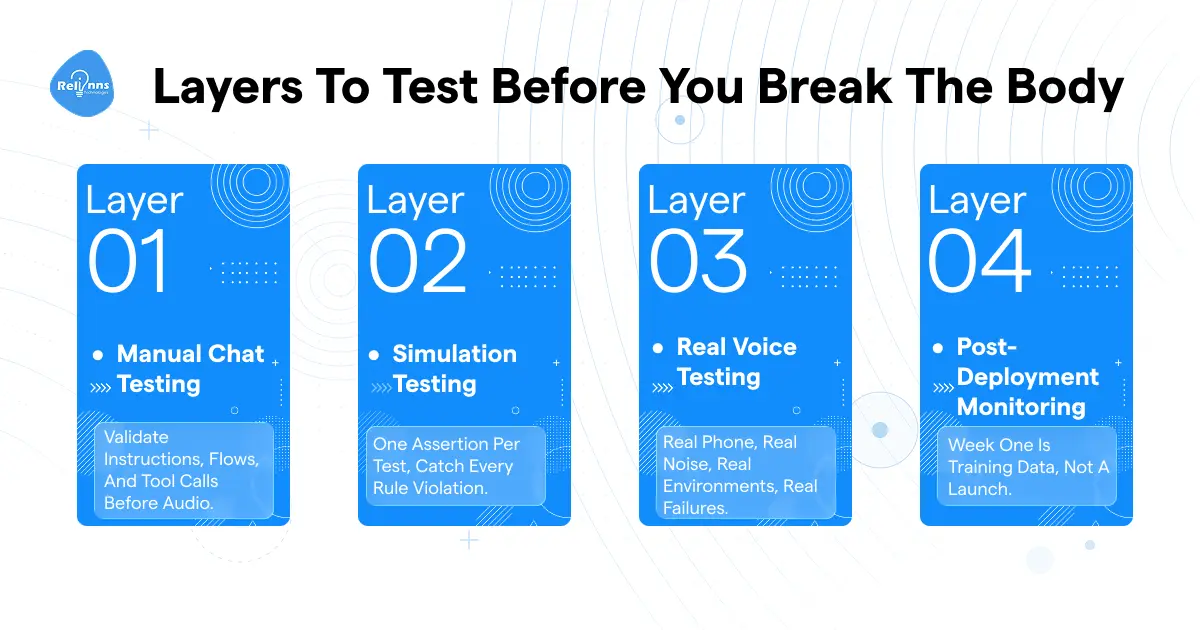
Most teams go straight to stress testing. Load up concurrent calls, throw noise at it, and watch what breaks. I understand the instinct. But skipping foundational voice AI testing layers is why engineers spend weeks debugging problems that a 10-minute chat simulation would have caught on day one.
Expect 60%+ of your build effort to go into testing and refinement. That number feels steep until you've shipped a broken agent.
Layer 1: Manual Chat Testing
Before touching audio, test the brain. Instruction-following, knowledge-base accuracy, tool-call payloads, refusal behavior, and full-flow logic.
Don't edit the prompt on the first failure. Reproduce it three times. On critical decision turns, regenerate 10 answers to understand response variance before accepting any behavior as stable.
Layer 2: Simulation Testing
Design one-assertion-per-test scenarios, not broad multi-branch flows. Voice AI testing at this stage is about precision, not volume. Generate 20 to 50 test cases using GPT or Claude, along with your full system prompt, to surface rule violations. Run in bulk, fix per-simulation failures, and rerun until stable.
Regression testing at this layer creates permanent checkpoints that protect you on every future prompt change.
Layer 3: Real Voice Testing
Call from a real phone. Office, car, coffee shop. And have someone who doesn't know it's AI call it. Their behavior surfaces failures that briefed testers never produce. Briefed testers are too deliberate.
Layer 4: Post-Deployment Monitoring
The first 7-10 days after launch are an active training period, not a release. Batch-export problematic transcripts weekly and feed them into prompt optimization sessions. AI voice agent testing doesn't end when you hit deploy. That's when the real data starts.
Before You Run Any Stress Test
- Only run edge-case and load tests after Layers 1 and 2 pass
- Skipping this sequence generates false failure signals that waste days of debugging
- Brief all testers on realistic caller intents. Unbriefed testers trying to "break" the agent with absurd inputs will distort your entire priority list
With the framework in place, you're ready for the 11 edge cases. They're grouped by where in the pipeline they strike.
11 Edge Cases That Break Production Voice Agents (And How to Test Each One)
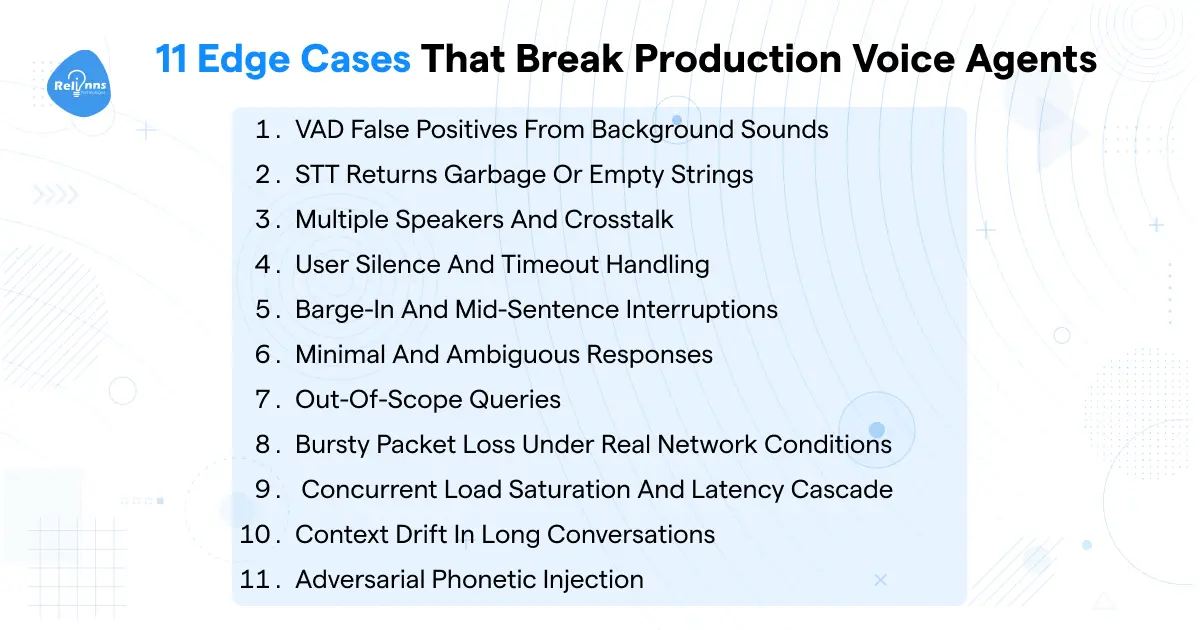
Two categories here. The first seven surface consistently in production monitoring data across thousands of deployments. The last four are the ones almost no team covers in voice AI testing until they've had an incident.
Failures Before Your LLM Sees Anything
Edge Case 1: VAD False Positives from Background Sounds
A door slams. A TV plays at low volume. Someone coughs nearby. Your Voice Activity Detection fires, treats the ambient noise as speech, and your agent responds to nothing while the caller stares at their phone.
It happens because most deployments use flat VAD thresholds without noise-profile calibration. There's no secondary validation between what VAD detects and what actually gets passed to STT.
To test it: inject background sounds at measured SNR levels. Television speech, keyboard typing, HVAC hum. Run at 20dB (quiet office), 10dB (moderate noise), and 5dB (noisy environment). Your target is a false-positive rate under 2% at 10dB SNR. Tracking noise-triggered VAD failures as a dedicated metric catches drift before users report it.
Expert Tip
Production deployments use asymmetric VAD thresholding: onset probability at 0.4, offset at 0.25. This captures trailing phonemes at sentence ends without triggering on sharp ambient sounds, such as coughs or doors closing.
Edge Case 2: STT Returns Garbage or Empty Strings
STT returns "[INAUDIBLE]" or an empty string. The agent either crashes, hallucinates a response, or loops on "could you repeat that" indefinitely. Expect a 5-15% STT failure rate in real production conditions. That's not a bug. It's a known characteristic of speech recognition in the field, and voice AI testing needs to account for it.
Feed recordings from cheap earbuds, low-bitrate phone calls, and domain-specific jargon your STT wasn't trained on through your pipeline. Test what the agent does at confidence scores below 0.6. Then test completely empty transcripts. If neither case is handled, you'll find out from a user.
Multilingual STT accuracy gaps make this significantly worse. And the LLM choice when working with degraded transcripts matters more than most teams expect.
Edge Case 3: Multiple Speakers and Crosstalk
A child interrupts a parent mid-call. Two people in the same room both speak. A TV generates conversation-level audio in the background. The agent responds to the wrong voice or gets a mixed transcript from two speakers at once.
No speaker diarization, no primary speaker detection. Context mixing across concurrent audio streams produces some of the strangest failure transcripts you'll ever see.
Call from a room with a TV at normal conversational volume. Have two people alternate speaking without pause between them. Check what the transcript actually contains. This is basic AI voice agent testing for any deployment going into a household or office environment.
Per-language acoustic challenges with multiple speakers vary a lot. What holds for English tends to fall apart fast with tonal languages.
Edge Case 4: User Silence and Timeout Handling
User puts the phone down to find their wallet. Pauses 15 seconds to think. Gets distracted. Your agent either hangs up immediately, remains silent with no acknowledgment, or continues without any input at all.
Fixed timeout values don't account for question complexity. There's no retry logic before abandonment, and the timeout messaging often confuses callers instead of buying time.
Test four silence patterns after a complex question: immediate silence, 15-second pause, 20-second pause, and intermittent silence (respond, pause, respond). Confirm retry logic triggers before the call drops. Timeout behavior differs significantly between inbound and outbound flows. Make sure your test mirrors the actual call type.
Failures in Dialog Management
Edge Case 5: Barge-In and Mid-Sentence Interruptions
The user interrupts mid-sentence. The system either ignores it, creates overlapping audio from both speakers simultaneously, or cuts TTS while dropping the memory of what has already been said aloud. That last one is subtle and breaks continuity in ways callers find deeply strange.
No barge-in detection, audio buffer delays, and agent memory that doesn't account for the actual cutoff point. Test three interruption timings as part of voice AI testing:
- Early: user speaks within 500ms of the agent starting its sentence
- Mid-sentence: user talks over the core of the response
- Late: user speaks near the last few words
In all three cases, TTS audio should be cut within 30-60ms, remaining LLM tokens should be discarded, and agent memory should reflect only what was spoken aloud before the cutoff. Simulation won't fully replicate real interruption dynamics. This requires actual phone calls in Layer 3. Barge-in configuration and natural turn-taking behavior are both worth getting right before any production launch.
Edge Case 6: Minimal and Ambiguous Responses
User says "yes" to a question with three implied options. Says "tomorrow" without a time. Answers every open-ended question with one word. The agent assumes incorrectly, loops the same clarification, or stalls completely.
No progressive information gathering, no disambiguation logic. AI voice agent testing for this edge case is deceptively simple to run: answer every open-ended question in your test flows with single words. "Yes," "no," "later," "that one," "same as before." Test pronoun responses with no antecedent. Confirm the agent requests clarification without looping. Prompt design for disambiguation is where this failure actually gets fixed. Lead qualification agents hit this at a higher frequency than almost any other use case.
Edge Case 7: Out-of-Scope Queries
Your appointment scheduling agent gets asked about drug interactions. Your order-taking agent receives a complaint about a competitor. Without defined scope limits, the agent either hallucinates a plausible answer or loops without resolution.
Missing intent classification for out-of-domain queries, no graceful redirect, no human handoff path. Those three gaps in combination produce the most embarrassing production failures. Guardrail design for scope enforcement and a solid hallucination mitigation strategy covers most of this.
Expert Tip
Explicitly decide what your agent will not handle, and build intentional human fallback routes for those cases. An agent that handles 80% of calls well outperforms one that attempts 100% of calls at mediocre quality. Scope control is a feature, not a limitation.
The Four Nobody Tests For
These rarely appear in testing guides. They show up in post-incident reviews.
Edge Case 8: Bursty Packet Loss Under Real Network Conditions
On real 4G or cellular, packet loss is not flat at 1%. It arrives in bursts where several packets drop in rapid succession, the Gilbert-Elliott pattern. Whole syllables vanish mid-word. STT receives fractured audio with gaps that the pipeline was never designed to handle.
Jitter buffer defaults are configured for video smoothness (50-150ms), which is too conservative for voice. The Opus codec handles up to 120ms of loss gracefully. Beyond that, without Forward Error Correction forced in the SDP offer, audio degrades fast.
Test it with Linux tc netem: tc qdisc add dev eth0 root netem loss 0.3% 25%. That's 0.3% base loss with 25% correlation between consecutive packets, which simulates real cellular burst behavior. If your agent performs identically under burst-loss and flat-loss conditions, your voice AI testing hasn't reached this failure mode at all. Check your transport resilience under degraded networks and stack-level packet loss handling before you draw any conclusions.
Edge Case 9: Concurrent Load Saturation and Latency Cascade
At 100 concurrent calls, TTFT stays at 200ms. At 120 concurrent calls, TTFT jumps to 5 seconds. Not because of bandwidth. Because the GPU's KV cache queue is saturated, and every new request starts waiting in line.
Load doesn't scale linearly for GPU inference. When vllm:num_requests_waiting climbs above zero, you're already in degradation. A 20-call increase in concurrency can push P95 latency from acceptable to completely unusable.
"A 70B parameter model serving 8 concurrent users at 128K token context needs approximately 343GB of VRAM for KV cache alone, separate from the 140GB needed for model weights. Most teams discover this number during their first real traffic spike."
To load test voice agents, ramp concurrent calls to 2x expected peak and watch vllm:num_requests_waiting throughout. Also measure latency at P99 under sustained load, not just at peak. P99 is what your users actually experience. Scaling GPU inference for concurrent voice workloads and contact center deployments at high concurrency faces this ceiling earlier than most teams anticipate.
Edge Case 10: Context Drift in Long Conversations
A 35-turn conversation causes the LLM's prefill phase to monopolize the GPU during that user's turn, stalling every other concurrent user mid-call. Or more quietly: the agent forgets instructions given at turn 3 when the context window fills. Instructions set at the start of a call become unreliable midway through a long one.
Without chunked prefill, one long conversation blocks all decoding steps for everyone else on the same GPU. Without prefix caching for system prompts, every turn pays the full prefill cost even for completely static instructions.
Build a test that measures TTFT separately at turns 5, 15, 25, and 35. TTFT should stay flat across all four checkpoints. If it climbs with turn count, chunked prefill isn't configured. Separately, verify whether the instructions given at turn 2 still hold at turn 30. Context management in long calls and RAG-based context handling for extended conversations are worth reviewing before you touch these settings.
Edge Case 11: Adversarial Phonetic Injection
An attacker speaks phonetically scrambled phrases that sound like noise to a human listener but map mathematically to sensitive commands via ASR tokenization. The agent executes the instruction.
This is not theoretical. Published research on AudioHijack and CodecAttack techniques reports average attack success rates of 79% to 96% against current multimodal models. Text-based WAFs and guardrails operate on transcribed text, not on the audio signal. Phonetic obfuscation exploits the gap between human phonetic perception and ASR tokenization. Your input sanitizers never see the attack coming.
To test it, use phonetic similarity algorithms (Soundex, Jaro-Winkler scoring) to generate inputs that approximate sensitive commands phonetically while bypassing exact-match filters. Check whether your guardrails catch semantically equivalent commands in scrambled phonetic form.
The defense that actually holds is the CaMeL dual-LLM pattern: a Privileged LLM handles all tool execution, a Quarantined LLM parses untrusted audio input. If the Q-LLM is compromised, it cannot, by design, trigger tool calls. For teams handling PHI and PII, adversarial audio attack surfaces, or HIPAA-compliant deployments, this architecture isn't an advanced option. It's the baseline.
Knowing the edge cases is half the job. The other half is building the monitoring stack that catches them before users do.
What to Instrument, What to Track, What to Alert On
Automate what you can. But know what you can't.
Expert Tip
Automate 80% of your testing. Reserve human review for edge case calibration and novel failure discovery. Your first week in production is not a monitoring task. It's an active training period. Treat every call log as a training example and feed failure patterns back into prompt refinement weekly.
For load generation, the right tool depends on your transport layer. Use SIPp for SIP/PSTN deployments, xk6-browser with the xk6-browser extension for hybrid WebRTC loads that hit both the signaling and media planes simultaneously, and lk load-test for LiveKit-based setups. On the CI/CD side, block deploys when regression tests fail and tracks baseline-to-delta changes per metric version, not just pass/fail.
Voice AI testing without a production monitoring setup is just hoping the edge cases don't show up. They will.
Your AI Voice Agent Testing Monitoring Checklist
- Track stt.confidence 7-day rolling average. Alert if it drops more than 5% from baseline.
- Monitor audio.buffer_utilization. Alert if it falls under 20% for more than 100ms.
- Measure TTFA at P50 and P95. Targets: under 1.7s at P50, under 5s at P95.
- Track task completion rate. Critical threshold: under 70% means something is broken.
- Monitor vllm:num_requests_waiting under peak load. It should stay at zero.
- Log barge-in recovery rate per call session.
Before deploying, check these numbers against production benchmarks.
The Numbers That Decide Whether You Deploy
Production readiness isn't a binary pass/fail. It's a zone, and knowing which zone your agent sits in tells you the actual business consequence before you find out from a user complaint.
Most voice AI testing frameworks over-index on latency and under-track task completion. That's backward.
"A 400ms TTFA with a 60% task completion rate is a worse user experience than a 1.7s TTFA with a 90% completion rate. Latency metrics without task completion data mislead deployment decisions."
Use benchmarking against human agent baselines to give these numbers real context. And track sentiment as a downstream signal of pipeline failures. When sentiment scores drop, something upstream broke. The angry caller is the last indicator, not the first.
The Gap Between Demo and Production Is Predictable
The 11 edge cases above aren't rare. Hamming's analysis of 4M+ production calls confirms these are the standard failure modes. Every voice agent hits them. The only variable is whether you find them first.
Test the brain before you stress the infrastructure. Real calls in real environments before load tests. And when you deploy, treat the first 7-10 days as a training period, not a finish line. Every call log is data.
Agents that survive voice AI testing built this way don't just perform better in demos. They handle the angry caller, the noisy environment, the concurrent traffic surge, and the malicious input without a 2 am incident response.
That's the actual goal. Not a clean test run. A system that holds up when conditions are no longer ideal.
Teams focused on scaling reliably after stress testing, building customer-facing deployments at scale, or starting AI voice agent testing from scratch on an enterprise build can explore custom AI development as a path to getting the architecture right from the start.