How to Build an AI Voice Agent in 2026: Architecture & Stack
Date
Sep 23, 26
Reading Time
10 Minutes
Category
AI Voice Agents
Share


Building an AI voice agent comes down to eight decisions, and most teams get the first one wrong. They start with the model. Pick GPT-5 or Claude, grab a TTS voice, wire up Twilio, and hope it holds together on a live call. It usually doesn't.
The order that actually works looks different.
You start by deciding exactly what the agent is allowed to do and when it hands off to a human.
Then you pick an architecture, cascaded, half-cascade, or full speech-to-speech, because that choice sets your latency floor before you've written a line of code.
Telephony comes next, then streaming speech-to-text, an LLM that can call your tools, and streaming text-to-speech, all wired into one loop that has to hold under a second end to end.
Getting an agent to talk is the easy part. A weekend and a demo script gets you there. What actually breaks builds is keeping that reply fast when a caller interrupts mid-sentence, or when the LLM needs to hit your booking API and wait for it to come back without going silent.
That's what this guide walks through: the architecture choices, the stack, and the production details most build guides skip.
If you're still figuring out whether a voice agent is the right fit before you get into how to build one, what AI voice agents are is a better place to start.
Choose Your Build Approach
Before you touch any code, decide how much of this you actually want to own.
You've got three real paths.
- A managed platform like Retell, Vapi, or ElevenLabs Agents gets you live fastest.
Most of the stack is already built and tuned; you're mostly configuring prompts and connecting your tools. Good if you need something working this quarter, not great if you want to swap out a component the moment a better one ships.
- A voice framework, think LiveKit or Pipecat, hands you more control.
You're still assembling STT, LLM, and TTS yourself, but the orchestration layer (turn detection, streaming, session handling) is done for you. This is where most product teams land.
- Then there's the fully custom pipeline:
Telephony, STT, LLM, TTS, and orchestration, all wired together by your own team. Maximum control, maximum effort. Enterprises with strict compliance or unusual call flows usually end up here.
| Route | Example tools | Best for | Control | Engineering effort |
|---|---|---|---|---|
| Managed platform | Retell, Vapi, ElevenLabs Agents | Fast production deployment | Medium | Low |
| Voice framework | LiveKit, Pipecat | Product teams wanting flexibility | High | Medium |
| Custom pipeline | Telephony + STT + LLM + TTS | Enterprise or custom requirements | Maximum | High |
None of these is the "right" answer on its own. It depends on how much you're willing to maintain. For a closer look at where each platform actually holds up, see this AI voice agent platform comparison.
How to Build an AI Voice Agent: Step-by-Step Process
Eight decisions, in order. Get the first one right and the rest mostly fall into place. Skip it (and most teams do), and you'll spend week three ripping out week one's mistakes.
Step 1: Define the Call Workflow
Most teams start writing prompts before they've even decided what the agent is allowed to do. That's backward.
Before touching any code, write down what this agent owns, what it can't touch, and the exact moment it needs to hand off to a person. A clinic booking agent might define it like this:
| Field | Clinic example |
|---|---|
| Owns | Booking, rescheduling, cancelling |
| Can't do | Clinical advice, billing disputes |
| Connected system | Scheduling platform (read + write) |
| Transfer when | Medical question, failed identity check, two misunderstandings in a row |
| Done when | New slot saved in the calendar and confirmed to the caller |
Fill in every row before you move on. If you can't answer "transfer when," you don't have an agent, you have a liability waiting to happen on a live call. And if the scheduling platform doesn't support write access, that's worth knowing now, not after the LLM tries to book a slot it was never allowed to touch.
Step 2: Choose the Architecture
Three ways to build this. Cascaded runs STT, LLM, and TTS as separate steps, you can swap any piece whenever a better one comes out.
Half-cascade skips the text step and lets the model hear raw audio, faster but harder to inspect. Speech-to-speech is one model end to end, 200-300ms replies, but you lose almost all your debugging room.
For phone workflows, go cascaded. It's slower on paper, but you can see exactly where a call breaks, and that beats shaving 200ms when real customers are on the line. More on choosing between the three further down.
Step 3: Connect Telephony
There are three ways through which audio reaches your app.
- PSTN is the plain phone network, capped at 8kHz, which loses more than you'd think.
- SIP sits on top of PSTN for VoIP and gives you routing control.
- WebRTC skips phone lines and runs over the internet at audio quality, better for browser and app calls.
I'd start with Twilio, broad reach, though it gets pricier at scale. AWS Connect works if you're already on AWS. Vonage holds up well across Europe and the Middle East.
Inbound waits for the caller. Outbound dials out and runs the script. In code, that looks like this:
# Reference pattern: receive live call audio from Twilio (FastAPI)
import base64, json
from fastapi import FastAPI, WebSocket
from fastapi.responses import Response
app = FastAPI()
@app.post("/incoming-call")
async def incoming_call():
    # <Connect><Stream> opens a two-way audio WebSocket to /media
    twiml = (
        '<?xml version="1.0" encoding="UTF-8"?>'
        '<Response><Connect>'
        '<Stream url="wss://YOUR_DOMAIN/media" />'
        '</Connect></Response>'
    )
    return Response(content=twiml, media_type="application/xml")
@app.websocket("/media")
async def media(ws: WebSocket):
    await ws.accept()
    stream_sid = None
    async for message in ws.iter_text():
        event = json.loads(message)
        if event["event"] == "start":
            stream_sid = event["start"]["streamSid"]
        elif event["event"] == "media":
            audio = base64.b64decode(event["media"]["payload"])  # 8kHz mu-law
            await send_to_stt(audio)  # Step 4
        elif event["event"] == "stop":
            break
Step 4: Configure Streaming STT
Audio's flowing in now. Time to turn it into text.
You've got two options: wait for the caller to finish, then transcribe, or transcribe as the words land.
For voice agents, streaming is the only viable option. Waiting even a beat too long makes the agent feel like it's not listening.
I'd default to Deepgram Nova-3 here. It handles noisy calls and mixed accents well, which matters more than people expect once real callers show up.
One catch: it won't know your product names or industry terms out of the box. Feed it a custom vocabulary list before launch, or it'll mishear them every time. And remember, PSTN audio caps out at 8kHz, so don't expect studio-quality input no matter which model you pick.
DEEPGRAM_URL = (
    "wss://api.deepgram.com/v1/listen"
    "?model=nova-3"
    "&encoding=mulaw&sample_rate=8000"  # matches Twilio audio, no conversion
    "&interim_results=true"              # partial words while the caller talks
    "&endpointing=300"                   # ms of silence before a turn ends
)
Step 5: Connect the LLM, Prompt and Tools
This is the step that makes the agent useful, not just talkative.
The LLM reads the transcript, works out what the caller's after, and decides what to do about it. Ask it for an order status, and it doesn't guess, it calls your CRM or order system, waits for that answer to come back, and only then responds.
That's what separates an agent that can talk from one that can act. One catch: function calls block streaming. The agent goes quiet for a beat while the tool runs, so build your conversation flow around that pause.
Session memory holds the thread mid-call, so the caller isn't repeating themselves every two sentences. Persistent memory carries that across calls, most teams add it once the core loop is stable, not before.
Two failure points show up constantly:
A slow API adds straight to the caller's wait time
, and a failed call needs a scripted fallback line, not dead air.
Scope your tokens too, read-only for lookups, write access only where the agent needs to change something.
For the model, GPT-5, Claude Sonnet, and Gemini Flash are solid picks right now, though worth a quick check at publish time since this moves fast.
Relinns production note: function calling blocks streaming, and that pause is real, don't fight it. And once a tool call fires, the result doesn't land back in the conversation on its own. You have to catch it and feed it back in, or the agent responds to nothing.
System prompt:
You are the scheduling assistant for Northside Family Clinic.
You book, reschedule and cancel appointments. Nothing else.
- Keep every reply under 25 words. This is a phone call.
- Confirm full name and date of birth before changing any appointment.
- Offer at most two time slots at a time.
- Never give medical advice. If the caller describes symptoms, say
"I'll connect you with our nurse line" and call transfer_to_human.
- If a tool fails, say "I'm having trouble reaching our calendar,
let me get someone to help" and call transfer_to_human.
- If you misunderstand the caller twice in a row, transfer.
Tool schema:
TOOLS = [
{
"name": "get_available_slots",
"description": "List open appointment slots for a date.",
"parameters": {
"type": "object",
"properties": {"date": {"type": "string", "description": "YYYY-MM-DD"}},
"required": ["date"],
},
},
{
"name": "reschedule_appointment",
"description": "Move an appointment. Call only after the caller confirms the new slot.",
"parameters": {
"type": "object",
"properties": {
"appointment_id": {"type": "string"},
"new_start": {"type": "string", "description": "ISO 8601 datetime"},
},
"required": ["appointment_id", "new_start"],
},
},
]
OpenAI wraps each tool in {"type": "function", ...}, Anthropic calls the schema field input_schema. Same structure underneath either way.
Tool loop, the part that actually catches the result and hands it back:
async def on_final_transcript(text):
   messages.append({"role": "user", "content": text})
   reply = await llm.chat(messages, tools=TOOLS)
   while reply.tool_calls:  # the model asked for data, it doesn't have it yet
       messages.append(reply.as_message())
       for call in reply.tool_calls:
           result = await run_tool(call.name, call.arguments)
           messages.append(tool_result(call.id, result))  # pass it back
       reply = await llm.chat(messages, tools=TOOLS)
   messages.append({"role": "assistant", "content": reply.text})
await speak(reply.text)llm.chat, tool_result, and speak are stand-ins, swap them for your provider's SDK calls.
Step 6: Add Streaming TTS and Turn Handling
The reply's ready. Now it has to actually sound like someone talking.
Stream the audio instead of waiting for the full response to render, the caller hears the first word while the model's still generating the last sentence. What matters here isn't total generation time, it's first-byte speed, and you want that under 200ms.
Request the output in 8kHz mu-law straight from the TTS provider (ElevenLabs calls it ulaw_8000). It already matches phone audio, so you skip a conversion step most teams don't realize they're paying for.
Barge-in matters just as much. If the caller starts talking mid-reply, cut the agent off and clear whatever audio Twilio hasn't played yet, don't let it talk over them. Voice cloning gets you a consistent brand voice across every call, worth setting before go-live, not after. More on handling interruptions cleanly here.
async def speak_chunks(ws, stream_sid, audio_chunks):
    async for chunk in audio_chunks:  # 8kHz mu-law from TTS
        await ws.send_text(json.dumps({
            "event": "media",
            "streamSid": stream_sid,
            "media": {"payload": base64.b64encode(chunk).decode()},
        }))
async def on_barge_in(ws, stream_sid):
    # Caller started talking: drop agent audio Twilio hasn't played yet
    await ws.send_text(json.dumps({"event": "clear", "streamSid": stream_sid}))
Step 7: Test Before Production
Everything works in your test call. That means almost nothing.
Start with scripted scenarios across your core call flows, then get adversarial. Interrupt the agent mid-sentence. Feed it half the information it needs. Ask it something outside its scope entirely. The failures that actually matter aren't crashes; they're wrong answers delivered with total confidence, escalations that never fire, and tool calls that leave the caller sitting in silence.
Test at 3 to 5 times your expected peak volume before you go live. Something that holds fine at 10 concurrent calls can fall apart at 100. Hamming and Vapi's evaluation suite both let you run hundreds of scenarios without dialing them yourself.
One thing worth knowing going in: what the caller actually heard and what your transcript logged won't always match. Don't let QA lean on transcripts alone, listen to the audio too. If you want the fuller list of where agents break, this breaks it down.
| Scenario | What you check | Pass condition |
|---|---|---|
| Caller interrupts mid-sentence | Agent stops and listens | Audio cuts within one turn, no talking over |
| 10 seconds of silence | Agent doesn't stall or repeat itself | Prompts once, then offers a transfer |
| Loud background noise | STT accuracy holds | Transcript stays usable, no dropped intent |
| Out-of-scope request | Agent recognizes the limit | Declines clearly, doesn't improvise an answer |
| Scheduling API timeout | Fallback phrase fires | Caller hears the fallback, not silence |
| Missing date or time in the request | Agent asks instead of guessing | No booking made on an assumption |
| Two requests in one sentence | Agent handles both or sequences them | Neither request gets dropped |
| Transfer to a human with context | Handoff carries the conversation | Human agent isn't starting from zero |
| Concurrent calls at 3-5x peak | System holds under load | No dropped calls, latency stays in range |
Step 8: Deploy and Monitor
Don't flip the switch for every call on day one. Start narrow, after-hours calls only, or one call type, and expand once it's holding up.
Once it's live, track four things: call completion and transfer rates, latency at each layer, failed tool calls, and unhandled intents. A spike in transfer rate usually means the conversation design broke somewhere, and climbing response time almost always traces back to a bloated prompt or a tool call hanging longer than it should.
LangSmith handles the LLM side, Datadog or Grafana cover infrastructure. Review transcripts weekly, that's where you catch the drift before a caller does.
AI Voice Agent Architecture: Production Reference Designs.
AI voice agent architecture is the real-time system that connects call audio, turn detection, speech recognition, LLM orchestration, business tools, speech generation, monitoring, and human handoff. That's a lot of moving parts, and most of them have to fire in under a second. Get the wiring right and a call feels like a conversation. Get it wrong and you get dead air, or an agent that jumps in before the caller's even finished talking.
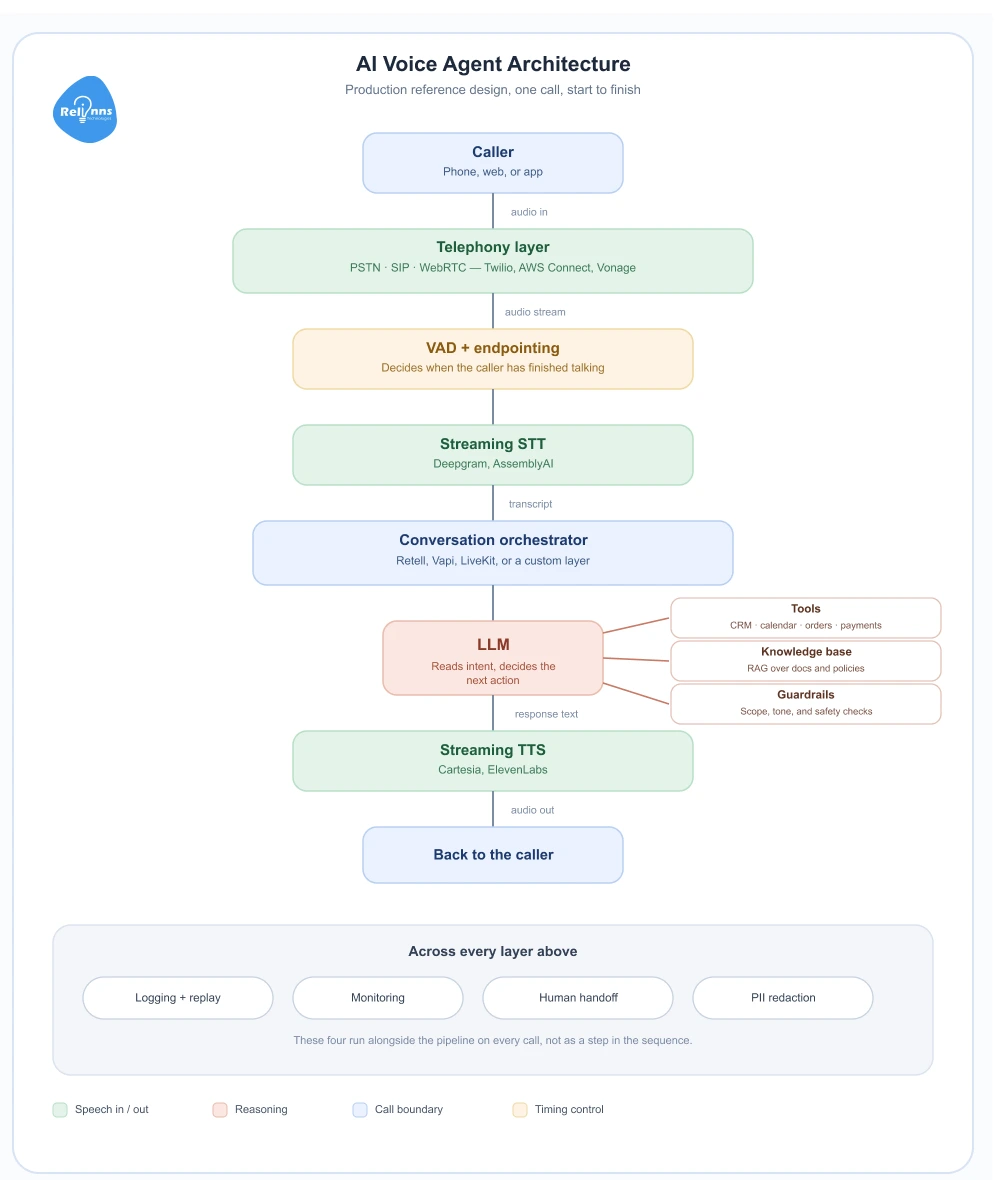
Three production patterns dominate voice agent architecture today. Each one makes a different tradeoff between latency, control, and cost. Picking the wrong one can create problems that are expensive to fix later. For a closer side-by-side, see this speech-to-speech vs STT LLM TTS comparison.
Architecture 1: The Cascaded Pipeline
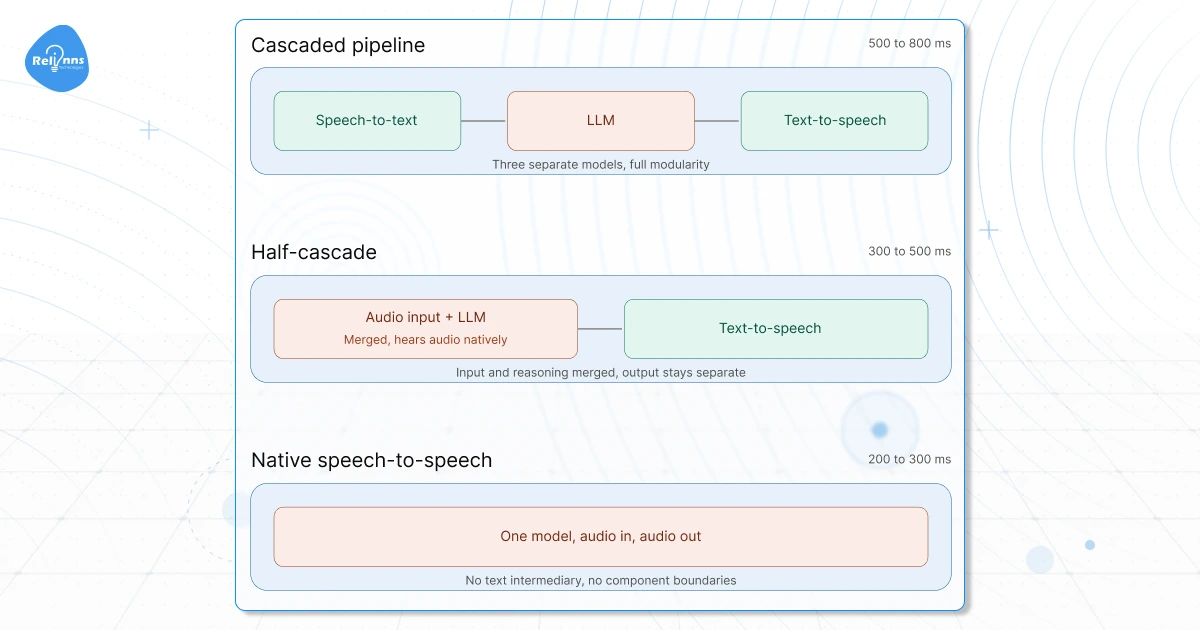
The cascaded pipeline runs three specialized models in sequence: speech-to-text converts audio to text, an LLM processes that text and generates a response, and text-to-speech converts the response back to audio. Plain text moves between each stage, and that simplicity is the point.
This is the most widely used production architecture in 2026, and for good reason.
Realistic end-to-end latency ranges from 500 to 800ms. That is not the fastest option, but it gives you something the other architectures cannot: full modularity. You can swap Deepgram for AssemblyAI, replace ChatGPT with Claude, or move from Cartesia to ElevenLabs without touching anything else in the system. Every component produces logs. Every layer can be measured, tuned, and replaced independently.
Most high-volume, telephony-based, compliance-sensitive deployments run on this architecture. Not because it is the most sophisticated, but because it is the most controllable.
How to Build a Voice Agent Using Cascaded Architecture
Each component runs on its own. Swap any one without touching the rest.
- Telephony stream: Connect via Twilio or AWS Connect. Route inbound audio to your STT layer over SIP or WebRTC.
- Streaming STT: Run Deepgram Nova-3 in streaming mode. Transcription starts before the caller finishes speaking.
- LLM orchestration: Pass the transcript to GPT-5 or Claude Sonnet with a prompt that defines scope, tone, and escalation conditions.
- Function calling: Connect your CRM, booking system, or database. The LLM calls these mid-conversation and waits for the result.
- Streaming TTS: Send LLM output to Cartesia or ElevenLabs. Audio starts playing before the full response finishes generating.
- Logging and replay: Capture transcripts and audio at every layer. Component-level logs pinpoint failures by layer.
- Human handoff: Define the exact intent signals and keywords that trigger a warm transfer to a live agent.
Architecture 2: The Half-Cascade
The half-cascade sends audio directly into a multimodal model that hears it natively, then routes only the output side through a specialized text-to-speech model. That single change drops latency to 300-500ms, and it opens up something the cascaded pipeline cannot do.
The model hears a caller who sounds frustrated. It catches rising intonation on a question. It picks up a mid-sentence language switch. No transcription step stands between the audio and the model's understanding. The output stays on a specialized TTS model, so you keep fine-grained control over voice quality on the other end.
ElevenLabs Agents and Google's Gemini Live both run on this pattern. It is the right call when how someone says something matters as much as what they say.
Architecture 3: Native Speech-to-Speech
Native speech-to-speech runs one model end to end: audio in, audio out, no text intermediary and no component boundaries. Latency drops to 200-300ms. Below 300ms, conversation stops feeling like software, and that threshold matters for use cases where hesitation breaks trust.
The tradeoffs are real. On long calls, costs run high because the model reprocesses all prior conversation tokens at every turn. A call that looks like $0.30 per minute can reach $1.50 in practice. You also lose all component-level control. If something goes wrong, you cannot isolate which layer caused it, because there are no layers.
One more constraint worth noting: PSTN phone calls use 8kHz audio. That strips out much of what makes native audio understanding valuable and narrows the quality gap with cascaded pipelines considerably.
How to Choose between these 3 Architectures?
Start with the cascaded pipeline if your deployment involves telephony, compliance logging, or cost predictability. The modularity alone justifies it for most enterprise use cases.
Move to the half-cascade if audio understanding on the input side matters, callers switching languages, emotional tone detection, or anything where transcription loses signal you need.
Use speech-to-speech only if sub-300ms latency is a hard requirement and your call volumes keep unit economics manageable. It is the right architecture for a narrow set of use cases. For most deployments, the cascaded pipeline gets you further.
| Cascaded Pipeline | Half-Cascade | Native Speech-to-Speech | |
|---|---|---|---|
| Latency | 500-800ms | 300-500ms | 200-300ms |
| Approx. Cost/min | Low | Medium | High ($0.30 can reach $1.50) |
| Modularity | Full, swap any component independently | Partial, TTS is swappable, input model is not | None, one model, no layers |
| Emotion & Tone Detection | No, transcription strips it | Yes, model hears audio natively | Yes |
| Compliance Logging | Per-layer logs on every component | Partial | Not possible |
| PSTN Compatibility | Strong | Strong | Weak, 8kHz audio narrows the quality advantage |
| Best For | Telephony, compliance-sensitive, high-volume deployments | Multilingual callers, emotional context, tone detection | Sub-300ms use cases with manageable call volume |
| Avoid When | Latency is a hard requirement under 500ms | You need full component control or strict cost caps | Long calls, regulated industries, unpredictable volume |
Caller says: “I need to move my appointment to Friday.”
1. Twilio streams the caller's audio
↓
2. Streaming STT produces a transcript
↓
3. LLM reads intent: reschedule request
↓
4. LLM calls get_available_slots(date="Friday")
↓
5. Scheduling system returns open slots
↓
6. Result gets added back into the conversation
↓
7. LLM generates a reply using that result
↓
8. TTS starts streaming audio before the full reply finishes
Agent says: "I have 10:30 AM or 2:00 PM available."
Minimum Architecture Needed for a Real-Time Voice Agent
Six components. Build these before anything else.
- Telephony or WebRTC input: Twilio or WebRTC routes caller audio into your pipeline.
- Streaming STT: Deepgram Nova-3 transcribes audio in real time as the caller speaks.
- LLM with short prompts: GPT-5 or Claude Sonnet with a system prompt under 500 tokens. Longer prompts raise latency.
- Streaming TTS: Cartesia or ElevenLabs starts playing audio before the full response finishes generating.
- Logging: Capture transcripts and audio at every layer from day one.
- Fallback and handoff: Define a transfer condition for anything the agent cannot resolve.
5 Important Layers to Build an AI Voice Agent
Five layers, one job each. Skip any one of them, and you don't get a leaner agent; you get a phone tree with extra steps.
Picking tools inside each layer comes down to three things: your compliance tolerance, your latency budget, and how much you want to own versus rent. A healthcare deployment leans conservative and audited. A retail agent chasing sub-second replies leans fast and swappable. Neither is wrong; they're just built for different pressures.
| Layer | Role | Common Tools | Enterprise Consideration |
|---|---|---|---|
| Telephony | Call routing | Twilio, AWS Connect, SIP | Region coverage, number portability |
| STT | Speech transcription | Deepgram, AssemblyAI, Whisper | Accents, noise, vocabulary |
| LLM | Reasoning and response | GPT, Claude, Gemini, Llama | Latency, compliance, tool use |
| TTS | Voice output | ElevenLabs, Cartesia, PlayHT | First-byte latency, brand voice |
| Orchestration | Turn-taking and routing | Retell AI, Vapi, LiveKit | Barge-in, handoff, monitoring |
That last column, enterprise consideration, is the one most teams skip until an audit or an angry customer forces the question. Don't skip it. Each of these layers gets its own full breakdown in the AI voice stack guide, this table is just your starting map.
How to Improve Latency in an AI Voice Agent
Cutting latency comes down to three levers:
- Streaming both STT and TTS rather than waiting for full responses
- Caching answers to high-frequency questions
- Keeping all components in the same region.
Together, these cut perceived latency by roughly 40%, and your target should be to be under one second end-to-end.
Where does the latency come from?
Every layer in the pipeline adds a little time, and two of them get left out of most explanations.
Before STT even sees the final chunk of audio, there's a silence window called endpointing, the pause your system waits through before deciding the caller's actually done talking. It's invisible in most diagrams, but it's real time, and it happens first.
Then there's the wildcard: tool calls. A function call pauses inference completely until the result comes back, which makes it the single biggest latency spike in the loop. It only fires on some turns, but when it does, it costs more than everything else combined.
| Stage | What adds time | Typical range |
|---|---|---|
| Endpointing | Silence window before a turn is marked complete | 200-400ms |
| Streaming STT | Transcribing as the caller speaks | 50-150ms |
| LLM time to first token | Model reasoning, worse with longer prompts | 200-500ms |
| Tool round trip | Only on turns that call a tool | 300-800ms |
| TTS first byte | Time to the first byte of generated audio | 100-200ms |
| Network / cross-region | Each hop between components | 0-150ms |
| Total, no tool call | End of caller's speech to first agent audio | ~630ms-1.4s |
| Total, with a tool call | Same measurement, one tool fires | ~950ms-2.2s |
Add it up properly and 1.5 seconds stops looking like a scary outlier. It's the realistic middle of the range once every stage gets counted. Target under one second end to end, measured from the moment the caller stops talking to the moment your agent's first audio starts.
How to cut it out?
Streaming is the biggest lever. Run STT in streaming mode so transcription starts before the caller finishes speaking. Use streaming TTS so the audio plays before the full response is generated. These two changes cut perceived latency.
- Cache responses for high-frequency queries. If most callers ask the same three questions, pre-generate those responses and serve them instantly.
- Deploy components in the same region. An STT model in US-East calling an LLM in EU-West adds 80-120ms of pure network latency on every turn.
For the lowest ceiling, native speech-to-speech brings end-to-end latency to 200-300ms. The cost tradeoffs are real, but the gain is significant where conversation pace matters. For more ways to bring this down further, see these tips to improve voice agent latency.
Deployment Options for Your AI Voice Agent
Where you deploy affects cost, compliance, latency, and infrastructure control. The decision matters more than most teams realise until they're already in production.
Cloud Deployment
Cloud is the default. AWS, Azure, and GCP offer managed services for every pipeline component, fast setup, automatic scaling, and no hardware to maintain. The tradeoff is data leaving your environment, which matters in regulated industries.
On-premise Deployment
On-premise keeps all audio, transcripts, and customer data inside your own infrastructure. For healthcare, financial platforms, or any deployment in a market with data residency laws, this is often a requirement. Open-source components like Whisper and self-hosted LLMs make it viable without rebuilding every layer.
Hybrid Deployment
Hybrid splits the pipeline by sensitivity. Telephony and STT run on-premise to keep raw audio contained. LLM inference runs on managed cloud. TTS runs wherever latency is lowest. This is common in enterprise deployments where compliance teams approve data handling layer by layer.
Compliance to take care of
- HIPAA requires Business Associate Agreements with every vendor, encrypted audio storage, and access logging for US healthcare deployments.
- GDPR applies to any pipeline handling EU residents, with explicit consent disclosures for call recordings.
- UAE, Saudi Arabia, and Germany each impose data residency restrictions on where conversation data can be stored. Map your vendor stack against these before go-live.
For the full jurisdiction-by-jurisdiction breakdown, see this guide to AI voice agent regulations. - Redact PII and PHI from transcripts before they reach your logs.
Lessons From Relinns Voice Agent Deployments
Most developers building their first AI voice agent do the same thing: pick a good model, write a decent prompt, ship it. Six weeks later they're debugging dropped calls, chasing latency spikes, and wondering why the agent answers confidently with information it made up.
We asked Ajay, our CTO, what actually breaks once these things hit real call volume. Here are his lessons, the kind no documentation warns you about.
1. Transport layer beats model choice. For web and app surfaces, UDP-based WebRTC beats TCP-based WebSockets on latency, and that transport choice moves the needle more than which LLM you're running. Most models do fine with a solid prompt. Latency and infrastructure don't respond to prompting, no matter how well you word it.
2. One agent, one job. When you need to handle multiple distinct tasks, spin up multiple agents. Make sure they can talk to each other. Rogue agents don't cooperate well with anyone.
3. Long context windows lie. Overstuffing a prompt is a bet you'll lose. The longer the context, the more the model hallucinates at the edges. Feed it what it needs.
4. RAG adds power and maintenance. RAG introduces a data pipeline you now own, update, and keep current. Weigh that overhead honestly before committing.
5. Live API tools beat static RAG for real-time data. If your agent needs current information, live API access outperforms any retrieval layer built on yesterday's data.
6. Prompts are architecture, not copy. Test them like code. Iterate on them like code. They are the foundational logic of your agent.
7. Voice infrastructure is not text infrastructure. Scaling patterns you've solved for text don't carry over. Voice has different latency profiles, connection behaviors, and failure modes. Start fresh.
What Does Building an AI Voice Agent Actually Cost?
Building one can run anywhere from $8,000 to $300,000 and up, depending on volume, functionality, and how much compliance and integration work you're taking on. A basic proof of concept sits at the low end. A full enterprise deployment with multi-agent orchestration sits at the high end. Nothing in between is unusual.
| Tier | Upfront Cost | Timeline | Key Features |
|---|---|---|---|
| MVP/Proof of Concept | $8K–$30K | 4–10 weeks | Basic voice flows, single integrations, RAG memory |
| Mid-Tier (CRM/multi-intent) | $25K–$150K | 2–6 months | Contextual reasoning, telephony (Twilio), analytics |
| Enterprise (autonomous, compliant) | $150K–$300K+ | 4–12 months | Multi-agent orchestration, multilingual, deep ERP/CRM, HITL governance |
That range doesn't include ongoing maintenance once the agent's live, and compliance work adds its own cost on top depending on your industry.
Build In-House or With a Partner?
In-house makes sense if your team already has real-time audio experience, backend depth, and DevOps to run it. That's a real skill combination, and most teams don't have it sitting around unused.
A partner makes more sense when telephony, enterprise integrations, and compliance all need to be production-ready on a deadline you don't control. That's most of the enterprise tier above. If that's where you're at, we'd pick up AI voice agent development.
Questions that keep coming up
How do you integrate voice AI with an existing phone system without changing numbers?
Port your existing number to a SIP trunk through your telephony provider, then route inbound audio from that trunk into your STT layer. The phone number stays the same. Only the routing behind it changes.
Can you build a voice agent without exposing customer data to third parties?
Yes, with an on-premise or hybrid deployment. Telephony and STT run inside your own infrastructure to keep raw audio contained, while LLM inference can still run on managed cloud if your compliance team approves it layer by layer.
How long does it take to build an AI voice agent?
Depends on the tier. A proof of concept takes 4 to 10 weeks. A mid-tier agent with CRM access and multi-intent handling runs 2 to 6 months. Full enterprise builds with multi-agent orchestration and compliance work stretch 4 to 12 months, and most of that time goes to integration and compliance sign-off, not the model itself.
Can I build one without a managed platform?
Yes. Managed platforms like Retell or Vapi get you live fastest, but they're not required. A voice framework like LiveKit or Pipecat still handles orchestration while giving you more control. Or skip both and go fully custom, wiring telephony, STT, LLM, and TTS together yourself. More engineering effort either way, but a managed platform was never a requirement.
One Step Before You Build
Voice agents can cut your inbound call volume, recover no-shows, and run outbound campaigns without adding headcount. But the gap between a working demo and a production deployment that holds under real call volume is where most builds stall.
Relinns has delivered and maintains 34 AI voice agent projects from 2026 to the time of writing this blog alone all across healthcare, logistics, insurance, and ecommerce.
We have worked with every major tool in the stack: Retell AI, Vapi, ElevenLabs, Deepgram, Twilio, and more. We know where each one breaks and how to build around it.
If you want to know whether a voice agent fits your workflow, book a call. We will scope your use case, recommend the right architecture, and tell you what it costs to go live.