7 Ways to Improve Your AI Voice Agent Latency
Date
Aug 31, 26
Reading Time
11 Minutes
Category
AI Voice Agents
Share


Your voice agent responded in 1.8 seconds. The caller already repeated themselves.
That's the thing about voice agent latency nobody warns you about early enough. It doesn't just slow down a conversation. It breaks the caller's trust in the system before your agent has said anything useful.
This blog is for teams already in production, or close to it, who know something feels off but aren't sure where in the pipeline to look. We'll cover what voice agent latency actually is, why human brains are wired to punish it, what it does to agentic workflows specifically, how to measure AI voice latency at each stage properly, and 7 ways to bring it down.
No fluff. Just the stuff that actually moves the number.
What Is Voice Agent Latency?
At its most basic, voice agent latency is the gap between when a caller stops speaking and when they hear the agent's first word back. That's it. But what happens inside that gap is where things get complicated.
Your agent isn't "listening and responding" the way a human does. Every turn runs through a chain of steps, in order:
Audio travels from the caller's device to your server
A speech-to-text model transcribes it
An end-of-turn detector decides that the caller actually finished speaking
The transcript goes to the LLM
The LLM generates a response, token by token
A text-to-speech model converts that text to audio
The audio travels back to the caller
Each step takes time. And because they're mostly sequential, a delay in any one stage delays everything after it. There's no catching up mid-chain.
Here's where it gets humbling. In a clean lab setup, a well-tuned pipeline hits 700 to 900ms end-to-end. But in production? The median sits between 1,400 and 1,700ms. At p90, you're regularly touching 3,500ms. That's three and a half seconds of silence on a live phone call.
And p90 means one in ten callers hits that. If you're running 500 calls a day, 50 people are sitting through a 3-second pause every single day.
That's the real picture of AI voice latency in production. Not the demo. The actual calls.
Why Human Brains Are Wired Against Latency
This isn't a UX problem. It's a biology problem.
Research in conversational psychology shows the natural gap between speakers in human dialogue sits at around 200 milliseconds. Not 500. Not 800. 200. That timing is consistent across languages, cultures, and age groups. Your callers didn't choose that expectation. They were built with it.
When voice agent latency breaks that rhythm, the brain doesn't think "slow software." It thinks something went wrong with the connection. Or the person stopped listening. The stress response kicks in before the caller can consciously process what happened.
Here's roughly what callers feel at each threshold:
- Under 300ms: Feels natural, conversation flows
- 300 to 500ms: A faint awkwardness. Most won't notice but some will
- 500 to 800ms: "Did it hear me?" starts forming
- Above 1,000ms: Caller repeats themselves or talks over the agent
- Above 1,500ms: Active frustration. Many just hang up
And that last point has real numbers behind it. Contact centers report 40% higher hangup rates when AI voice latency crosses the one-second mark. That's not anecdotal. That's lost calls, failed resolutions, and damaged trust.
So when your product manager says "the latency is a little high but users will adjust," they won't. Their nervous system already decided.
What Latency Does to Agentic Workflows
Single-turn voice agent latency is annoying. Agentic latency is a different problem entirely.
When your agent is just answering FAQs, one slow response is one bad moment. But the second your agent starts doing things, booking appointments, pulling policy data, verifying identities, checking order status, the latency compounds across every turn. And it gets ugly fast.
Take a real example. An insurance claims intake agent. The caller gives their policy number. The agent queries the policy database: 400ms gone. Caller describes the incident. Agent calls a claims classification API: 600ms gone. Based on that classification, it pulls the documentation checklist from a third system: another 350ms. That's three tool calls across three turns, and you've already burned over 1,300ms in API overhead alone, before STT, LLM, and TTS even run.
By turn five, the caller has sat through multiple dead-air pauses. They don't know why. They just know the agent feels broken.
There are three patterns that cause this kind of compounding:
Tool Call Stacking is when an agent needs multiple API results before it can respond, and those calls run one after another instead of in parallel. Each call adds its full wait time to the turn. A 300ms LLM response becomes a 1,400ms pause once four sequential tool calls finish.
Context Window Growth is quieter but just as damaging. Every turn adds more tokens to the prompt. A conversation that starts at 500ms TTFT can drift to 900ms by turn eight because nobody trimmed the history.
Retry Cascades are the worst. An external API fails. The agent retries without a timeout. The caller waits 10, 20, 30 seconds. The call ends. You never find out why in your average latency metrics because one 30-second outlier gets smoothed out.
This is why tracking AI voice latency at the workflow level matters, not just per turn.
7 Ways to Improve Your AI Voice Agent Latency
Most teams hit a latency problem and go straight to swapping models. New LLM, same pipeline, marginally different numbers. The issue is that voice agent latency rarely comes from one place. It's a chain, and the slowest link changes depending on your stack, your use case, and how complex your agentic workflows are.
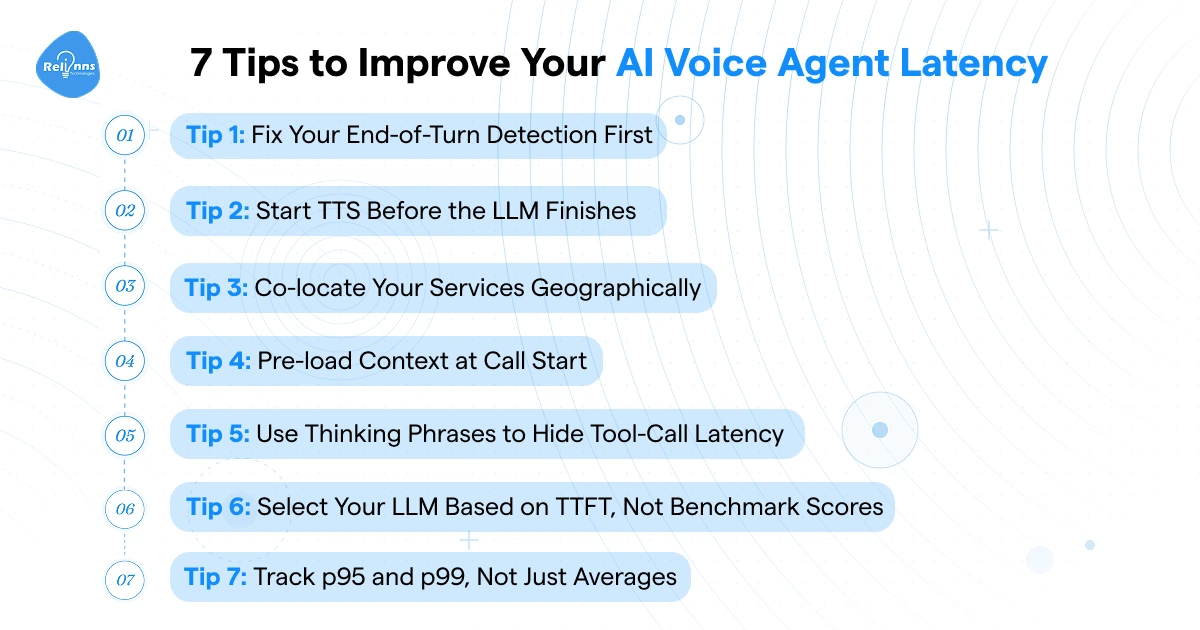
These seven fixes cover the full chain. Some are quick configuration changes. Others need architectural decisions. Start with whichever maps to the bottleneck you've already measured.
1. Fix Your End-of-Turn Detection First
Honestly, this is the fix most teams skip because it's not as exciting as trying a new model. But end-of-turn detection is sitting at the very front of your pipeline, and if it's slow, everything else is slow by default.
The basic version uses a silence timer. The agent waits for audio energy to drop, holds for 500 to 800ms, then triggers the response chain. That hold time gets added to every single turn, no exceptions. If your silence threshold is at 800ms, you've already burned nearly a second before STT even starts.
Basic VAD (voice activity detection) is better. It detects the presence of speech rather than just silence. But it still can't tell the difference between a caller pausing mid-sentence and actually finishing their thought. A caller saying "my policy number is, uh..." gets cut off. So teams overcorrect and push the threshold higher. Which makes voice agent latency worse.
Semantic endpointing is the right move. It reads the partial transcript in real time and infers whether the sentence structure looks complete. That lets you bring the silence threshold down to 200 to 300ms without increasing interruptions.
The trade-off worth knowing: when transcripts are ambiguous or audio quality degrades, semantic models sometimes hold too long. You'll see this as a sharp spike in your p95 latency that roughly aligns with your fallback silence timeout. That's the tell.
Tune your silence threshold down to 500ms first. Add semantic VAD on top. For most stacks, that combination alone cuts 200 to 300ms of AI voice latency from every turn consistently.
2. Start TTS Before the LLM Finishes
This one's a structural mistake I see in a lot of production pipelines. The LLM finishes generating the full response. Then TTS starts. Then audio plays. It feels logical. It's also adding hundreds of milliseconds to every single turn for no reason.
LLMs generate tokens sequentially. The first sentence is ready long before the last one. There's no technical reason to wait for the complete response before you start converting text to audio.
Streaming TTS changes the order of operations. As soon as the LLM produces a complete sentence or phrase, that segment goes straight to TTS. The first audio byte reaches the caller while the LLM is still working on the rest of the response. From the caller's side, the agent responded fast.
The implementation has three moving parts: segment the LLM output on sentence boundaries, feed segments to TTS in order, and buffer playback so the audio streams without gaps between segments. Most modern TTS providers support streaming natively, so this is more of a pipeline architecture change than a provider problem.
In practice, this single change cuts 200 to 400ms of voice agent latency on any response longer than two sentences. Shorter one-line responses won't see much difference. But for anything conversational or agentic, where responses run three or four sentences, the gain is consistent and real.
If your current setup waits for a full response string before touching TTS, fixing that is the highest-impact single change you can make to your AI voice latency right now.
3. Co-locate Your Services Geographically
Most teams think about model quality and completely ignore where their models are running. That's a mistake. Geography is quietly one of the biggest contributors to voice agent latency, and it shows up in every single turn.
Your transport layer matters too. Comparing WebRTC vs SIP for AI voice agents shows where browser-based media and carrier-grade telephony fit, and when both belong in the same stack.
A typical multi-vendor setup routes audio from the caller's device to a telephony edge, then to an STT API in one cloud region, then to an LLM somewhere else, then to a TTS service potentially in a third location. Each inter-service hop adds 20 to 50ms. Across eight handoffs in one turn, that's 160 to 400ms of pure network overhead before any actual processing happens.
Running your orchestration server, STT, and TTS in the same availability zone, close to where your callers' audio enters the network, cuts those inter-service hops to under 10ms each. Same work, fraction of the travel time.
But here's the part people get wrong: co-locate, don't co-host. Running STT and TTS on the same GPU feels efficient because their workloads are usually out of phase. The problem is interruptions. When a false turn detection fires mid-response, both STT and TTS activate at the same time, competing for the same compute. The latency spikes that follow are genuinely hard to debug.
Same facility, separate hardware. That's the configuration that holds up under real production load.
And if you're serving callers across multiple regions, this isn't optional. AI voice latency in Australia on a US-hosted stack can easily run 200 to 300ms higher than it should, just from the round trip.
4. Pre-load Context at Call Start
Here's something that doesn't get talked about enough. A lot of voice agent latency doesn't come from the pipeline being slow. It comes from the agent waiting for data it could have already fetched.
When a call connects, your agent knows things immediately. The caller's phone number. The time of day. Sometimes the campaign or IVR path that routed them. Start pulling data the moment the call connects, while the greeting is still playing. By the time the caller finishes their first sentence, their account details, open tickets, or policy history are already in memory.
For agentic workflows where certain tool calls happen on almost every call, you can go further. Run those calls in the background during the opening turns. Cache the results. When the agent needs them mid-conversation, it's an in-memory lookup, not a live API round trip. The difference between a 5ms memory read and a 400ms database query is the difference between a smooth turn and dead air.
Now, the honest limitation: this only works for data you can predict. If the lookup depends on something the caller hasn't told you yet, you still have to wait. Pre-loading isn't a fix for every tool call. It's a fix for the deterministic ones, the calls you know are coming regardless of what the caller says.
Used in the right places, it's one of the cleaner ways to reduce AI voice latency without touching a single model or threshold.
5. Use Thinking Phrases to Hide Tool-Call Latency
Some latency you can't engineer away. A live API call to a legacy database is going to take 700ms. That's just the reality. But the caller doesn't need to sit in silence while it runs.
Thinking phrases are pre-synthesized audio clips your agent plays the moment a high-latency tool call triggers. Something like "Let me pull that up for you" or "Give me just a second." The phrase starts playing within 50 to 100ms of the turn ending. The API call runs in parallel behind it. By the time the phrase finishes, your data is back and the agent continues.
It's not a hack. It's how humans handle the same situation. You've said "let me check on that" while opening a browser tab. Same principle.
Three things that make or break the implementation:
Vary the phrases. A caller who hears the exact same sentence every time a lookup runs will clock it fast. Keep a library of five or six and rotate them.
Keep them short. A two-second thinking phrase for a 400ms tool call creates a new silence problem after the phrase ends. Match the phrase length roughly to your typical API response time.
Time the handoff cleanly. The agent should move directly from the thinking phrase into the actual response, with no gap. If there's dead air between the phrase ending and the answer starting, you've just moved the voice agent latency problem, not solved it.
Used well, this is one of the few ways to genuinely improve perceived AI voice latency without changing a single component in your pipeline.
6. Select Your LLM Based on TTFT, Not Benchmark Scores
Most teams pick their LLM based on quality evals. Reasoning scores, accuracy benchmarks, how well it follows instructions. All of that matters, but for voice, none of it matters more than TTFT: time to first token.
TTFT is the time between sending your prompt and receiving the first output token back. In a streaming TTS pipeline, that's the exact moment audio can begin. A model sitting at 900ms TTFT is adding nearly a second of silence before your caller hears a single word, regardless of how good the response is.
Current TTFT ranges by tier in production:
- Fast tier (GPT-4o-mini, Claude 3.5 Haiku, Gemini 2.5 Flash): 200 to 400ms
- Balanced tier (GPT-4o): 400 to 600ms
- Premium tier (Claude 3.5 Sonnet, GPT-5 with reasoning): 800ms and above
For the live conversational loop, fast tier covers most use cases without meaningful quality loss. Save the premium models for background reasoning that runs outside the response loop.
What Are the Best Ways to Reduce First Token Latency?
Choosing the right model is step one. But TTFT isn't just about which model you pick. Your implementation adds to it, sometimes significantly.
Shorten your system prompt. Every token in the prompt gets processed before the first output token generates. A 2,000-token system prompt takes longer to process than a 400-token one. Audit it. Cut boilerplate. Most system prompts I've seen in production are carrying at least 30% dead weight.
Trim conversation history aggressively. This is the one teams ignore the longest and regret the most. Every turn appends more tokens. A conversation at turn eight is sending a significantly heavier prompt than turn two. Summarize earlier turns into a compressed state block instead of appending raw transcripts indefinitely.
Cache your tool schemas. If your LLM sees 10 to 12 tool definitions on every single turn, that's hundreds of tokens inflating every prompt. Inject only the tools relevant to the current conversation state.
Reuse HTTP connections. Cold connections add a TCP handshake before the first token even starts generating. On high-volume deployments, that overhead compounds across thousands of calls. Persistent keep-alive connections to your LLM provider cost almost nothing to set up and shave real milliseconds off every turn.
And a genuine warning: don't trust published TTFT benchmarks directly. Those numbers are measured with short, clean prompts under ideal load. Your production TTFT with a full system prompt, eight turns of conversation history, and tool schemas loaded will be higher. Measure it yourself, with your actual prompt structure, before you commit to a model.
That's the only number that actually reflects your voice agent latency in the real world.
7. Track p95 and p99, Not Just Averages
Average latency is the metric that makes your pipeline look fine while callers have terrible experiences. I'd go as far as saying: if you're only tracking average response time, you're flying blind.
Here's why. A pipeline averaging 900ms can still deliver 4,000ms at p95. That's one in twenty callers sitting through a four-second pause. On 500 calls a day, that's 25 people hitting a broken experience every single day, and your dashboard shows green.
Tail latency in voice agent latency comes from a handful of specific causes:
Cold starts on serverless functions add 500 to 2,000ms sporadically. Not on every call. Just enough to wreck p99 without moving your average.
Provider congestion on shared LLM or TTS infrastructure spikes during peak hours. Your p50 looks stable. Your p99 quietly doubles.
Endpointing failures where semantic turn detection holds too long before the fallback silence timeout fires. You'll see this as a discrete jump in tail latency, not a gradual rise.
Retry cascades when an external API fails and the agent retries without a hard timeout. One 30-second outlier gets averaged away. The caller whose call it was doesn't come back.
The fix is component-level instrumentation. Tag every stage of every turn with a call_id and turn_id, then look at latency distributions per component, not just end-to-end totals. That's how you isolate whether the tail is coming from your LLM provider, your STT, or your own orchestration layer.
And set regression gates on p95 before you ship anything. An average improvement that quietly raises p95 is a net negative for real AI voice latency in production.
Final Word
Voice agent latency doesn't have one fix. It has a chain of them.
End-of-turn detection fires too late, and every turn starts slow. TTFT runs high, and every response starts with dead air. TTS waits for the full LLM output, and you've burned another 300ms for no reason. Services run in different regions, and network overhead compounds across every hop. Agentic workflows stack tool calls sequentially, and a five-turn conversation becomes an endurance test.
None of these problems are exotic. They're all solvable. But you can't fix what you haven't measured.
Start with instrumentation. Know your p50, p95, and p99 per stage before you touch anything. Then fix the slowest component in the chain, not the most interesting one. Use pre-loading and thinking phrases to mask the latency you can't eliminate yet. Set regression gates so you don't ship a model change that improves averages while quietly breaking tail performance.
Your callers won't file a ticket about AI voice latency. They'll just stop calling.