What Is a ReAct Agent? The Loop, the Code, and the Failure Modes Nobody Mentions
Date
Oct 30, 26
Reading Time
12 Minutes
Category
AI Agents
Share


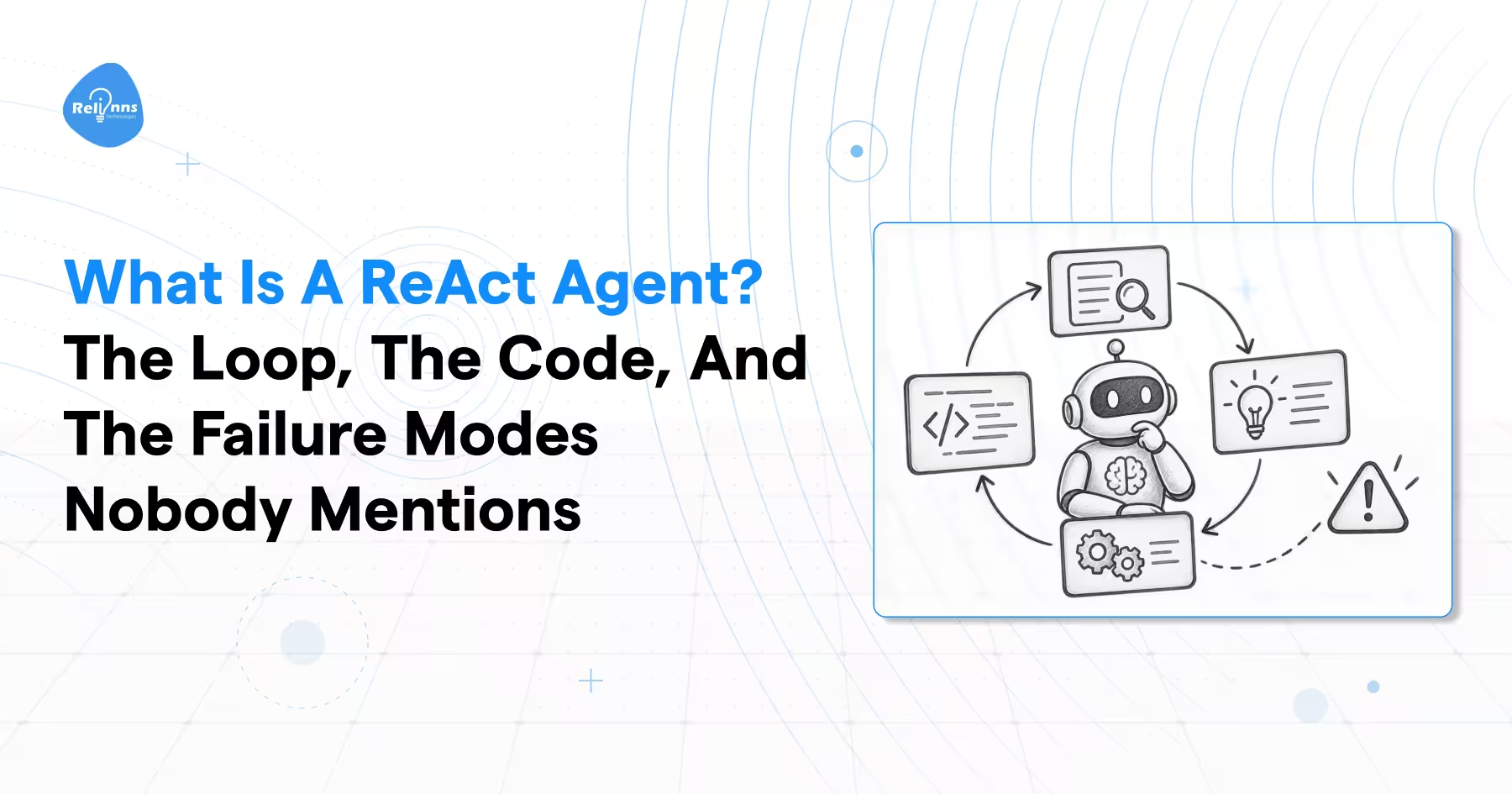
A react agent is an LLM stuck in a loop, and I mean that in a good way. It thinks, picks a tool, reads what comes back, then thinks again. It keeps doing that until it actually has an answer instead of a guess.
Here's the thing nobody tells you upfront. The tutorial version of a React agent framework works in about ten minutes. You copy the code, run one query, it nails it, you feel like a genius. Then you ship it, real users start typing weird stuff into it, and by day ten it's looping on itself or timing out or just making things up with total confidence.
So that's what this post is actually about. Not just what is a react agent, but how the loop works underneath, how to build one that doesn't fall apart, and the failure modes that only show up once real people are using it.
Every failure later traces back to one of five parts of that loop breaking. So let's start there.
What is a ReAct agent?
A ReAct agent is an AI agent built on the ReAct pattern. The model writes out its reasoning, picks a tool, reads the result, and loops until it's done. This isn't some vague industry term either. It comes from a specific paper by Yao and others, published in October 2022 and later presented at ICLR 2023.
Break the word apart, and it explains itself. Reasoning plus Acting, wrapped in a loop. That's the whole idea.
Think about a new intern in their first week. They don't sit there and solve the whole problem in their head. They think about what they need, go check something, read the result, then think again. A react agent does the same thing, just faster and without needing coffee breaks.
Here's a distinction worth remembering: ReAct is a pattern for building agents, not a separate species of agent. Plan-and-execute agents, Reflection, Agentic RAG, these are all different patterns doing the same basic job in different ways.
A plain LLM call, by contrast, just answers once and stops. No loop, no second look, no correction.
| AI Agent (the category) | ReAct Agent (the pattern) | |
|---|---|---|
| Definition | Any LLM wrapped in a loop with tools | LLM that loops through Thought, Action, Observation |
| Reasoning visibility | May or may not be shown | Explicit, written out at every step |
| Loop shape | Not fixed | Thought then Action then Observation, repeat |
| When to use the term | Talking about agents generally | Talking about this specific loop |
The loop itself is three steps. Which three, and what actually passes between them, is where most builds quietly fall apart.
What happens inside the Thought, Action, Observation loop?
Three steps, on repeat. The model writes a Thought explaining what it's about to do. That Thought turns into an Action, which the code behind the scenes actually runs as a tool call. Whatever comes back becomes an Observation. And that Observation feeds straight into the next Thought.
Here's the part most explainers skip. A Thought doesn't touch anything in the outside world. It changes the model's own context, not reality. That's actually the whole trick behind why this works so well. The thinking is free to happen without consequences, and only the Action step actually does something.
The loop ends one of two ways. Either the model produces a final answer, or you hit a hard step cap you set yourself. No cap, and you're gambling.
User Question

      |

      v

   Thought

      |

   /     \

Action   Final Answer --> done

  |

  v

 Tool

  |

  v

Observation --back to Thought
One thing worth updating in your head: the original version ran one tool per Thought, strictly. Modern models like Claude, GPT, and Gemini can return several independent tool calls from a single Thought and run them at once. Same basic shape, just a list instead of one lonely action.
Five components actually make this loop run. Skip even one, and what you've built isn't a react agent anymore. It's just a chatbot pretending.
What are the five parts of a ReAct agent architecture?
Five pieces make up every react agent framework, no matter which library you're using. The LLM does the reasoning. The system prompt sets the rules it has to follow. The tools do the actual work. The memory carries the running history, while a well-designed agent memory architecture determines how conversation history, previous observations, and relevant information are retained or retrieved across steps. And the loop controller runs the whole cycle, deciding when to stop. Together, these components form the AI agent architecture that determines how an agent processes inputs, invokes tools, and manages execution.
Here's the piece nobody talks about enough. The loop controller isn't something the model does. It's code you write. It decides how much budget the agent gets, how observations get handled, and when the whole thing exits. Honestly, this is where most of your reliability gets won or lost, not in the prompt.
And tools need more than just a function name. They need a clear description and a defined input schema, because the description is literally what the model reads when deciding which tool fits the job. Vague description, wrong tool, every time.
| Component | What it does | What breaks if it's weak |
|---|---|---|
| The LLM | Reasons and decides the next move | Poor tool choices, shallow thinking |
| System prompt | Sets format and rules | Model answers too early or skips reasoning entirely |
| Tools | Do the actual work outside the model | Wrong tool gets picked, or none at all |
| Memory | Carries the running transcript | Model repeats work it already did |
| Loop controller | Runs the cycle, enforces stop conditions | Infinite loops, runaway costs, no clean exit |
The system prompt is the cheapest part to get wrong. It's also the part most tutorials teach badly.
How do you write a ReAct prompt, and what is the mistake everyone copies?
A good prompt does three things. It explains the Thought, Action, Observation pattern. It lists the tools available and what they take as input. And it sets clear rules for when to stop.
Here's the mistake almost every tutorial makes, and it's an easy one to inherit without noticing. The original paper used a literal string format, something like Action: Search[entity]. Later tutorials swapped in parentheses instead. Neither belongs in anything you build today.
Your prompt needs four things sitting inside it: the current query, whatever's happened so far, the tools on hand, and instructions for how output should look. Miss one of these and the model starts improvising, which is exactly what you don't want.
Zero-shot prompts give instructions with no examples. Few-shot prompts add a couple of worked examples so the model sees the pattern before it has to use it.
If you're building on Claude, GPT, or Gemini, define your tools using that provider's actual tool-calling schema. The API validates the input, parses the call, and handles formatting for you. You keep the ReAct thinking in the prompt itself, and you drop the fragile string parsing that breaks the moment a model gets creative with punctuation.
System: You are a ReAct agent.

Tools: search(query), calculator(expression)

Respond in one of two ways:

1\. Thought: your reasoning

   Action: tool call

2\. Thought: final reasoning

   Final Answer: your answer

Rules: think before every action, one tool per turn unless

parallel calls clearly help, stop once you have the answer.
Get the prompt right, and the next question is whether you even needed a full react agent for this job, or if something simpler would've done it cheaper.
ReAct vs function calling vs plan and execute agents: which one do you need?
Use function calling when the task is predictable and one step does the job. Use plan and execute agents when you already know every step before starting. Use a react agent when the right next move depends entirely on what the last result told you. That's the whole decision, really.
Function calling is fast and cheap. The model spits out a structured call, you run it, done. But you give up control over when and how it picks that tool. It's a straight line, not a conversation.
Plan and execute agents work differently. The model builds the entire plan first, then runs through it step by step. Great when the work is predictable. Terrible the moment step two changes what step five should've been, because the plan doesn't know to adjust. It just keeps executing the old plan into a wall.
ReAct agents replan on every single turn. That's expensive, you're paying for reasoning at every step instead of just at the start. But you're buying something real for that cost: the agent can actually change its mind when new information shows up.
Here's the actual rule I use: if you can draw the whole flowchart before the task even starts, you don't need ReAct. Save yourself the tokens.
One nuance worth knowing. A lot of production systems don't pick just one. They run a fixed, predictable process overall and drop a ReAct agent framework into just the one or two decision points that actually need flexibility. This is where AI agent orchestration becomes relevant, as it coordinates agent execution, tool interactions, and workflow transitions across a larger system. That's usually smarter than going all-in on either extreme.
| Function calling | Plan and execute | ReAct | |
|---|---|---|---|
| Planning | None, reactive | All upfront | Every turn |
| Adapts mid-task | No | Limited | Yes |
| Token cost | Lowest | Medium | Highest |
| Visible reasoning | No | Plan only | Every step |
| Best for | Structured, predictable requests | Known multi-step pipelines | Unstructured, multi-hop problems |
If ReAct actually fits your problem, good news: the build is smaller than you'd guess. About twenty lines of code, give or take.
How do you actually build a ReAct agent?
Strip away all the framework magic and here's what's actually happening. You write a loop. It sends the conversation to the model, checks if the model gave a final answer, runs whatever tools got picked, appends the results back into the message list, and repeats. That loop, in full, is the agent. Nothing hiding behind it.
async def run_react_agent(question, tools, max_steps=10):

    messages = [{"role": "system", "content": SYSTEM_PROMPT},

                {"role": "user", "content": question}]

    step = 0

    while True:

        if step >= max_steps:

            return "Hit step limit without a final answer."

        step += 1

        response = await call_llm(messages, tools)

        if response.is_done:

            return response.final_answer

        for tool_call in response.tool_calls:

            result = await call_tool(tool_call.name, tool_call.arguments)

            messages.append({"role": "tool", "name": tool_call.name,

                             "content": str(result)})
Six things happening in that block:
- The messages list starts seeded with the system prompt and the question. Nothing else yet.
- The while loop is the whole engine. It just keeps going.
- The step limit is your safety net. Without it, a bad run never stops.
- The actual LLM call is where thinking happens, every single pass.
- Right after, you check if it's done. If yes, return and exit clean.
- If not, you run the tools it picked and feed the results back in.
Everything else you'll ever bolt onto this, tracing, retries, reflection, parallel calls, is just polish sitting on top of this core loop. The loop itself never changes shape.
One catch worth knowing before you copy this straight into production. Providers don't format tool results the same way. OpenAI wants a tool_call_id. Anthropic wraps its result in a tool_result block. Small detail, breaks everything if you skip it.
You don't have to write this from scratch either. LangGraph ships create_react_agent out of the box, and LlamaIndex and BeeAI both have their own versions. Good for getting started fast. Gets limiting the moment you need to jump out of the loop mid-flow and do something completely different.
It runs. Feels great. But here's the uncomfortable part the original research actually found about what this loop fixes, and what it quietly makes worse.
Does ReAct actually make agents more accurate?
Not in general, no. It trades one kind of failure for a different kind. That's the honest answer, and it's more useful than the marketing version.
Here's what actually happened in the original testing. Without any tool use, the model hallucinated facts constantly; that was 56% of its failures. Add in the react agent loop, grounded in real lookups, and hallucination drops straight to zero. Nothing invented anymore. That part of the story gets repeated everywhere, and it's true.
But here's what usually gets left out. Reasoning errors jumped to 47% for ReAct, against just 16% without it. The dominant failure became the model getting stuck repeating the same search step over and over, unable to reason its way out of its own loop. Add another 23% of failures where the search just returned nothing useful, and the model had no clean way to recover.
So what's really going on. Grounding buys you facts and spends your flexibility to get them. That's the trade, plain and simple. The best fix found wasn't picking one approach, it was a hybrid, letting the model fall back between ReAct and plain reasoning depending on which one was struggling.
And this isn't just a HotpotQA thing either. On interactive tasks, the best ReAct run hit 71% success, well past acting alone at 45% and the older imitation-learning approach at 37%.
| Failure mode | ReAct | Chain of thought |
|---|---|---|
| Hallucinated reasoning or facts | 0% | 56% |
| Reasoning error, including repeated steps | 47% | 16% |
| Search returned nothing useful | 23% | not applicable |
That 47% isn't some academic footnote. It's the first of six ways ReAct agents actually break once real people start using them.
Why do ReAct agents break in production?
Six failure modes cause almost every real incident I've seen with react agents. Infinite loops, picking the wrong tool, hallucinating a tool call that doesn't exist, blowing past the context window, stopping too early, and freezing solid after a tool throws an error. And here's the important bit: five of these six get fixed in the loop controller, not the prompt. People keep tweaking the prompt when the actual bug lives somewhere else entirely.
| Failure mode | What it looks like | Fix |
|---|---|---|
| Infinite loop | Same tool, same input, forever | Step cap plus repeat detection plus an intervention message |
| Wrong tool selection | Search used for arithmetic | Rewrite tool descriptions, say exactly when to use each |
| Hallucinated tool call | Tool that doesn't exist, invalid arguments | Native tool schemas, validate inputs, return the error as an Observation |
| Context explosion | History outgrows the window | Compact older turns, drop stale observations |
| Premature stopping | Answers before gathering enough | Explicit verification step before the final answer |
| Frozen after tool error | Exception with no recovery path | Convert errors into natural language Observations |
Let's dig into the loop problem specifically, because a step cap alone doesn't actually fix it. There are three distinct shapes this takes.
Identical repetition is the obvious one. Same tool, same arguments, turn after turn. Circular semantic cycling is sneakier, the wording shifts, but the logic loops between two equivalent dead ends. And stagnation is the quiet killer: new tokens show up every turn, but the actual information gain is zero, while your context and your bill both keep climbing.
A hard recursion cap isn't a fix; it's a crash with a delay. It throws an exception, wipes whatever state you had in memory, and hands back a fatal error after you've already paid for every one of those tokens.
The better approach catches this before the next model call even fires, then steps in instead of just killing the process. Hash the tool name and its arguments, flag repeats. Embed the reasoning trace and watch for suspiciously similar thoughts back to back. Or model the whole action history as a graph and look for cycles forming.
Once you catch it, inject a message telling the model exactly what got flagged, block that specific action, and ask it to either try something new or just summarize what it's already found. A crash turns into a graceful stop instead.
Loops are the failure you can actually see happening. The invisible one just quietly shows up on your inference bill.
Why does a ReAct agent get expensive so fast?
Because the scratchpad just keeps growing, and you pay to re-read the whole thing on every single call. A 20-turn run doesn't cost 20 times what one call costs. It costs way more than that, since turn 20 has to re-process everything from turns 1 through 19 all over again.
Two things are driving that cost up. First, token accumulation. Uncurated observations, raw HTML dumps, full API responses, verbose schemas, these are the real sinks. They pile up fast and nobody trims them. Second, attention dilution. As the context grows, instructions sitting in the middle start getting less weight from the model. That's when agents quietly start breaking rules they were given right at the start.
Here's the part almost nobody talks about. Prompt caching needs a byte-for-byte match starting from token zero. Drop one old message to save space, and you shift every offset after it. That invalidates your entire cache, and now you're paying full price for a full prefill again.
The fix is splitting context into three zones. An immutable static prefix that never changes. A compaction block that summarizes older turns. And a verbatim tail, just the last three to five turns, kept exactly as they were.
Cost is something you can actually plan for and budget around. The next problem isn't about budget at all. It's about someone else deciding what your agent does next.
How do you stop a ReAct agent from being hijacked?
Treat every single observation as untrusted, full stop. The moment your agent reads a web page, an email, or a support ticket, someone could've planted instructions right inside that content. And those instructions land in the exact same context the model uses to decide its next move. It won't know the difference between your instruction and theirs.
One pattern actually deals with this properly. Run two models. One handles the raw, untrusted content and has zero tools, zero credentials, it just pulls out typed fields into a schema and nothing more. The other model, the one holding all the tools, never touches that raw text directly. So even if an attacker's instruction is sitting right there in the content, there's nothing for it to act with and nothing for it to act on.
Idempotency matters here too. Retries and loops mean a mutating tool can fire twice by accident. Give every mutating call a deterministic key, so if it fires twice, the second one just returns the cached response instead of charging the card again.
| Tier | Examples | Runtime behavior |
|---|---|---|
| 0, read only | Vector search, SQL reads, log lookups | Runs freely |
| 1, reversible writes | Draft records, staging config | Runs, logs an audit event |
| 2, irreversible | Payments, routing changes, deletions | Pauses, saves state, waits for a human |
These constraints exist for a reason. The pattern has already moved well past whatever the original 2022 paper described.
What comes after ReAct?
Three patterns pick up where the base react agent framework runs out of room. CodeAct swaps JSON tool calls for actual executable Python and reported up to 20% higher success rates across a batch of 17 different models. Reflexion adds self-critique between attempts and pushed HumanEval pass@1 from 80% up to 91%. LATS adds tree search with real backtracking.
CodeAct lets loops, conditionals, and dependent calls all run inside one turn instead of one round trip per action. When something breaks, the exception comes back as a real stack trace, so the agent can actually debug itself instead of guessing. Needs proper container isolation though, you're letting it run code.
Reflexion skips weight updates entirely. An evaluator scores the attempt, a separate reflection model writes up what went wrong, and that diagnosis gets fed into the next try.
LATS runs Monte Carlo tree search across possible agent states. Powerful, but expensive, since every branch multiplies how many calls you're making per node.
None of these actually replaces ReAct. Each one keeps the same Thought, Action, Observation core and just turns one dial further.
| Pattern | What it changes | What it costs | When to use it |
|---|---|---|---|
| CodeAct | Action format becomes code | Sandboxing overhead | Multi-tool, multi-step tasks |
| Reflexion | Adds self-critique loop | Extra model calls per trial | Tasks with clear pass/fail signals |
| LATS | Adds branching search | Exponential call growth | High-stakes, low-frequency decisions |
Which leaves one question worth answering before you actually start building.
FAQ
Is a ReAct agent the same as an AI agent? No. AI agent is the broad category, any LLM looped with tools. A react agent is one specific way to build that loop, where the model writes out its reasoning at every step instead of just picking actions silently.
Do I still need ReAct prompting if my model supports native tool calling? Yes, but skip the string format. Keep the Thought, Action, Observation discipline in your prompt, and let the provider's tool schema handle parsing. You get the reasoning structure without the fragile parsing headaches.
How many steps should a ReAct agent be allowed to take? Depends on the task, but most production builds cap it somewhere between five and ten. Beyond that, you're usually watching a stuck loop burn tokens, not real progress toward an answer.
Is ReAct good for production, or only for demos? It's solid for production, but only once you've added loop detection, context management, and tool-level safeguards. The raw tutorial version is a demo. The version with a real loop controller is a product.
Where this leaves you
The pattern itself is simple. Thought, Action, Observation, repeat. The loop controller is the actual product, everything else is decoration around it.
If you'd rather have a team build and harden this for your business instead of debugging it at 2am, Relinns builds custom AI agents end to end, from the first prompt to the production guardrails.