LangGraph vs CrewAI vs AutoGen: Which AI Agent Framework Should You Choose in 2026?
Date
Oct 30, 26
Reading Time
12 Minutes
Category
AI Agents
Share


You picked a framework in week one. By month four, you are not debugging your agent. You are debugging the framework's idea of your agent.
That is why choosing the right AI agent framework early matters. Architecture choices that look interchangeable during a prototype behave differently once tools fail, state grows, and production traffic becomes unpredictable.
Lenovo's 2026 research with IDC found that 46% of AI proofs of concept had progressed into production. The gap is narrowing, but getting a prototype into production remains a serious filter. (Lenovo StoryHub)
This comparison focuses on three questions:
- What actually differs between the leading AI agent frameworks
- Where each framework starts breaking in production
- What those choices cost to operate and maintain
The differences that matter are not in feature lists. They show up when the system fails under real traffic.
What Actually Differs Between LangGraph, CrewAI, and AutoGen as AI Agent Frameworks?
Framework choice determines how state is stored, how execution moves, where humans can intervene, and what happens after failure.
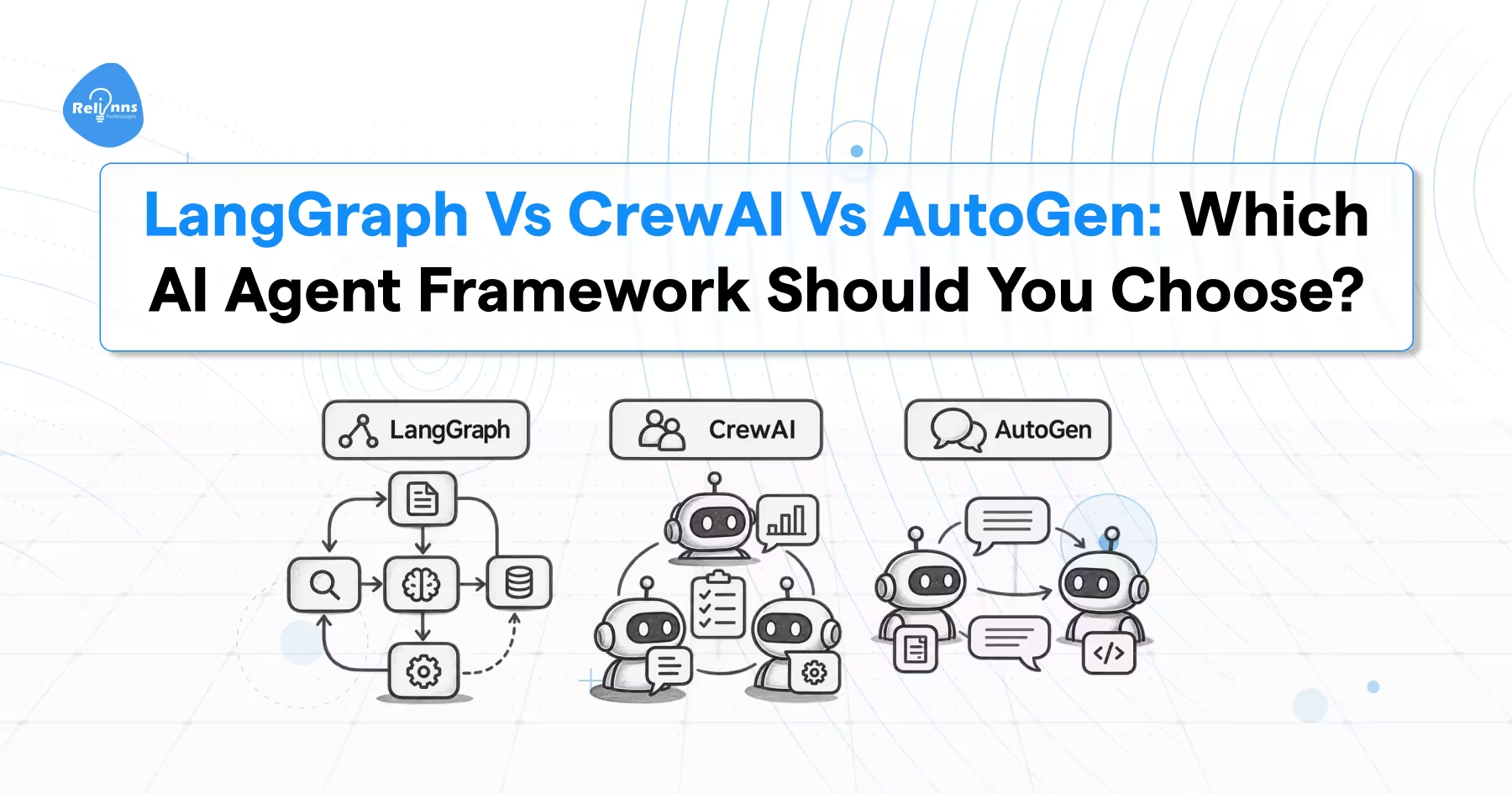
LangGraph, CrewAI, and AutoGen start from different mental models. LangGraph models execution as a graph. CrewAI organizes work around agents, Crews, and Flows. AutoGen organizes agents around messages and conversations.
| LangGraph | CrewAI | AutoGen | |
|---|---|---|---|
| Core model | Nodes and edges in a graph | Role-based crews plus structured Flows | Agents communicating through messages |
| State | Explicit graph state with checkpoints | Crew context or Flow-managed state | Serializable agent and team state |
| Control flow | Branches, cycles, conditions | Crew processes and event-driven flows | Message passing and group conversations |
| Recovery | Resume from checkpoints | Persist and resume Flow state | Save and reload agent or team state |
| Strongest fit | Controlled stateful workflows | Collaborative agent workflows | Existing conversational agent systems |
| Status in 2026 | Actively developed | Actively developed | Maintenance mode |
Why Explicit State Matters
LangGraph asks you to define what information the workflow carries.
That state might include the customer request, tool output, approval status, retry count, and final result. The framework can then checkpoint that state as execution progresses.
CrewAI lets you start at a higher level. A Crew can coordinate agents around defined roles and tasks. Flows add explicit state, branching, event handling, and structured control when the application needs more predictability. (CrewAI Documentation)
AutoGen also supports persisted state. Current versions expose save_state() and load_state() for individual agents and teams. This is important because older comparisons often describe AutoGen as purely in memory. That is no longer accurate. (Microsoft GitHub)
LangGraph itself is inspired by Google's Pregel execution model and Apache Beam. That lineage explains why the framework thinks in coordinated graph execution steps rather than loose conversations. (GitHub)
Now look at popularity, because the most starred framework is not necessarily the one seeing the most current package activity.
Does the Most Starred AI Agent Framework Win?
No. GitHub stars measure accumulated attention. They do not measure current production adoption.
As of September 2026, AutoGen still has the most GitHub stars. LangGraph has substantially fewer. But current Python package downloads tell the opposite story.
| Framework | GitHub Stars | PyPI Downloads Last Month | Development Status |
|---|---|---|---|
| AutoGen | 60.9K | 1.0M | Maintenance mode |
| CrewAI | 58.4K | 15.9M | Active |
| LangGraph | 40.1K | 70.4M | Active |
Sources checked in September 2026: AutoGen GitHub repository, CrewAI GitHub repository, and LangGraph GitHub repository.
Current Python download data: LangGraph PyPI statistics, CrewAI PyPI statistics, and AutoGen AgentChat PyPI statistics.
These numbers need context.
GitHub stars accumulate permanently. Someone who starred AutoGen two years ago still counts today. Downloads respond faster to current package usage.
Downloads are not perfect adoption data either. Dependencies, automated builds, and continuous integration can inflate them. That is why release activity and project status should be read alongside downloads.
The conclusion is still useful. Do not choose an agent framework from GitHub stars alone.
Popularity tells you where attention has accumulated. Architecture tells you what you will have to operate.
How Does LangGraph Actually Work?
LangGraph gives you control by making execution explicit.
An agent becomes a graph. Nodes contain work. Edges determine what runs next. State carries information between those nodes.
Add a checkpointer and LangGraph stores state throughout execution. That enables recovery, human approval, memory, replay, and detailed debugging. (Docs by LangChain)
from typing import TypedDict

from langgraph.graph import StateGraph

class AgentState(TypedDict):
    request: str
    result: str
    approved: bool

def process(state: AgentState):
    return {"result": state["request"].upper()}

graph = StateGraph(AgentState)
graph.add_node("process", process)
Checkpointing Preserves Completed Work
LangGraph creates checkpoints at graph execution boundaries.
If a later node fails, earlier successfully checkpointed work does not need to start again. That matters when earlier steps already made expensive model calls or external API requests.
The framework also preserves pending writes from successful parallel nodes when another node in the same execution step fails. Those successful nodes do not need to run again after recovery. (Docs by LangChain)
Human Approval Is Part of the Runtime
LangGraph's interrupt() primitive can pause execution and save state.
A reviewer can approve, reject, or modify the information. The same execution thread then continues using the stored checkpoint. (Docs by LangChain)
Debugging Can Start From an Earlier State
Stored checkpoints also enable replay and state forking.
You can return to a previous point, inspect what happened, alter the state, and test another path without reproducing the entire run.
The cost is extra structure. You define the graph, state, routing conditions, and recovery behavior yourself.
That work is intentional. You spend more effort describing execution because the framework gives you more control over execution.
Read the official LangGraph persistence documentation
CrewAI makes a different trade. It hides more orchestration initially so teams can assemble agent workflows faster.
How Does CrewAI Actually Work?
CrewAI models the system around agents working together.
Each Agent receives a role, goal, tools, and instructions. Tasks describe the work and expected result. A Crew coordinates those Agents using a process.
CrewAI is built independently. It does not depend on LangChain as its underlying framework. (GitHub)
researcher = Agent(
    role="Researcher",
    goal="Find verified evidence"
)

task = Task(
    description="Research the topic",
    expected_output="Verified findings",
    agent=researcher
)

crew = Crew(
    agents=[researcher],
    tasks=[task],
    process=Process.sequential
)
Crews and Flows Solve Different Problems
A Crew is useful when multiple agents need autonomy to complete assigned work.
A Flow is useful when execution needs defined state, routing, branching, conditions, or a specific sequence.
CrewAI Flows support @start, @listen, and routing controls. They can also maintain structured or unstructured state across workflow steps. (CrewAI Documentation)
The useful production pattern is often simple.
Use the Flow for deterministic business logic. Call a Crew only where autonomous reasoning adds value.
CrewAI Memory Has Changed
CrewAI now provides a unified Memory class.
It replaces the older separate short-term, long-term, entity, and external memory types. Recall combines semantic relevance, recency, and importance. (CrewAI Documentation)
This matters because many older CrewAI comparisons still describe its previous memory architecture.
CrewAI can feel faster when the problem already maps cleanly to agents, roles, and tasks. It can feel more abstract when routing and workflow state become complex.
That is not a universal advantage or disadvantage. It depends on whether your application naturally looks like a team of agents or a controlled workflow.
Read the official CrewAI Flows documentation
Is AutoGen Still Worth Building On in 2026?
Not for a new build.
AutoGen still works, but Microsoft has moved it into maintenance mode. It will receive bug fixes, security patches, and documentation updates, but not new features or enhancements. Microsoft directs new users toward Microsoft Agent Framework. (GitHub)
View AutoGen's current project status on GitHub
What AutoGen Did Well
AutoGen made agent conversations its central abstraction.
Group chat patterns made it straightforward to build systems where one agent creates an answer, another critiques it, and other agents participate through shared messages.
Its layered design also includes lower level message passing, AgentChat abstractions, extensions, and code execution capabilities.
State Persistence Is Not the Problem
AutoGen now supports saving and loading both agent state and team state.
That means an AutoGen application can serialize its state to storage and restore it later. Older comparisons that say every failed conversation must restart are outdated. (Microsoft GitHub)
The real problem is roadmap direction.
Microsoft Agent Framework is now Microsoft's production-focused successor. AutoGen remains available for existing applications, but active framework development has moved elsewhere. (GitHub)
Microsoft provides a specific migration path for existing users.
AutoGen to Microsoft Agent Framework migration guide
That makes the decision straightforward. Maintain AutoGen where it already works. Do not make it your default choice for a greenfield 2026 project.
Where Do These AI Agent Frameworks Break in Production?
Production problems expose framework differences faster than demos do.
The critical questions are simple. Can you see what happened? Can a human stop an action? Can execution resume after failure? Can you keep model usage under control?
Observability
LangGraph integrates with LangSmith for tracing and production monitoring.
You can inspect model calls, tool execution, state transitions, latency, token usage, and errors across a workflow.
CrewAI now has its own built-in tracing through CrewAI AMP. Current traces include agent decisions, task timelines, tool usage, LLM calls, execution time, token usage, cost, and errors. (CrewAI Documentation)
This is an important correction to older comparisons. CrewAI's current observability story is stronger than it was.
The production requirement is the same for either framework.
When an answer is wrong, you need to know:
- What state entered the step
- What prompt reached the model
- Which tools were called
- What those tools returned
- What changed afterward
- What the call cost
If your tracing cannot answer those questions, debugging becomes guesswork.
Human Approval
| Framework | Mechanism | Production Position |
|---|---|---|
| LangGraph | interrupt() plus persisted state | Strong native primitive |
| CrewAI | Task human input plus Flow control | Supported, more workflow dependent |
| AutoGen | Human agents and pause controls | Functional, but maintenance mode |
LangGraph's interrupt model is particularly strong when approval may take minutes, hours, or days. The checkpoint keeps the thread state until the external decision arrives. (Docs by LangChain)
For regulated, financial, healthcare, or high-impact actions, this can matter more than agent creation speed.
Failure Recovery
LangGraph uses explicit checkpoints.
CrewAI Flows provide state management and structured workflow controls. CrewAI also exposes checkpointing and replay capabilities in its current documentation. (CrewAI Documentation)
AutoGen can serialize and restore state, but its roadmap remains the larger concern. (Microsoft GitHub)
Cost Runaway
Agent loops can multiply calls quickly.
CrewAI exposes aggregated token usage across Flow execution, including Crews and direct LLM calls. That gives teams a better view of total consumption than looking only at the final Crew output. (CrewAI Documentation)
LangGraph gives you explicit control over cycles and routing, but you still need termination conditions and operational budgets.
The framework will not rescue an architecture that allows a model to call itself indefinitely.
The larger lesson is that production fit depends on durable state, observability, approval controls, and integration reliability. GitHub popularity does not solve any of those.
What Does Each AI Agent Framework Cost to Run?
The open-source libraries themselves are not the expensive part.
LangGraph, CrewAI, and AutoGen are available as open-source software. Your meaningful costs come from model inference, tracing, managed deployment, storage, tools, and infrastructure.
| Framework | Library Cost | Managed Platform Position |
|---|---|---|
| LangGraph | Free open-source library | LangSmith Developer is free. Plus starts at $39 per seat monthly |
| CrewAI | Free open-source library | CrewAI Basic is free with 50 workflow executions monthly. Enterprise is custom |
| AutoGen | Free open-source library | No active AutoGen platform roadmap. Microsoft Agent Framework is the successor |
Current LangSmith pricing includes 5,000 base traces monthly on Developer. Plus includes 10,000 base traces and one small managed serverless deployment. (LangChain)
CrewAI's Basic plan is currently free and includes 50 workflow executions per month. Enterprise pricing is custom. (CrewAI)
Your Model Usually Costs More Than Your Framework
Framework choice does not determine GPU memory by itself.
The model you run, quantization level, context size, concurrency, and number of model calls have a much larger effect.
As one current reference point, Runpod lists an NVIDIA L40S with 48 GB of VRAM at $1.09 per hour on Secure Cloud. Running it continuously for 24 hours would cost about $26 before storage, networking, and other infrastructure. (Runpod)
API economics work differently. You pay according to model tokens, cached input, tool calls, and provider pricing.
That is why a three-agent workflow is not automatically three times as expensive. It depends on how often each agent actually invokes a model and how much context each invocation carries.
Do not select a framework from infrastructure cost alone. Select the model and orchestration pattern together.
Which AI Agent Framework Should You Pick?
Pick based on the control your workflow requires and the stack your team already knows.
| Your Situation | Recommended Choice | Why |
|---|---|---|
| Need explicit state, recovery, approval, and replay | LangGraph | Checkpoints and graph control are core concepts |
| Need role-based agent collaboration quickly | CrewAI Crews | Agent and task abstractions map directly to the problem |
| Need CrewAI with more deterministic execution | CrewAI Flows plus Crews | Flows manage state and routing while Crews handle reasoning |
| Already committed to Microsoft and Azure | Microsoft Agent Framework | Current Microsoft direction and AutoGen successor |
| Already running AutoGen successfully | Keep it stable and plan migration | Maintenance mode does not mean existing systems stop working |
| TypeScript is your primary stack | Consider Mastra or LangGraph JS | Both have native JavaScript and TypeScript options |
Pick LangGraph When Control Is the Requirement
LangGraph fits systems where state, branching, approval, replay, and recovery are central requirements.
This usually includes workflows that act on money, customer records, regulated data, or multiple external systems.
Pick CrewAI When the Work Naturally Maps to Roles
CrewAI fits applications where the problem already looks like a team.
A researcher collects information. An analyst evaluates it. A writer produces an output. A reviewer checks it.
Flows can add more structure as that system moves toward production.
Do Not Pick AutoGen for a New Project
AutoGen is still functional.
But the roadmap has moved to Microsoft Agent Framework. Starting on the maintained predecessor creates migration work without a clear upside.
Pick Microsoft Agent Framework for Microsoft Centric Teams
Microsoft Agent Framework supports current Microsoft agent architecture, managed services, MCP, and A2A interoperability.
Its A2A support can also communicate with compliant remote agents regardless of the framework used to build them. (Microsoft Learn)
There is no single best framework.
There is a best fit for a specific state model, failure model, deployment stack, and team.
What Exists Beyond LangGraph, CrewAI, and AutoGen?
A useful AI agent framework comparison should not pretend these three are the entire market.
Several alternatives now solve specific problems better than the main comparison set.
| Framework | Primary Stack | Strongest Fit | Main Consideration |
|---|---|---|---|
| Microsoft Agent Framework | C#, Python, Go integrations | Microsoft ecosystem, multi-agent orchestration, A2A, MCP | Newer framework with rapidly evolving ecosystem |
| Pydantic AI | Python | Typed outputs, validation, usage limits | Smaller agent ecosystem than LangGraph |
| OpenAI Agents SDK | Python and JavaScript | Lightweight agents, handoffs, guardrails, tracing | Best fit when its abstractions match your application |
| Mastra | TypeScript | TypeScript agents, workflows, memory, observability | Different ecosystem from Python-first stacks |
| n8n | Visual workflows | API orchestration and low-code automation | Complex agent state may require additional architecture |
| BeeAI Framework | Python and TypeScript | Open-source multi-agent workflows | Smaller community than the leading frameworks |
Pydantic AI Is Strong When Usage and Validation Must Be Explicit
Pydantic AI is valuable when malformed structured output is a recurring problem.
Its UsageLimits can cap requests, successful tool calls, input tokens, and cost for a run. That gives developers a native budget mechanism instead of relying only on provider dashboards. (Pydantic)
OpenAI Agents SDK Keeps the Abstraction Small
The OpenAI Agents SDK focuses on Agents, tools, handoffs, and guardrails.
It includes tracing by default in supported server environments. Traces capture model generations, tool calls, guardrails, handoffs, and custom events.
Mastra Is a Serious TypeScript Option
Mastra provides TypeScript native agents, workflows, memory, tracing, evaluation, approval, and persistent workflow state.
Current workflows support branching, parallel execution, suspension, resume, and replay.
BeeAI Supports Both Python and TypeScript
BeeAI Framework supports production-oriented agent and multi-agent development in Python and TypeScript.
It includes workflows, tools, model backends, and protocol integrations. (GitHub)
A2A Can Reduce Framework Lock-In
Agent-to-agent, or A2A, defines a standard way for agents to communicate across framework and language boundaries.
That matters because interoperability can sometimes remove the need to standardize every agent on one orchestration framework.
Microsoft describes A2A as framework-agnostic, allowing one compliant agent to call another across HTTP regardless of its implementation. (Microsoft Learn)
The framework decision matters, but it no longer has to define every agent in your architecture.
Can You Run LangGraph and CrewAI Together?
Yes.
A LangGraph node can call ordinary Python code, which means it can call a CrewAI Crew as part of a larger graph.
A practical AI agent architecture can therefore use LangGraph to manage state, routing, checkpoints, and approval gates. A CrewAI Crew can run inside one step where collaborative agent reasoning is useful.
The benefit is specialization.
This approach to AI agent orchestration separates deterministic workflow control from the collaborative reasoning handled by CrewAI.
LangGraph owns deterministic orchestration. CrewAI owns the part of the workflow that genuinely benefits from role-based agent collaboration.
The cost is operational complexity.
Two frameworks mean two execution models, two sets of logs, two abstractions, and more dependencies to understand.
Use both only when the second framework solves a real architectural requirement.
Do not introduce another framework to avoid rewriting one prompt.
The orchestration layer is also not the only thing controlling production latency or cost. Model selection, context size, tool latency, and the number of inference calls often matter more.
FAQ
Is LangGraph or CrewAI Better for Production?
LangGraph is the stronger default when production requires explicit state, checkpoints, recovery, and detailed execution control. CrewAI is strong for role-based multi-agent systems and now provides Flows, persistence, and tracing that make it far more production-capable than older comparisons suggest.
Is AutoGen Still Maintained in 2026?
Yes. AutoGen is maintained in 2026, but it is in maintenance mode. Microsoft says it will receive bug fixes, security patches, and documentation updates, but no new features. New projects should start with Microsoft Agent Framework. (GitHub)
Is CrewAI Built on LangChain?
No. CrewAI is built independently from LangChain and other agent frameworks. Its repository describes it as a Python framework built from scratch, with its own Agents, Tasks, Crews, Flows, memory, and orchestration model. (GitHub)
What Is the Difference Between CrewAI Crews and Flows?
Crews coordinate autonomous agents around roles and tasks. Flows control structured execution using state, events, conditions, and routing. Use Crews where agents need autonomy. Use Flows where the application needs predictable workflow logic. (CrewAI Documentation)
Can LangGraph and CrewAI Be Used Together?
Yes. A LangGraph workflow can call a CrewAI Crew from a graph node. This lets LangGraph handle state and execution control while CrewAI handles a specific collaborative reasoning step. Use the combination only when both abstractions provide clear value.
Final Take
There is no framework winner independent of the workload.
Choose LangGraph when explicit state, recovery, approval, and execution control are central.
Choose CrewAI when agent roles map naturally to the work and development speed matters. Add Flows when the workflow needs more deterministic control.
Do not start a new project on AutoGen in 2026. Maintain existing deployments while planning toward Microsoft Agent Framework.
Consider Pydantic AI when validation and runtime budgets matter. Consider Mastra when TypeScript is your primary environment. Consider the OpenAI Agents SDK when you want a smaller set of agent primitives with built-in tracing.
The framework should follow the production requirements, not the other way around.
If you are choosing the architecture for a real production workflow, Relinns provides AI Agent Development Services covering framework selection, state and memory design, integrations, guardrails, testing, deployment, and production monitoring.