GPT Fine-Tuning: Methods, Costs, APIs, and Practical Limitations
Date
Mar 06, 26
Reading Time
10 Minutes
Category
Generative AI
Share


Most companies are leaving money on the table with GPT.
Sounds harsh, right? But it’s true; many just use AI as-is and settle for average results.
What if your AI could think like your team? Fine-tuning turns generic models into business experts that speak your language and know your goals. But getting there isn’t always easy or cheap.
This guide will show you the real story behind GPT fine-tuning. You’ll learn what it means, how it works, the costs, the roadblocks, and the APIs you’ll need to know.
Ready to unlock your AI’s full potential? Let’s dive in.
What is GPT Fine-Tuning and Why It Matters
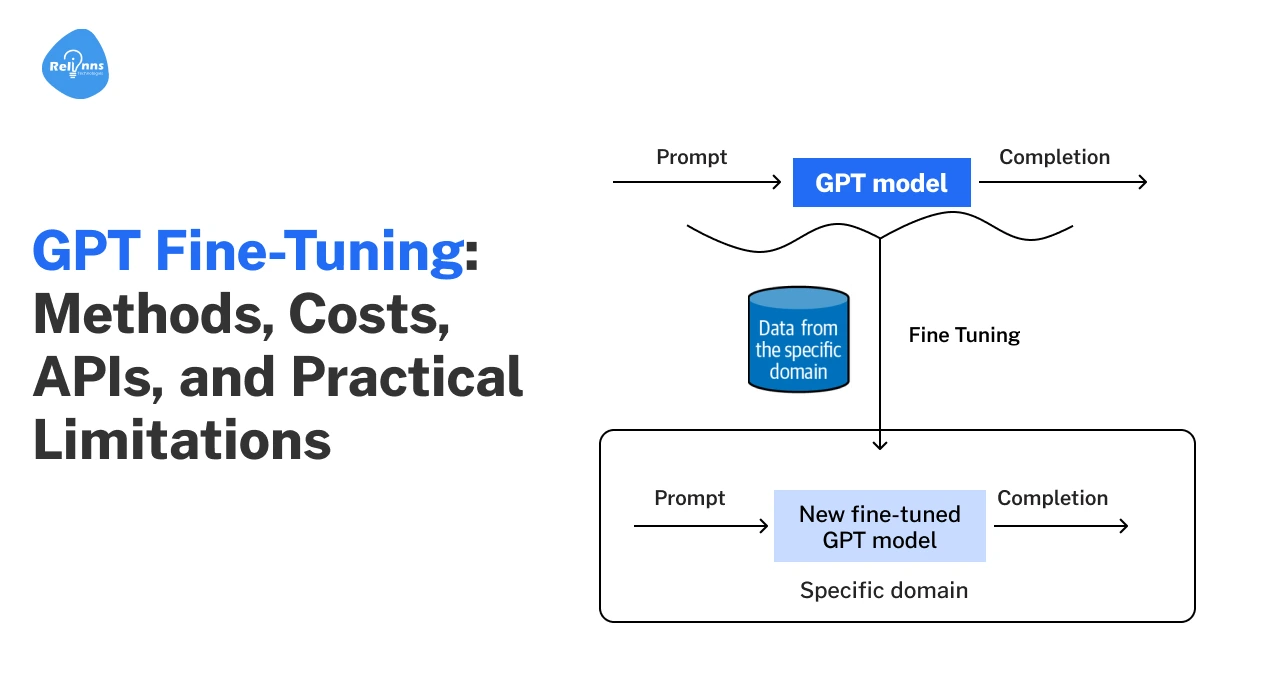
GPT fine-tuning lets you adapt a general AI model to your unique needs.
Instead of using a “general-purpose” tool, you train the model with your own examples. This can make outputs more accurate, relevant, and aligned with your business goals.
Fine-tuning is now a key part of using AI effectively, especially if you want responses tailored to your brand or workflow.
Definition of GPT Fine-Tuning
GPT fine-tuning is the process of taking a pre-trained language model, like GPT-3 or GPT-4, and training it further on your own data to perform specific tasks aligned with your business needs.
This extra training helps the model learn new patterns, tone, or specialized knowledge. It’s different from prompt engineering, which only changes the “way you ask questions”.
Why Businesses Fine-Tune GPT Models
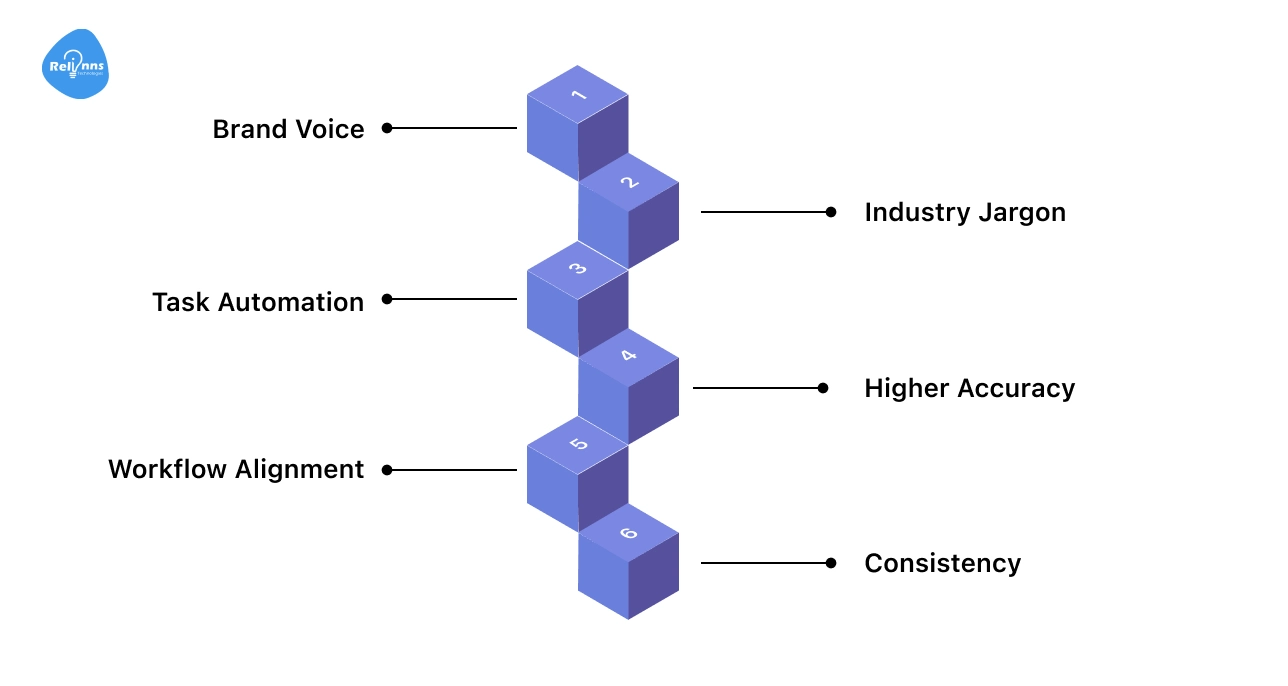
Fine-tuning helps businesses get more from AI than out-of-the-box models can offer.
Generic models often miss things like brand details or industry terms. By fine-tuning, companies make AI work the way they need.
Key reasons businesses fine-tune GPT models:
- Brand Voice: Makes AI match your company’s tone and style
- Industry Jargon: Helps AI understand and use specialized language
- Task Automation: Enables handling of unique tasks, like legal or technical writing
- Higher Accuracy: Reduces errors in responses and improves relevance
- Workflow Alignment: Ensures AI follows your processes and business rules
- Consistency: Delivers predictable, reliable answers every time
When standard AI isn’t enough, fine-tuning turns it into a custom-fit solution.
How GPT Fine-Tuning Works
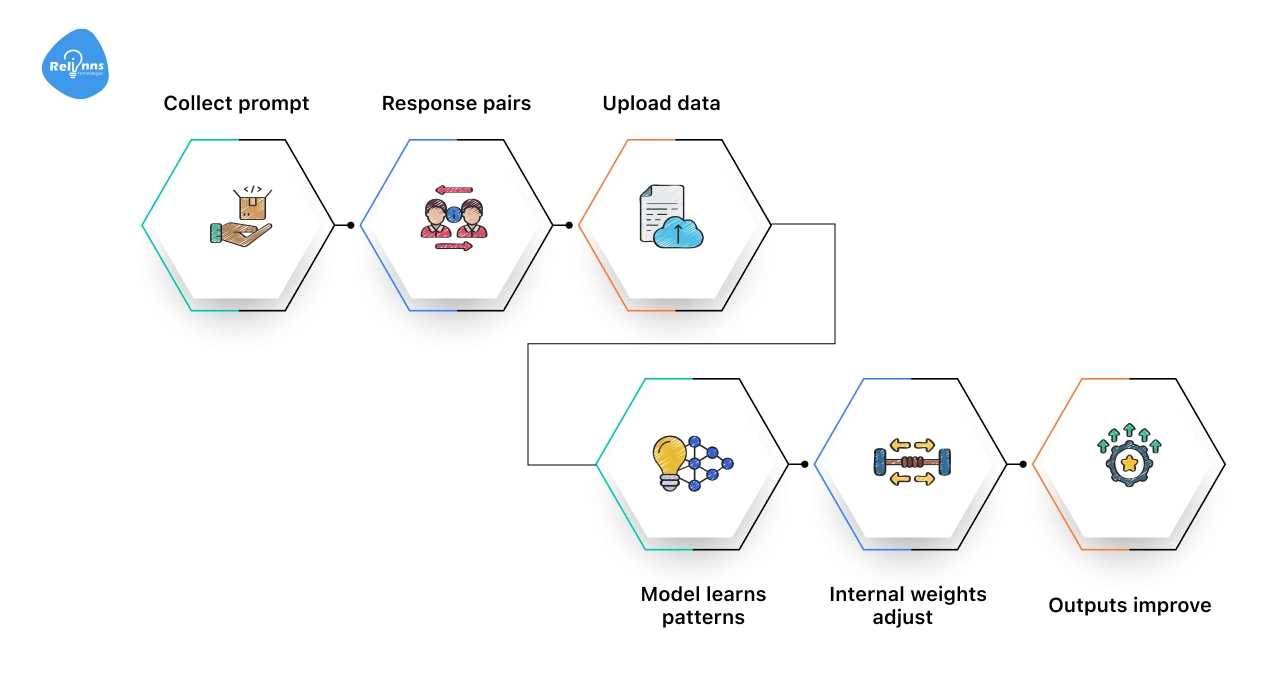
Fine-tuning adjusts an AI model so its responses match your specific goals.
Here’s how the fine-tuning flow works:
Collect prompt–response pairs → Upload data → Model learns patterns → Internal weights adjust → Outputs improve
First, you gather real examples from your business conversations, customer support tickets, emails, product descriptions, or internal documents.
Then, you upload these examples to the AI platform. The model studies them and adjusts its internal settings. After training, it responds in a way that better fits your business.
You can repeat this process whenever you have new data or changing needs, keeping your AI aligned with your workflow.
For teams that want a structured, production-ready setup, working with experienced AI partners like Relinns Technologies can help design the right data pipeline, training strategy, and evaluation process, so fine-tuning delivers measurable results, not just experiments.
When You Should Fine-Tune GPT Instead of Prompting or RAG
Fine-tuning a GPT model isn’t always the best first step.
Sometimes, prompt engineering or retrieval-augmented generation (RAG) can solve your problem faster and at a lower cost.
However, there are clear cases where fine-tuning is the best choice for maximum control and accuracy.
Fine-Tuning vs Prompt Engineering
Prompt engineering means designing questions or instructions to get the output you want from GPT, without changing the model itself.
It’s fast, low-cost, and works well for general use cases.
Fine-tuning, on the other hand, actually teaches the model from new examples. This is best when you need the model to reflect specific tone, terminology, or workflows.
| Feature | Prompt Engineering | Fine-Tuning |
| Operational Impact | Agile. Instant updates via instructions. | Structural. Requires training cycles. |
| Resource Intensity | Low. Uses existing API setup. | High. Needs compute, expertise, and data. |
| Specialization | Broad. Adapts using general reasoning. | Specific. Embeds defined styles and formats. |
| Scalability | Flexible. Good for varied or experimental tasks. | Strategic. Built for high-volume, specialized use. |
Fine-Tuning vs RAG
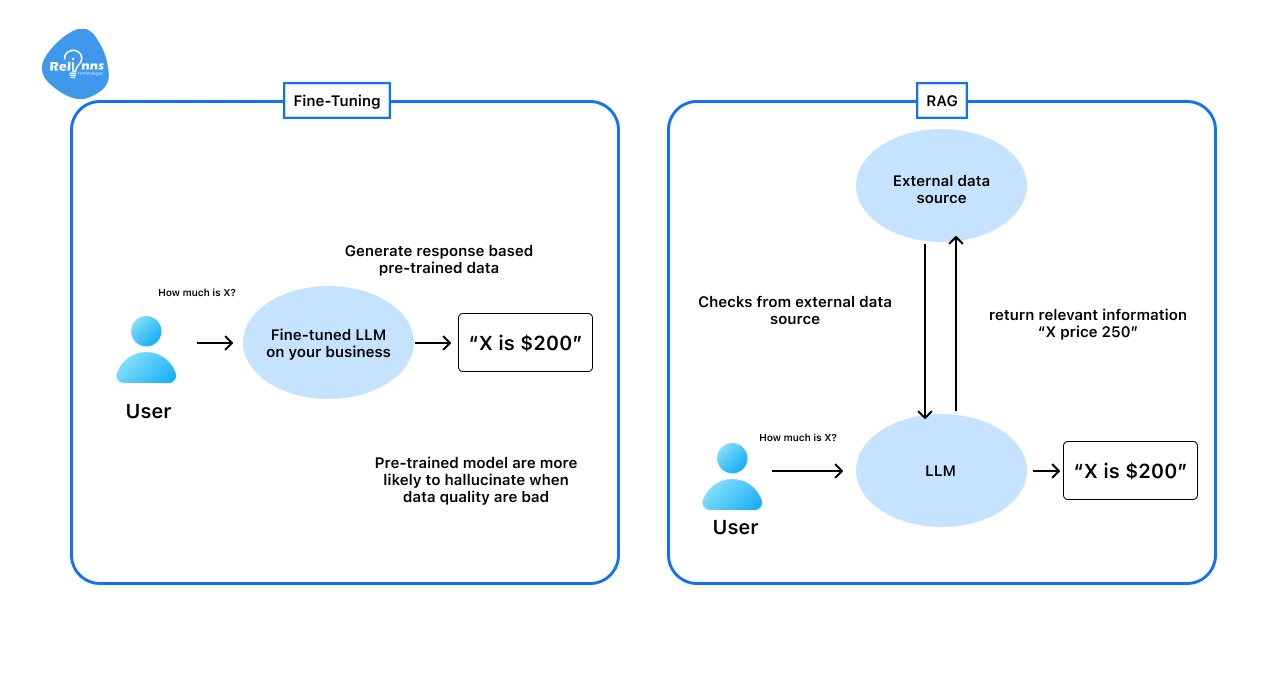
Retrieval-augmented generation (RAG) lets GPT access external data, like documents or databases, at inference time.
A RAG chatbot can pull real-time or company-specific information, keeping responses accurate and up-to-date.
Fine-tuning is better for changing how the model reasons or writes, not just what it sources its information from.
Real Use Cases That Require Fine-Tuning GPT
Choose fine-tuning when you need deep model adaptation beyond what prompts and RAG can offer.
Some business needs are simply too specific for generic GPT models or prompt tweaks alone.
Here’s where fine-tuning makes a real difference:
- Customer support bots that must match your brand’s voice and policies
- Drafting legal or medical documents in a precise, company-approved style
- Creating or understanding content filled with specialized industry jargon
- Automating business workflows that require strict, step-by-step accuracy
Fine-tuning gives you the control needed for these advanced, business-critical scenarios.
Custom GPT vs API-Level Fine-Tuning vs RAG: A Comparison
When tailoring AI models for business needs, three main approaches stand out: Custom GPT, API-level fine-tuning, and Retrieval-Augmented Generation (RAG).
Each method addresses different use cases and technical requirements.
Below is a table to help you quickly compare these options:
| Method | What It Is | Pros | Cons | Best For |
| Custom GPT | No-code customization in ChatGPT using instructions and uploaded files | Quick setup, no coding needed, easy to tweak | Limited control, stays inside ChatGPT, not deeply customizable | Internal assistants, small teams, rapid experiments |
| API-Level Fine-Tuning | Train a GPT model on your own prompt-response dataset | Consistent behavior, strong domain alignment, scalable for production | Higher cost, technical setup required, needs high-quality data | High-volume workflows, domain-specific tasks, structured outputs |
| RAG (Retrieval-Augmented Generation) | Connect GPT to external knowledge sources for retrieval before answering | Keeps answers up-to-date, flexible knowledge updates, no retraining needed | Doesn’t change model reasoning, requires infrastructure setup | FAQs, document search, dynamic knowledge bases |
Selecting the right method depends on your goals, budget, and technical resources.
For most business applications, RAG offers the best balance of flexibility and cost, while fine-tuning is best reserved for high-volume, specialized workflows.
Here’s a rewritten, reader-friendly version of your section, around 200 words, concise, with keywords naturally included:
GPT Fine-Tuning Methods and Techniques
Fine-tuning GPT lets you make the model smarter for your needs.
Depending on your goal, you can adjust how it responds, what it knows, or how efficiently it learns. Choosing the right method saves time and improves results.
Supervised Fine-Tuning (SFT)
The most common approach, SFT trains GPT on labeled examples in a JSONL conversational format.
Think of it as showing the model exactly what a correct answer looks like. You give the model examples of questions and the exact answers you want it to produce.
Where This Works Best: This method works well for chatbots, Q&A, and content generation.
Instruction Fine-Tuning
Instruction fine-tuning teaches GPT to follow prompts better.
You provide examples of instructions and ideal responses. This helps the model behave consistently and makes ChatGPT fine-tuning more predictable.
Where This Works the Best: Ideal for improving user interactions, building assistant-like models, or guiding GPT to follow specific workflows.
Domain Adaptation Fine-Tuning
Domain adaptation focuses on industry-specific data.
For example, legal, medical, or finance reports are used to train the model on domain terminology, tone, and context. The model learns terminology and context, improving accuracy for specialized tasks.
Where This Works the Best: This is useful for regulated or technical industries where precision, terminology accuracy, and context awareness are critical.
Full Fine-Tuning vs Parameter-Efficient Tuning
Full fine-tuning changes all model weights for maximum customization, but it’s costly.
Parameter-efficient methods, like LoRA or adapters, tweak fewer weights, saving time and money. Enterprises often pick full fine-tuning for high-stakes accuracy, and LoRA for quick, efficient updates.
Where This Works the Best: Full fine-tuning fits complex, mission-critical tasks; LoRA and adapters work best for fast updates or budget-conscious projects.
Multi-Stage Fine-Tuning
Some teams combine methods: supervised fine-tuning first, then instruction or domain adaptation.
This creates a model that is both versatile and highly specialized.
Where This Works the Best: Great for building advanced, multi-purpose models that need both accuracy and adaptability
It’s critical to choose the right GPT fine-tuning method that aligns with your objectives, data, and resources. While simple SFT works for general tasks, instruction and domain adaptation refine behavior and expertise. Likewise, parameter-efficient methods make updates faster and cheaper.
Combining approaches ensures your model is accurate, flexible, and ready for real-world applications.
GPT Model Versions and Fine-Tuning Support
Fine-tuning lets you adjust GPT models to perform better for your tasks. Different GPT versions have different strengths, costs, and limitations.
This section will break down the key differences between GPT-3, GPT-4, and GPT-4o for fine-tuning.
GPT-3 Fine-Tuning
GPT-3 fine-tuning is the starting point for custom models and typically refers to fine-tuning GPT-3.5 class models.
It is cost-effective and works well with structured datasets.
- Use Cases: chatbots, simple content generation, internal tools.
- Cons: It is slower than newer models for complex reasoning and lacks some advanced capabilities.
GPT-4 Fine-Tuning
GPT-4 brings stronger reasoning and more natural outputs. Fine-tuning improves domain alignment and consistency.
- When It Is Needed: Ideal for high-quality content, specialized workflows, and tasks that require a better understanding of instructions
- Trade-off: It is more expensive than GPT-3.5 but often worth it for critical applications.
GPT-4o Fine-Tuning
GPT-4o is the latest GPT-4 class model. It supports multimodal inputs and offers lower latency.
Fine-tuning GPT 4o improves task consistency, tone control, and domain adaptation. It can handle text and images, depending on API support.
Best for: real-time systems, multimodal applications, and performance-critical use cases.
ChatGPT Version Comparison Table
Here’s a quick overview of the various GPT versions discussed above.
While the section focuses on GPT-3 fine-tuning and GPT-4 fine-tuning, the table below also covers mini and nano variants for a broader comparison.
| Version | Training Cost | Inference Cost | Context Window | Best For | Limitations |
GPT-3.5 (Turbo instruct) | $0.008 / 1K tokens | Input: $0.003 / 1K tokens Output: $0.006 / 1K tokens | 4,096 tokens (newer models have moved up to 16K tokens) | Simple tasks, budget-friendly apps | Limited reasoning, smaller context |
| GPT-4.1 | $25 / 1M tokens | Input: $3 / 1M tokens Output: $12 / 1M tokens | Up to 1,000,000 tokens | High-quality content, complex tasks | Higher cost, slower than GPT-3.5 |
| GPT-4.1 mini | $5 / 1M tokens | Input: $0.80 / 1M tokens Output: $3.20 / 1M tokens | Up to 1,000,000 tokens | Low-latency apps, smaller workloads | Less capable than full GPT-4.1 |
| GPT-4.1 nano | $1.50 / 1M tokens | Input: $0.20 / 1M tokens Output: $0.80 / 1M tokens | Up to 1,000,000 tokens | Cost-sensitive tasks, testing | Very limited capacity, simpler reasoning |
| o4-mini (RL fine-tune) | $100 / training hour | Input: $4 / 1M tokens Output: $16 / 1M tokens | Up to 200,000 tokens in many API contexts | Specialized RL fine-tuning, performance-critical | Very expensive, niche use cases |
*Pricing/ context window may vary based on model version, deployment tier, and updates to OpenAI’s official documentation.
Whether you choose GPT-3 fine-tuning or fine-tuning GPT-4, the right decision depends on your use case, cost limits, and performance goals.
Match the model version to your workload, not just its capabilities.
GPT Fine-Tuning API Step-by-Step Tutorial
Follow this practical GPT fine-tuning tutorial to build, train, and launch your custom model with confidence.
Step 1: Define the Business Objective
Before touching the API, it’s important to answer:
What behavior do we want to improve? What business KPI are we impacting? What tone or decision pattern must the model follow?
Simple Example: You’re a healthcare CEO. You want your AI assistant to:
- Use compliant medical language;
- Avoid casual tone;
- Provide structured responses
Instead of retraining from scratch, you fine-tune GPT with examples that reflect your desired tone and structure. The objective is behavioral alignment, not knowledge expansion.
Step 2: Prepare Training Examples (In Plain English)
Think of fine-tuning as giving the model “before → after” examples.
Example Dataset (Simplified)
You provide examples like:
User: What are early flu symptoms?
Early flu symptoms typically include fever, fatigue, muscle aches, and a sore throat. Patients should consult a healthcare provider if symptoms worsen.
You're teaching: Tone (formal); Structure (clear, medical); Risk framing (consult provider)
No new knowledge, just refining how the model communicates and reasons within your domain standards.
Step 3: Upload the Training File
Technically, the data must be in JSONL format, but strategically this means:
You’re uploading a structured file containing the real user queries and your company’s ideal responses.
This becomes your model’s behavioral blueprint.
Example API snippet:
file = client.files.create( file=open("training.jsonl", "rb"), purpose="fine-tune" ) |
Step 4: Launch the Fine-Tuning Job
You select a base model and start training:
Example:
job = client.fine_tuning.jobs.create( training_file="file-abc123", model="gpt-4.1-mini" ) |
You’re adapting a high-performing foundation model to reflect your brand voice and decision logic.
Step 5: Use Your Custom Model
Once complete, your fine-tuned model behaves consistently across use cases.
Example:
response = client.chat.completions.create( model="ft:gpt-4.1-mini:your-org::abc123", messages=[ {"role": "user", "content": "Explain flu prevention."} ] ) |
Now the output is automatically:
- Follows medical compliance tone
- Avoids casual language
- Provides structured recommendations
Thus, fine-tuning customizes how a GPT model thinks and responds, ensuring consistent brand-aligned, domain-specific AI performance at scale.
GPT Fine-Tuning Cost Factors Breakdown
GPT fine-tuning cost depends on four factors: total tokens in your dataset, number of training epochs, model version, and ongoing inference usage.
Training is a one-time cost. Inference is recurring and based on token usage per request.
Training Cost = Tokens × Epochs × Price per Token
Cost Breakdown for Fine-Tuning GPT
| Factor | Impact on Cost |
| Tokens | More tokens increase training cost. |
| Epochs | Each epoch multiplies total token usage. |
| Model | Larger models cost more per token. |
| Inference | Ongoing cost per input and output token |
Example (100K Examples)
| Scenario | Tokens |
| 100,000 examples × 200 tokens | 20M |
| 3 epochs | 60M training tokens |
Example: If you have 100,000 training examples and each averages 200 tokens, that equals 20 million tokens.
If you train for 3 epochs, the dataset is processed three times. That brings total training usage to 60 million tokens. This number is what pricing is based on.
Overall, the GPT fine-tuning cost is directly tied to how much data you use and how many times you train on it.
Pro Tips for Reducing GPT Fine-Tuning Cost
Here are practical ways to control and lower your GPT fine-tuning cost:
- Trim weak or duplicate data: Keep only high-quality examples. More tokens mean a higher cost.
- Compress prompts: Remove unnecessary words to reduce token usage during training and inference.
- Limit epochs: Train only as long as needed. Each extra epoch multiplies the total token cost.
- Choose the right model: Use the smallest model that meets your accuracy needs.
Practical Limitations and Common Mistakes in GPT Fine-Tuning
GPT fine-tuning can improve performance, but it is not risk-free.
Understanding its practical limitations and common mistakes helps leaders avoid wasted spend, unstable models, and unexpected production issues.
Overfitting
The model may memorize patterns too closely and fail on new, real-world inputs over time.
The Fix: Use diverse examples and carefully test on unseen data before full deployment.
Hallucinations
Fine-tuning does not completely eliminate incorrect, misleading, or confidently fabricated answers.
The Fix: Pair it with retrieval (RAG) and implement structured output validation checks.
Data Privacy Risks
Sensitive or confidential data in training can unintentionally resurface in generated responses.
Fix: Remove private information and thoroughly audit datasets before training begins.
Model Drift
Business goals, terminology, and internal policies naturally change over time.
Fix: Refresh datasets regularly and retrain the model on updated examples.
Too Small a Dataset
Limited training data often leads to unstable and inconsistent behavior.
Fix: Build a sufficiently large and representative high-quality dataset first.
Poor Formatting
An inconsistent prompt–response structure can easily confuse the model during training.
Fix: Maintain clean, standardized formatting across all training examples.
Training for Knowledge Instead of Behavior
Fine-tuning should not be treated as a storage system for facts.
Fix: Use it to shape tone, reasoning patterns, and structured outputs.
No Validation
Skipping evaluation often leads to costly surprises after production deployment.
Fix: Define clear performance metrics and rigorously test outputs before launch.
In short, GPT fine-tuning delivers value only when paired with strong data discipline, clear validation, and ongoing oversight.
For teams navigating these risks at scale, partnering with experienced AI specialists like Relinns Technologies can help structure datasets, define evaluation metrics, and deploy fine-tuned models safely in production.
Final Thoughts
GPT fine-tuning can be a game-changer, but it’s not magic. It works when you know exactly what you want the model to do. Clear goals. Clean data. Real testing.
Use GPT fine-tuning to shape tone, reasoning, and structured outputs. Don’t treat it like a database. If you need up-to-date knowledge, combine fine-tuning with RAG instead of forcing the model to memorize facts.
Think about cost, maintenance, and model drift from the start. Review outputs. Update your dataset as your business changes.
Done right, GPT fine-tuning improves consistency and control. Done casually, it wastes time and money. The difference is thoughtful execution.
Frequently Asked Questions (FAQs)
What is GPT Fine-Tuning?
GPT fine-tuning trains a pre-trained GPT model on custom prompt-response examples to improve tone, structure, and task performance for specific business needs.
How Much Does GPT Fine-Tuning Cost?
GPT fine-tuning costs depend on model version, training tokens, and inference usage. You pay for training data processing and ongoing API usage.
Can GPT-4 Be Fine-Tuned?
Yes, certain GPT-4 variants support fine-tuning through the API. Availability depends on the specific model release and OpenAI deployment tier.
What is the Difference Between Prompt Engineering and Fine-Tuning?
Prompt engineering adjusts instructions without changing the model. Fine-tuning retrains the model on structured examples to create consistent, domain-specific behavior.
When Should You Fine-Tune GPT?
Fine-tuning is useful when you need consistent tone, structured outputs, or domain-specific responses across high-volume, production-level workflows.
Is GPT Fine-Tuning Better Than RAG?
Fine-tuning improves behavior and consistency. RAG improves factual accuracy by retrieving external data. They solve different problems and are often used together.
Does Fine-Tuning Remove Hallucinations?
No. Fine-tuning improves response alignment and consistency but does not fully eliminate hallucinations. Additional validation or retrieval systems may still be required.