Joget Intelligence Explained: AI Designer, Agent Builder
Date
Jul 30, 26
Reading Time
10 Minutes
Category
Joget Development
Share


TL;DR
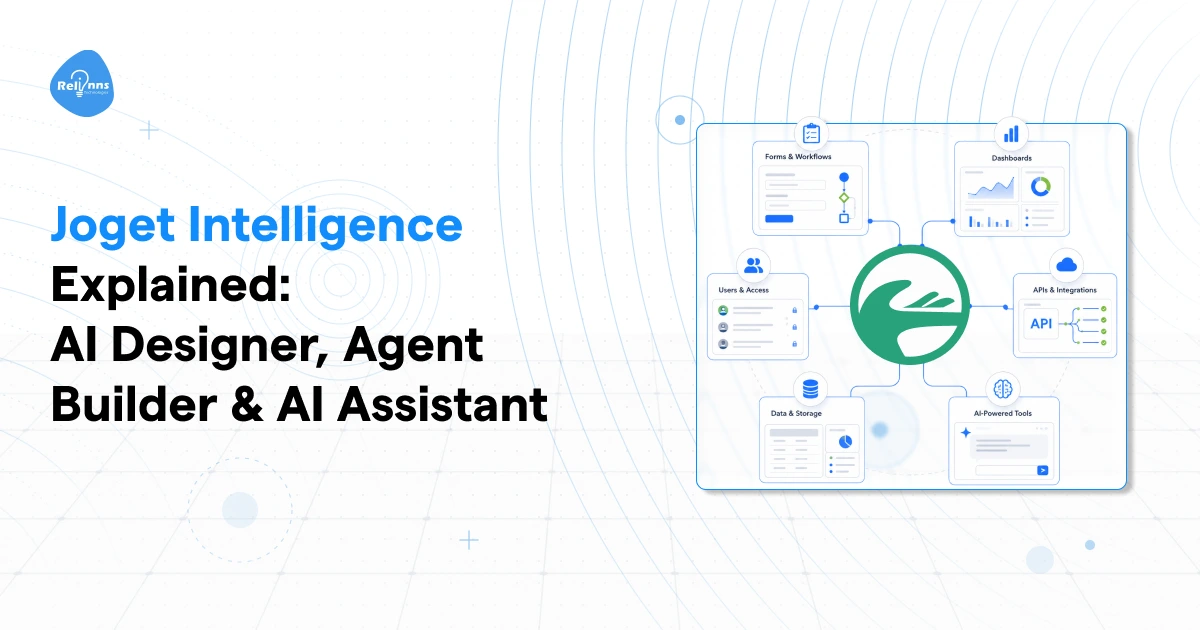
- Joget Intelligence is the AI layer inside Joget DX. Three parts: AI Designer (now AI Composer), AI Agent Builder, and AI Assistant.
- AI Designer composes the application. AI Agent Builder runs multi-step actions. AI Assistant is the chat surface on top.
- AI Designer generates governed metadata, not code. Output lands in the normal visual builders, editable.
- AI Agent Builder runs in a fixed order: Prompt, then Tool, then Enhancer.
- AI Assistant is the least documented of the three. Joget's DX 9 community docs still list it as coming soon.
- All three sit in DX Enterprise Edition.
What is Joget Intelligence, and what sits inside it?
Joget Intelligence is the AI layer built into Joget DX and includes three tools: AI Designer (renamed AI Composer), AI Agent Builder, and AI Assistant. Joget DX 9 introduced it as the formal umbrella for all of them, alongside AI Bundle. Three tools, three jobs, one platform. That last part is where people get tripped up.
What each one does, in a line:
- AI Designer composes the application
- AI Agent Builder automates work inside the application
- AI Assistant surfaces both conversationally
DX 9 is the release that shipped it, and there's a lot more in that version than the AI features if you want the wider picture.
Now the messy part. All three names live inside the same platform, and Joget's own documentation calls the first one by two different names depending on which page you land on. So teams end up choosing whichever name they've seen before instead of asking which layer of the app actually has to change.
That guess is cheap on day one and expensive by week three.
Why does picking the wrong component mean rebuilding?
Because the three tools write to different layers of the app, so output from the wrong one has nowhere to live. AI Designer produces governed application metadata, meaning the form, process, list, UI and theme definitions. AI Agent Builder produces sequential task logic tied to a process step or a form event. AI Assistant produces presentation and nothing else. Choose by name and you'll generate something the platform can't attach to anything.
Three ways this goes sideways:
- Used AI Designer to automate a recurring decision. You get clean forms and a tidy process diagram. Nothing fires when a record actually lands.
- Used AI Agent Builder to build an app shell. You get task chains with no forms, list, UI or theme underneath. The logic works and has nowhere to run.
- Used AI Assistant to hold the business rules. It's a surface. One stale endpoint or a thin agent behind it, and users decide the whole feature is broken.
The three parts of Joget Intelligence are not equally documented, and pretending otherwise is how pilots stall in week three.
Where each one stands today:
- AI Designer has the clearest end to end story, with current product pages plus a self-hostable API service behind it
- AI Agent Builder is the most concrete operationally, with explicit task sequencing and a preview you can debug inside
- AI Assistant has a polished page pushing early access, while Joget's own DX 9 community docs still mark it coming soon
That last gap gets glossed over in most coverage of the Joget DX 9 AI features, and I think it's the single most useful thing to know before you scope anything.
Expert Tip (Ajay, CTO): Pick the component by the layer that has to change, not by the demo that impressed you. Fastest way to lose a sprint on a Joget build is generating an app when you needed an action, or wiring an action when you needed an app.
And half of these mis-picks trace back to one naming problem Joget still hasn't cleaned up.
Is AI Designer the same thing as AI Composer?
Yes. AI Composer is the current product name for what Joget's older pages call AI Designer. Joget's own AI Composer page spells it out, listing the suite as AI Composer formerly known as AI Designer, plus AI Agent Builder and AI Assistant. Same app-composition capability, new label.
What actually shifted with the rename:
That last row is the one worth sitting with. Composition and agent execution aren't separate systems inside Joget Intelligence. They share a substrate.
Now the annoying part. Version support keeps moving. AI Designer 8.2.5 accepts free-text custom model names. AI Agent Builder 8.2.2 lists OpenAI, Anthropic, Gemini and IBM in its provider configurations, where earlier docs said OpenAI only. And the public documentation you'll find spans DX 8, 8.1, 8.2 and DX 9 paths all at once, which means the page you're reading may not describe the build you're running.
Do this: pin your design to a specific Joget DX release and plugin version. Then check the provider matrix inside your deployed environment rather than trusting a public page.
So the naming is settled. What the composer actually hands you is the more interesting question.
What does Joget AI Designer actually generate?
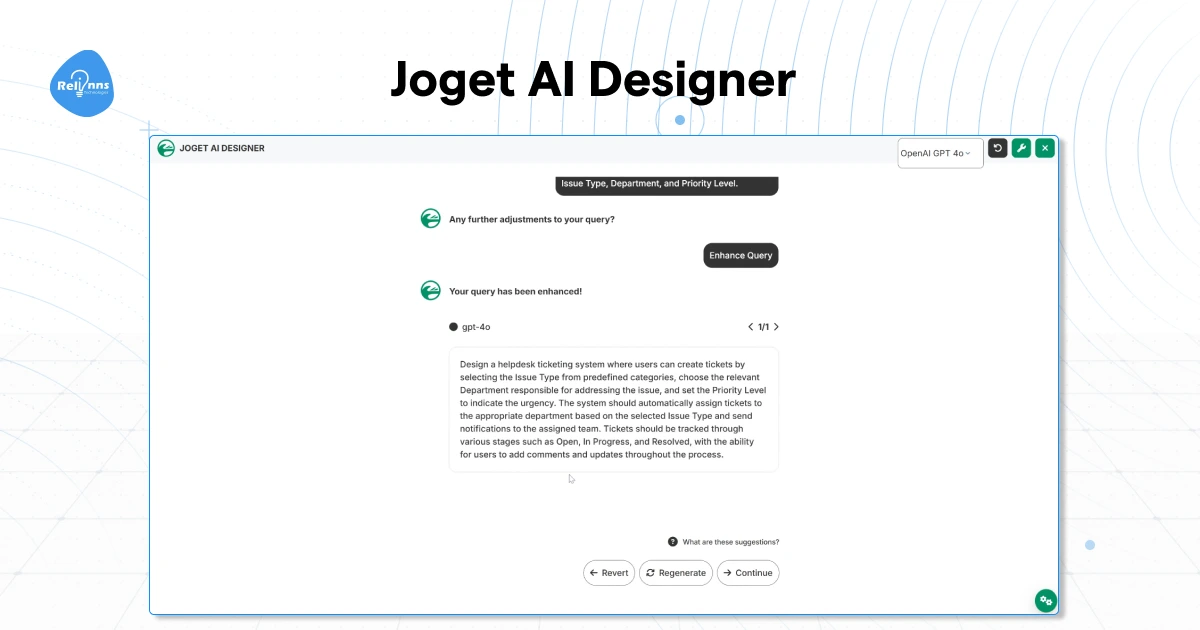
Governed application metadata, not source code. Joget's AI Composer page states it plainly: the platform has always saved metadata rather than code, and a conversation produces the same metadata that already defines forms, workflows, data views and interfaces. Worth reading that first if you're new to how Joget stores an app. Everything generated lands inside the normal visual builders, visible and editable immediately.
Three steps to get there:
- Describe or upload. Plain language works. So does a sketch or a process flow image.
- Generate. The composer drafts the app.
- Customise. In the same builders you'd use for any other Joget app.
One detail regulated buyers ask about first: the builder communicates with an AI service layer via an API Server URL and a server API key. That service layer can be self-hosted, so you're not forced to route prompts through a closed endpoint you can't inspect.
Joget's own named examples tell you the shape it's good at. Task management, procurement, customer request portals, contract management, vendor selection, risk management, patient referral. All workflow-heavy, all form-centric. Give it a vague consumer app idea, and you'll get a vague app.
Prompt like this:
"Create a procurement approval application. Start with one request form, one finance review step, one procurement validation step, and one approval step for requests above £10,000. Keep the first version simple. I will refine fields and rules afterward."
Joget's guidance says the same thing: lead with the workflow, don't over-specify the first prompt, improve it in passes.
And you'll still have a shell that sits there doing nothing until something runs inside it.
How does Joget AI Agent Builder actually run a task?
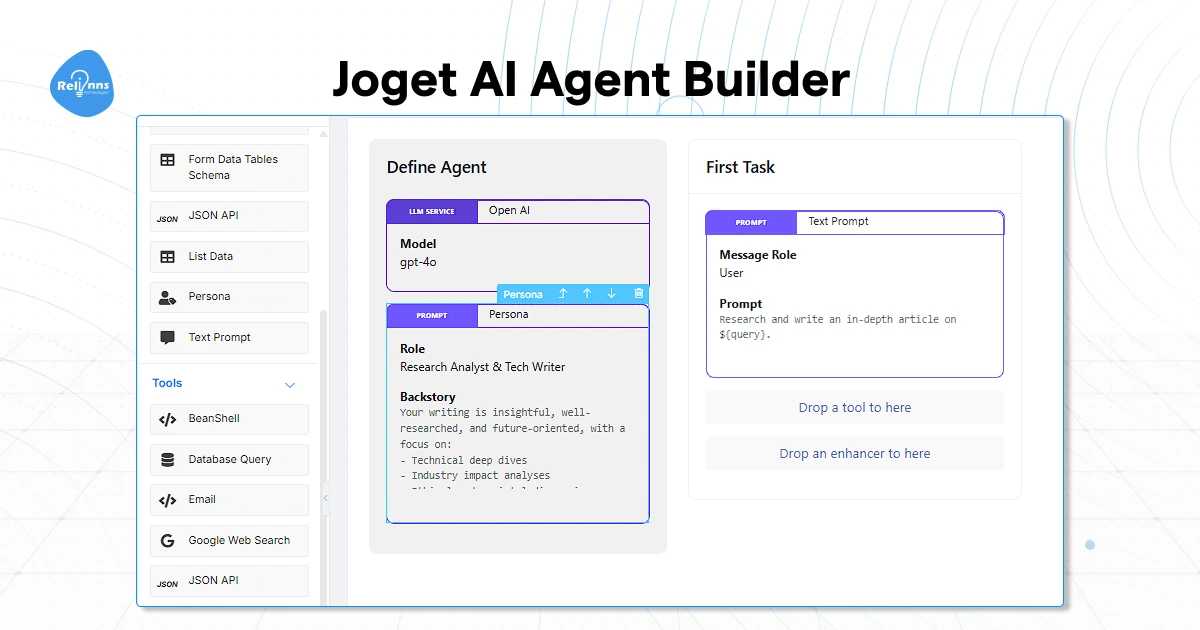
In a fixed order. You define the agent, then add tasks that run one after another, and inside every task the documented execution order is Prompt, then Tool, then Enhancer. Define Agent holds the LLM service and your default prompts. Task Setup holds the step logic. Nothing jumps the queue, which is the whole reason this feels less like a chatbot and more like a build.
Here's the full component set you get to work with:
A Joget agent is a workflow graph composed of LLM instructions, ordinary enterprise actions, and storage hooks. Hold that model, and the rest of the builder stops feeling mysterious.
Three places an agent can run:
- As a process tool inside a workflow step
- As form post-processing when a record gets created or updated
- Behind the AI Assistant chat interface
Joget doesn't sell these as free-roaming bots. They're contained application components, wired into a specific step or event, which is a meaningfully different posture from most low-code AI agents on the market right now.
You can also nest them. The Run AI Agent tool calls another agent by Agent ID and Function Name, so you build small reusable sub-agents instead of one giant prompt chain that nobody wants to debug six months later.
A ticket triage agent, compressed:
- Inputs: query, ticket_id
- Text Prompt summarises the issue and returns structured fields for summary, severity, and next action
- JSON API or Database Query tool pulls customer tier, past incidents, or SLA data
- Store to Form Enhancer writes the result back into form fields
Before any of it touches a live process, the Preview tab shows you content, request payload, and full response. And any AI service with an exposed endpoint can be called through the JSON API tool, so you're not locked to the providers on the dropdown.
Expert Tip (Ajay, CTO): Your first agents should be narrow, reversible, and measurable. Summarising, drafting, routing, enrichment. Anything that sends money or deletes records waits until you've got approval gates in place.
All of that runs underneath. The layer your users actually touch is something else.
What can Joget AI Assistant do right now?
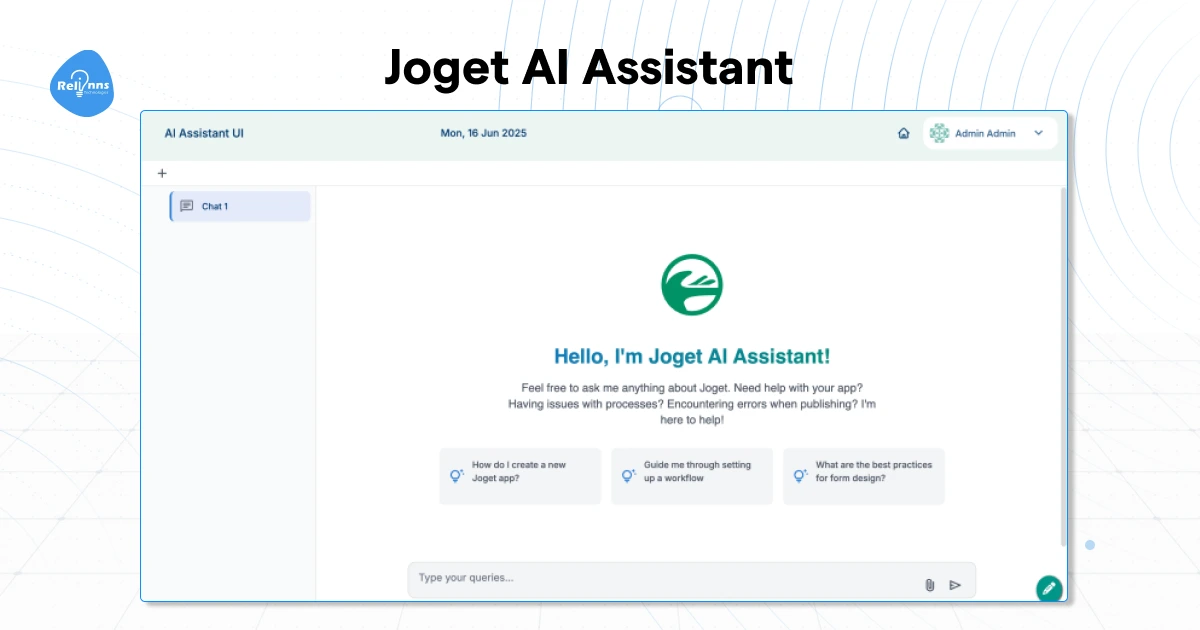
Three modes. Contextual help inside the UI Builder, recommendations pulled from endpoints you configure, and a branded chat interface that fronts agents you've built in AI Agent Builder. Status is murkier than the marketing suggests: Joget's product page promotes early access, while its DX 9 community documentation still lists AI Assistant as coming soon. Both are live right now, saying different things.
Read that third row twice, because it changes what this thing is. AI Assistant is the conversation and presentation layer, not a help bot. Reasoning and action stay in the agents. Data stays in the endpoints. The assistant just talks.
Which makes the good pattern obvious. An HR assistant fronting three separate agents: one for leave policy questions, one for onboarding checklists, one for case routing. Seed it with suggested questions, drop your logo on it, and users see one assistant instead of three tools.
I'll be straight about the gap, though. Public documentation on data flow, authentication, observability and the actual configuration objects is noticeably thinner here than for the other two parts of Joget Intelligence. So treat your first deployment as a scoped pilot sitting on agents you've already tested, not as the place where you go discover your business logic.
Stale endpoint data or thin agent logic will degrade this assistant faster than any model choice you make.
So you've seen all three. Picking between them is the part that actually decides your build.
AI Designer, AI Agent Builder or AI Assistant: which one do you need?
Choose by the layer that has to change. AI Designer if you need the application shell across five builders. AI Agent Builder if you need controlled multi-step action inside a workflow. AI Assistant if you need the conversation surface on top. Licensing doesn't split the decision for you, since Joget positions all three inside DX Enterprise Edition.
The strongest pattern uses all three in order. The composer creates the governed scaffold. Agent Builder adds the actions that run inside it. The assistant becomes the interaction layer for users or operators.
Build it in that sequence and each layer has something real to sit on. Skip a layer and you'll feel it.
On cost, one thing worth knowing before you scope a budget: Joget publishes no standalone price for any of the three. And under the bring-your-own-key model, external LLM billing lands on top of your platform licence, not inside it.
Which brings up the question every technical buyer asks about two minutes into the demo.
Does Joget Intelligence remove the engineering work?
No. It relocates it. You do less manual builder labour at the start, and more platform design, integration, supervision and observability across the whole lifecycle. Joget's own guidance points the same direction, telling non-technical users to define scope and governance upfront and keep human oversight on anything critical. The work doesn't vanish. It moves later and gets harder to see.
The belief worth correcting: prompt-to-app tooling replaces the build team.
Three things say otherwise. Generated apps still need the same refinement as any other Joget app. The legacy service path involves an API server, a server key, model service configuration and an optional container, which is more setup than a consumer AI builder, not less. And Joget's own material on why AI agent projects fail lands on system-level constraints mattering more than prompt wording.
Microsoft Research's Low-code LLM found that visible, editable graphical plans improve controllability and stability on complex tasks. Same argument Joget makes for keeping output inside the visual builders as governed application metadata rather than code you inherit.
Before you go to production:
- Pick one measurable workflow. Ticket summarisation or approval drafting are good first picks
- Keep the first prompt simple and refine after
- Instrument it: Preview in Agent Builder, health checks on the AI service, platform APM and audit trails
- Require human confirmation for deletion, payment and external communication
- Separate sandbox, staging and production, and ship AI changes through Git like any app change
- Write down what data is allowed to leave the estate
Most of that is platform design work rather than prompt work, and it's where Joget implementation and integration support earns its keep.
Pick one workflow, scope it narrow, and build it in a sandbox this week.