How to Create a RAG Chatbot: Architecture and Design Guide
Date
Aug 24, 26
Reading Time
11 Minutes
Category
Generative AI
Share


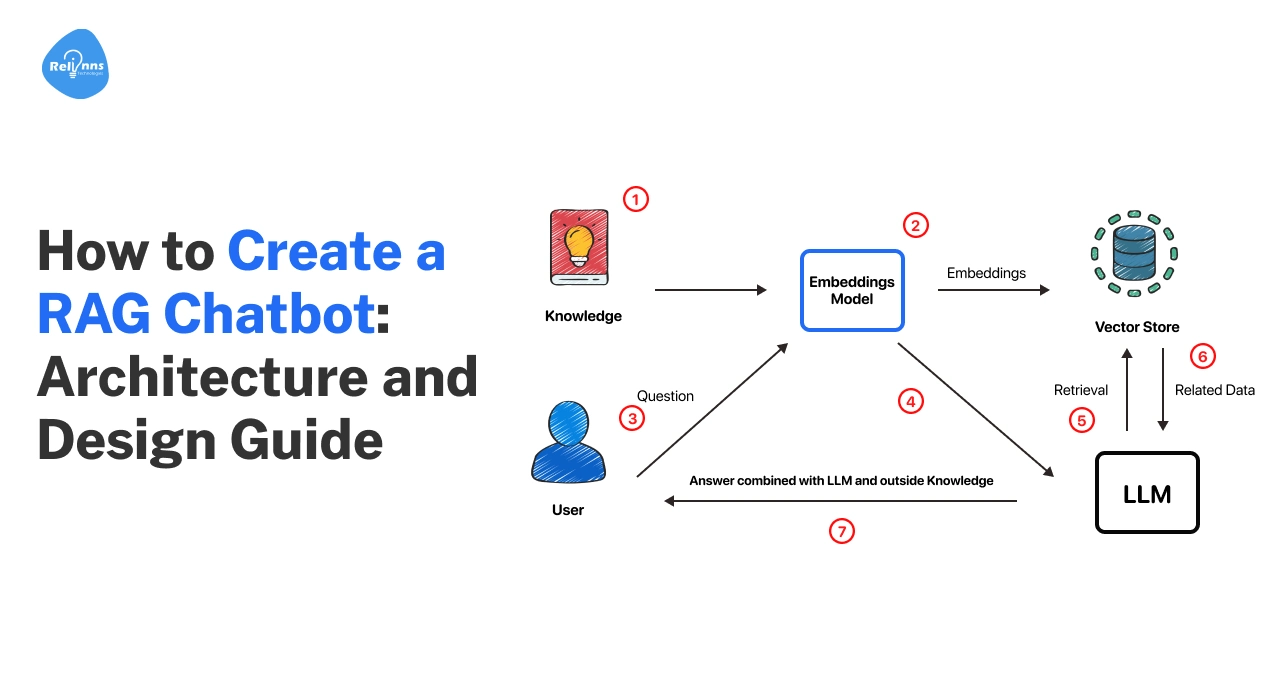
When it comes to RAG, good answers start long before the models respond.
Most RAG chatbots don’t fail because the model is weak. They fail because the system around it isn’t well thought out.
Teams often start by picking a powerful LLM and expect it to carry the experience. In reality, that’s not how a RAG system is supposed to deliver. Answers become slow, irrelevant, or outright wrong.
The real challenge isn’t generational quality. It’s a poorly designed retrieval.
This guide addresses that missing layer. It shows how to create a RAG chatbot by putting architecture first (data flow, retrieval, and orchestration). No fluffy code demos. Just clear system design.
When a RAG Chatbot is the Right Architectural Choice
RAG is not something you add by default. It is an architectural choice that depends on the nature of your data and the kind of answers you need to deliver.
Before you build a RAG LLM chatbot, it’s important to understand what RAG is designed to solve and where it actually adds value.
New to RAG? Start with our RAG chatbot fundamentals guide.
Problems RAG Solves That Fine-Tuning Doesn’t
Fine-tuning shapes how a model responds, not what it knows in real time. It struggles with private, rapidly changing, or large knowledge bases.
On the other hand, a RAG model chatbot retrieves information at query time.
This keeps answers in sync with the current data and removes the need for frequent retraining.
RAG vs Fine-Tuned LLMs vs Traditional Search
Traditional search finds documents but leaves users to read and interpret them.
Similarly, fine-tuned LLMs generate fluent answers but can drift from facts.
A RAG approach overcomes the limitations of both by combining retrieval with generation. It pulls relevant context and lets the model reason over it. This leads to higher accuracy and reliable responses.
Many teams find that moving from RAG concepts to a reliable system is where things get complex.
As a result, teams often partner with experienced AI solutions companies like Relinns to design and build custom AI chatbots based on RAG architecture. These systems are perfectly tailored to their data, security needs, and scale requirements.
Data Freshness, Explainability, and Compliance Considerations
RAG works well when information is highly dynamic.
Data can be updated without touching the model. At the same time, it improves transparency by linking answers to sources. This is critical for audits, trust, and regulated industries.
Access rules can thus be enforced during retrieval, supporting compliance requirements in regulation-heavy domains, including healthcare.
When Not to Use RAG
While effective, RAG introduces considerable overhead. For small or stable datasets, it may be unnecessary.
If content rarely changes, fine-tuning can be simpler. Likewise, for exact queries or keyword lookups, traditional search may be enough.
RAG is the most effective when reasoning over fast-changing, unstructured data is required.
Core Components of a RAG Chatbot Architecture
Building a production-ready RAG chatbot is less about picking the “best” model and more about how you connect the pipes.
It’s an ecosystem where every component impacts the accuracy, speed, reliability, and final user experience. Understanding these building blocks is key to designing a system that works in production.
Here is the breakdown of the six pillars that make a RAG system actually work:
Data Sources: The Knowledge Boundaries
Think of this as the chatbot’s library. Whether it’s PDFs, SQL databases, or live APIs, these sources define its “knowledge boundary”.
The Golden Rule: Your bot is only as smart as your data. Information quality, freshness, and access rules directly shape retrieval relevance and response accuracy.
Embedding Models: The Translator
Embedding models translate human language into mathematical vectors the system can search. Architecturally, consistency matters more than size. Domain alignment, update frequency, and stability have a greater impact than small accuracy gains.
Key Insight: You must use the same embedding logic for both saving data and searching it, or the system will “lose its keys”.
Vector Databases and Storage Layers: The Filing Cabinets
Vector databases store embeddings. A good vector database allows for lightning-fast similarity searches. What matters most is efficient retrieval, metadata support, and the ability to grow with data volume.
Focus on: Speed, scalability, and the ability to filter by metadata so the bot doesn't search the entire library when it only needs one chapter.
Retrieval Layer: The Gatekeeper
This is where most RAG systems fail or fly. Retrieval decides what context reaches the model, handling similarity search, filtering, and re-ranking.
The Goal: Reduce noise. High-quality retrieval ensures the LLM only sees the facts it needs, which keeps costs down and accuracy up.
Generation Layer (LLMs): The Narrator
Once retrieval is complete, the generation layer’s LLM becomes the “voice” of your bot. Its job is to take the retrieved data and turn it into a helpful answer.
Pro Tip: Don't expect the LLM to “know” things. Its job here is to reason over the context you provide, not to invent facts from its training data.
Orchestration Layer: The Conductor
Orchestration is the “glue” that connects all components into a single flow. It handles the sequence: user query → retrieval → prompt assembly → final response.
The Risk: A weak orchestration layer makes for a brittle system. It needs to handle errors and “no results found” scenarios gracefully.
Each of these components becomes clearer when seen in action. The next section breaks down the RAG chatbot building process step by step.
How to Build a RAG Chatbot: Architecture-First Approach
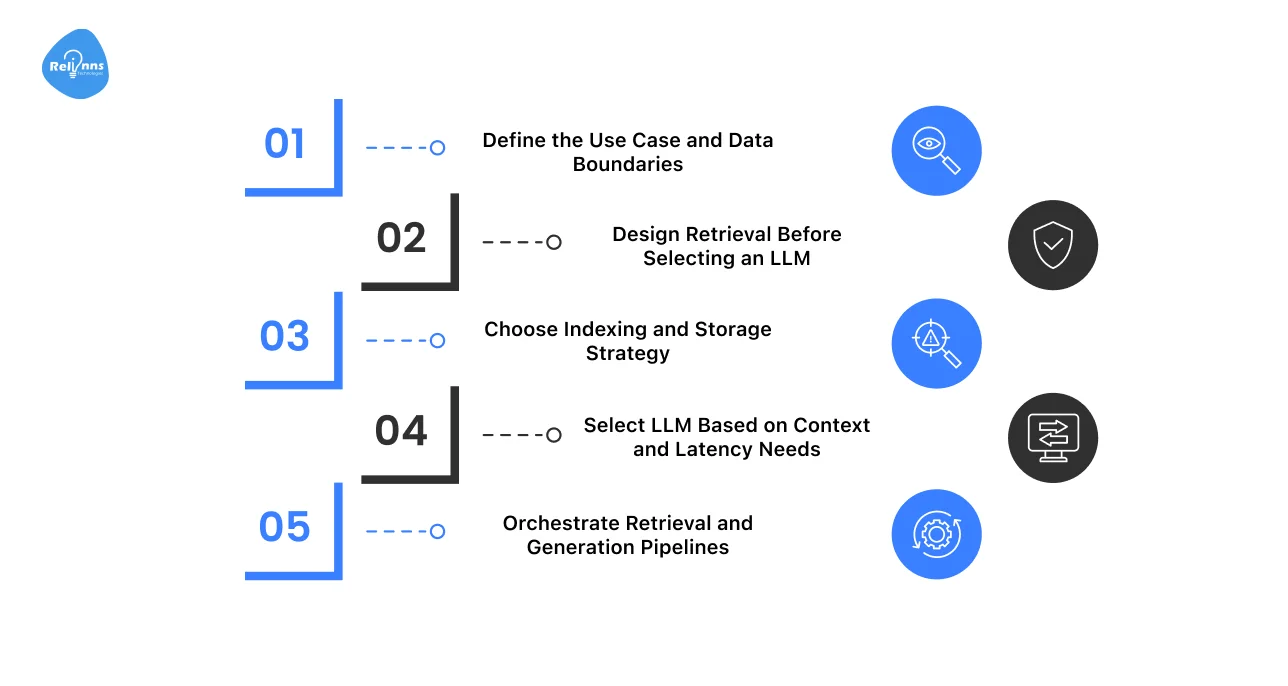
To master how to build a RAG chatbot, you have to start with design, not just tools.
Before you write code, you need to architect the system that dictates how the model finds information, how it processes logic, and how it ultimately talks to your users.
Here are the important steps to follow when creating a RAG chatbot:
Step 1: Define the Use Case and Data Boundaries
Start by clearly defining the problem the chatbot should solve.
- Identify the primary user intent and expected outcomes.
- Decide what the chatbot should answer, and what it should not.
- Define approved data sources, ownership, and access rules.
Clear boundaries reduce noise, improve answer quality, and protect sensitive data.
Step 2: Design Retrieval Before Selecting an LLM
Strong retrieval is essential for a good RAG system.
- Decide how content will be chunked and embedded.
- Define search methods, filters, and ranking logic.
- Focus on relevance before generation.
When retrieval is clean, the chatbot relies less on the LLM guessing.
Step 3: Choose Indexing and Storage Strategy
Your storage layer influences speed and scalability.
- Match the indexing strategy to data size and update frequency.
- Use vector databases for semantic search.
Consider a hybrid search for better precision.
The goal is fast and reliable retrieval as data grows.
Step 4: Select LLM Based on Context and Latency Needs
Choose the model only after retrieval is finalized.
- Evaluate context window requirements.
- Balance response speed, cost, and accuracy.
- Smaller models often perform better with cleaner inputs.
The system should guide the model, not depend on it.
Step 5: Orchestrate Retrieval and Generation Pipelines
This step brings everything together.
- Control the flow from user query to final answer.
- Handle retries, fallbacks, and failure cases.
- Maintain consistency across responses.
Strong orchestration turns a RAG prototype into a production-ready chatbot.
Here’s a quick overview of how these steps map to core architectural decisions:
| Step in RAG Chatbot Building | Architectural Decision | What to Think About | Common Mistakes |
| Define use case | Data scope | Internal vs external data | Overloading scope (trying to make one bot answer everything) |
| Design retrieval | Chunking + ranking | Relevance first | Picking LLM too early |
| Index & storage | Vector / hybrid | Scale & updates | Ignoring metadata (makes it impossible to filter or update specific documents later) |
| Select LLM | Model size | Context + latency | Over-engineering (Using a massive, expensive model for simple tasks) |
| Orchestration | Pipeline flow | Error handling | No fallbacks |
Next, we’ll break down how these steps translate into real-world RAG chatbot architecture patterns and implementation decisions.
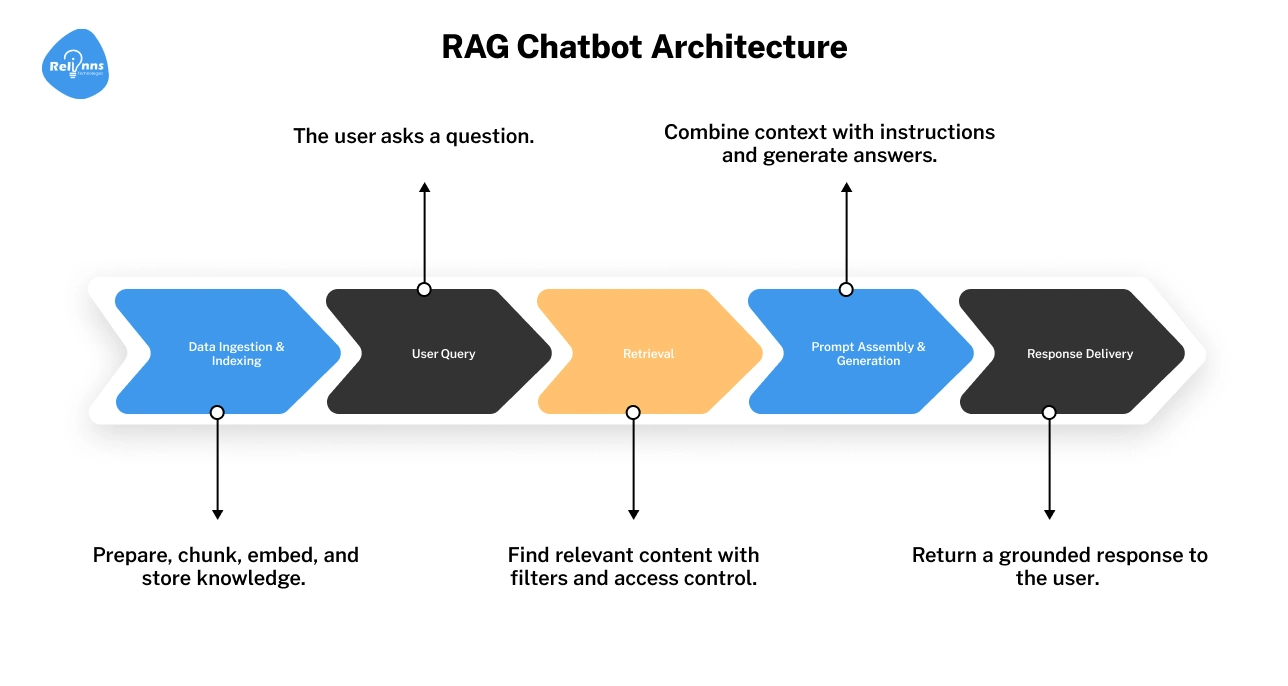
RAG Chatbot Architecture Diagram (Explained Step by Step)
A RAG chatbot architecture diagram shows how information flows through the system.
Once you understand how data moves through these five stages, RAG design becomes far easier to reason about and improve.
Data Ingestion Flow
This is where knowledge enters the system. Data may come from documents, databases, APIs, or internal tools. Ingestion defines what the chatbot can access.
Pre-Processing and Chunking
Raw data is often too dense for an AI to digest.
You must break it into smaller chunks. Oversized chunks introduce "noise," while tiny chunks lose the broader context. Finding the ideal size is critical for precise retrieval.
Indexing and Embedding Creation
Here, your data is converted into mathematical vectors (embeddings) and stored in a vector database. Indexing enables semantic search. Poor indexing leads to slow or irrelevant results in the rag chatbot.
Query Understanding and Retrieval
When a user asks a question, this layer finds the most relevant chunks. This step decides what the model is allowed to see. Strong retrieval is the backbone of any reliable RAG chatbot architecture.
Context Assembly and Response Generation
The retrieved data is packaged into a prompt for the LLM. The LLM then generates an answer using only that context. This keeps the response grounded in your data, significantly reducing the risk of hallucinations.
(RAG chatbot architecture diagram showing ingestion → indexing → retrieval → generation)
At this stage, it’s worth checking what happens inside the most critical layer (retrieval) and why small design choices there make or break the system.
How Retrieval Works in a RAG Chatbot
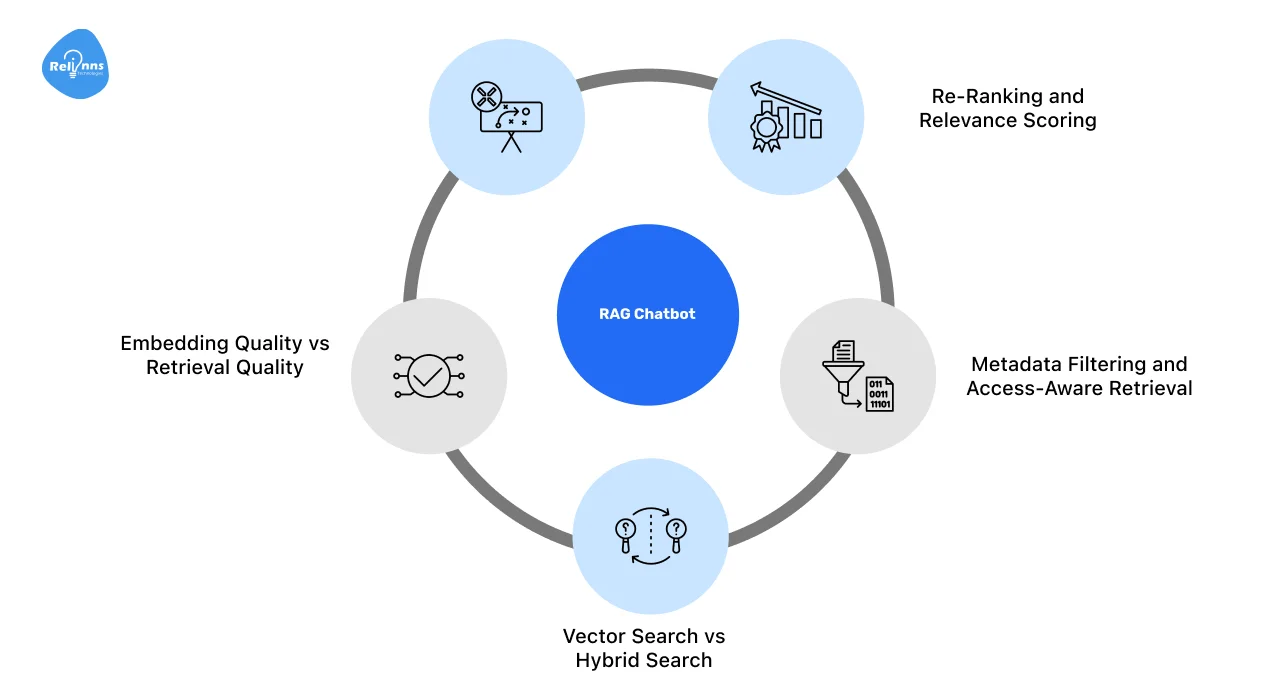
Retrieval determines what information reaches the model.
Even the best LLM cannot recover from poor retrieval. This layer is the backbone of any reliable RAG-based chatbot architecture. Core aspects include:
Chunking Strategies
Chunking controls how data is broken down for search. Fixed chunking is easy to deploy but inflexible.
While semantic chunking preserves meaning, sliding windows balance context and recall.
The right approach depends on data structure and query behavior.
Embedding Quality vs Retrieval Quality
Embedding models matter, but retrieval design matters more.
Clean chunking, good filters, and strong ranking logic often outperform simply switching to a better embedding model.
Vector Search vs Hybrid Search
Vector search captures semantic similarity. Hybrid search combines vectors with keyword signals like BM25.
This sharpens accuracy for the things that usually trip up AI, such as technical jargon, specific IDs, and exact industry terms.
Metadata Filtering and Access-Aware Retrieval
Metadata filters limit what gets searched and retrieved.
They enforce permissions and improve relevance by narrowing the search space before ranking occurs.
Re-Ranking and Relevance Scoring
Re-ranking refines retrieved results before generation.
It removes noise and prioritizes the most useful context, improving precision when you build a RAG chatbot.
Once the right information is retrieved, the next challenge is using it correctly.
This is where generation comes in, and where many RAG chatbots quietly go wrong.
How Generation Works in a RAG Chatbot
Generation turns retrieved context into a usable answer. In a RAG system, the model does not “know” the answer. It reasons only over what retrieval provides. This distinction is critical in any LLM RAG chatbot.
Here are the key generation patterns that make RAG systems reliable:
Prompt Structure in RAG Pipelines
Think of your prompt as a well-organized workspace.
The prompt first sets rules (“use only the information below”), then supplies retrieved documents, and ends with the user’s question.
This structure lowers confusion and keeps answers grounded in the data.
Context Window Management Strategies
Just because a model can take in 100,000 words doesn’t mean it should.
For example, Google’s Gemini 1.5 can support context windows of up to 1 million tokens, yet effective RAG systems still pass only the most relevant information.
Trimming context reduces cost, latency, and irrelevant reasoning.
Grounding Responses in Retrieved Sources
The model is instructed to answer strictly from the retrieved data.
If the answer isn't in your documents, the bot should say "I don't know" rather than tapping into its own imagination (pretraining).
Citation and Traceability Patterns
Responses can reference source IDs or document links. This inclusion allows users to verify the information themselves.
It also makes debugging much easier when things go wrong.
Reducing Hallucinations Through Architectural Design
Hallucinations are usually the result of poor retrieval or vague prompts.
When you build a system where the retrieval is precise and the prompt enforces context-only reasoning, hallucinations naturally drop to near zero.
However, getting good answers is only half the work. Teams now need to choose how to build their RAG chatbot based on control, speed, and long-term ownership.
Ways of Building RAG Chatbots (From Custom Systems to Managed AI)
.webp)
There is no single “correct” way to build a RAG chatbot. Teams choose different approaches based on control, speed, data sensitivity, and long-term ownership.
Below are the most common ways of building RAG chatbots, along with when each approach makes sense.
Building a RAG Chatbot From Scratch
This approach gives complete control over architecture, data flows, and security. You design retrieval, indexing, orchestration, and monitoring yourself.
It’s best for enterprise systems or regulated data.
Trade-off: Higher development and ongoing maintenance effort
Building a RAG Chatbot Using Frameworks
This option prioritizes speed.
Prebuilt components reduce setup time and make iteration easier. It works well for MVPs and early-stage production use cases.
Trade-off: Less flexibility and visibility as the system grows
Building a RAG Chatbot Using Managed AI Platforms
Managed platforms bundle retrieval and generation into a single service.
They simplify setup and reduce operational work. This suits internal tools and low-risk applications.
Trade-off: Limited customization, reduced transparency, and potential vendor lock-in
Choosing the Right Build Approach
The right build approach depends on what you need to optimize for: speed, control, cost, or compliance.
| Priority | Best Option | Why |
| Speed and Experimentation | Frameworks or managed platforms | Faster setup with prebuilt components |
| Low Operational Cost | Managed AI platforms | Minimal infrastructure and maintenance |
| Control Over Data and Retrieval | Build from scratch | Full architectural ownership |
| Security and Compliance | Build from scratch | Custom access control and auditability |
| Large or Dynamic Datasets | Build from scratch or hybrid | Better scaling and update handling |
| MVP Validation | Frameworks | Quick iteration with manageable trade-offs |
Key Takeaway:
- If speed matters most, start with frameworks or managed platforms.
- If control, security, or scale matter, building from scratch is often the better choice.
The best approach aligns system design with business and data constraints.
Production-Grade RAG Chatbot Architecture Considerations
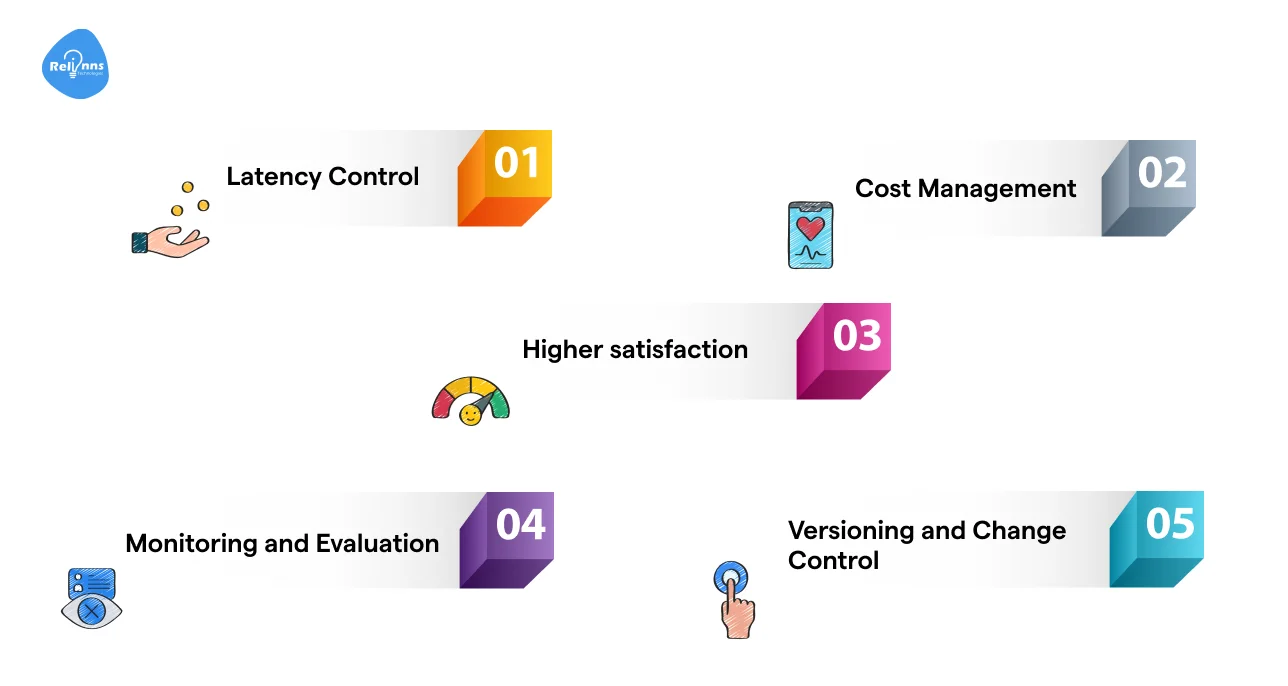
When a RAG chatbot moves into production, the focus shifts from working to working reliably at scale.
Major considerations for enterprise systems include:
- Latency Control: Keep responses fast with strict retrieval limits, smart caching, and re-ranking.
- Cost Management: Reduce token usage by trimming context and avoiding unnecessary generation.
- Fallback Handling: Add safe fallbacks for cases where retrieval is weak or returns nothing useful.
- Monitoring and Evaluation: Track performance, errors, and data drift through logging and regular reviews.
- Versioning and Change Control: Version embeddings, prompts, and data to make updates predictable and traceable.
These choices turn a RAG chatbot into a dependable production system.
And once a RAG system is stable at scale, securing what it can access becomes the next critical architectural concern.
Security and Access Control in RAG Chatbot Architecture
Security in a RAG system is enforced before generation. Most risks come from what the model is allowed to retrieve, not how it writes responses.
Why Security Belongs in the Retrieval Layer
LLMs cannot reliably enforce access rules. If you accidentally feed the model sensitive information in its context window, it will talk about it.
Security must be applied at retrieval time, where data selection is deterministic and auditable.
Row-Level and Document-Level Access Control
Each chunk should carry access metadata (user, role, tenant).
When a user asks a question, your retrieval logic should automatically say: “Only show me chunks that match this user's badge.”
If they don't have permission, the model never even knows the data exists.
Isolating Private Data in Multi-Tenant Systems
If you are building for multiple clients or departments, “mixing data” is your biggest risk.
Use separate indexes or strict tenant-level filters to prevent cross-tenant data exposure, even during semantic search.
Preventing Prompt Injection Through Retrieval Design
Your retrieval layer should only pull from your verified, internal library.
By locking your system prompts and limiting the “truth” to trusted sources, you create a firewall that keeps malicious user queries from hijacking the bot’s logic.
RAG Chatbot Example: Putting It All Together
To make this concrete, let’s look at how a real team uses a RAG chatbot to solve a business problem, without getting buried in tools or code.
A Realistic Business Use Case
BreakBag, a travel company, needed to engage visitors, qualify leads, and respond faster across its website and Instagram. Manual handling was slow and inconsistent.
They adopted BotPenguin, a RAG-based AI chatbot platform developed by Relinns, to automate conversations and capture high-intent leads.
Architecture Choices Explained
Their chatbot uses a RAG setup where travel FAQs, packages, and policies are indexed and retrieved based on user intent.
Retrieval happens first. Only the most relevant context is passed to the model.
This keeps responses accurate and in sync with BreakBag’s data.
Why Each Design Decision Was Made
RAG ensured replies stayed grounded in real trip information instead of generic answers.
Automated lead qualification reduced sales workload by 40% and improved response time by 60%, while delivering 3x more qualified leads.
How This Architecture Scales Over Time
As BreakBag adds destinations and offerings, new data is indexed without changing core logic.
Using Relinns’ BotPenguin platform, it scales by improving retrieval rather than constantly retraining models.
Thinking about building a RAG chatbot like this?
Relinns helps teams design, build, and scale RAG-based chatbots, without locking you into rigid platforms.
Final Thoughts
Building a RAG chatbot is less about tools and more about design choices.
Retrieval quality, data control, and system boundaries shape how reliable the chatbot becomes over time.
Choosing the right strategy ultimately comes down to your specific needs for speed, scale, and data security. The beauty of a well-designed RAG system is that it stays accurate and cost-effective without the need for constant, expensive retraining.
That’s what makes RAG a practical foundation for real business use cases, not just demos.
Frequently Asked Questions (FAQs)
What is a RAG chatbot?
A chatbot that pulls out relevant data and generates responses grounded in that context
When should you use RAG instead of fine-tuning?
When data changes often or accuracy and traceability matter
How do you build a RAG chatbot?
Design data ingestion, retrieval, and generation layers around your business data
Do RAG chatbots require retraining models?
No. Most updates happen by re-indexing data, not retraining
Is RAG suitable for enterprise and regulated data?
Yes, when built with proper access control and retrieval security
How does a RAG chatbot scale over time?
By improving retrieval and indexing, not increasing model complexity