How to Build AI Apps for Medical Record Retrieval and Management
Date
Mar 24, 26
Reading Time
10 Minutes
Category
Generative AI
Share


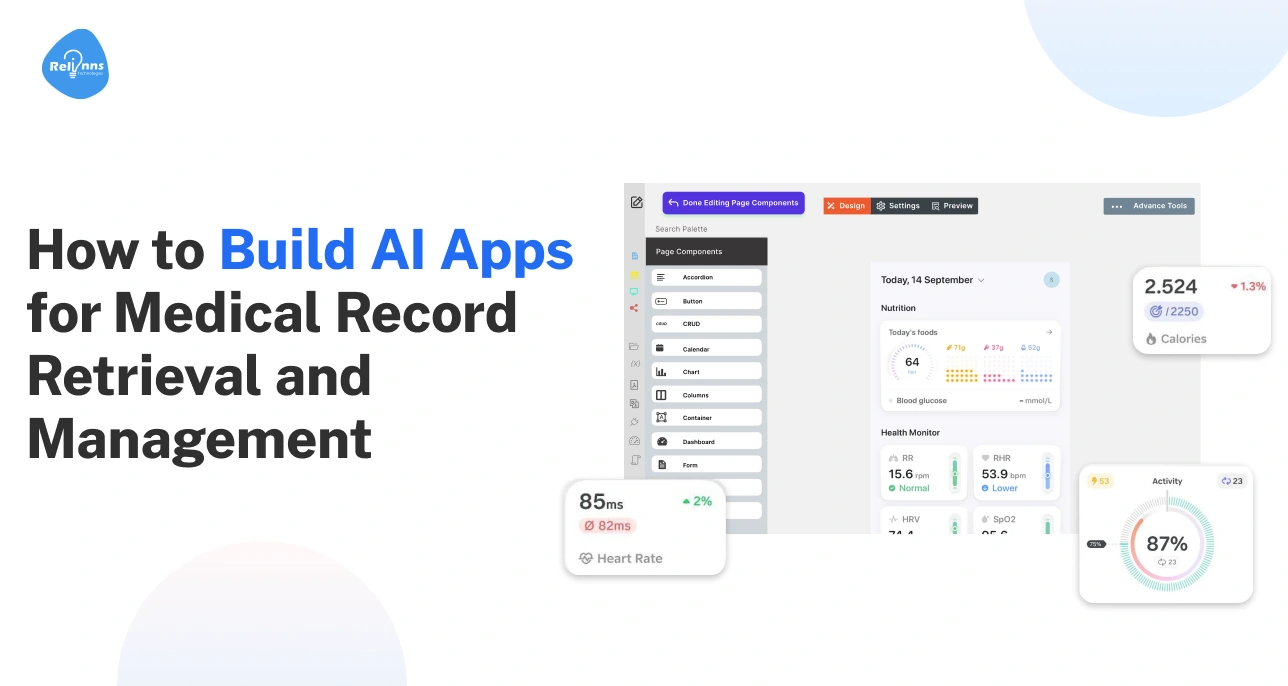
Delays in finding medical records aren’t just annoying; they can affect patient care.
Hospitals and clinics store data in PDFs, scans, and EHRs, making it hard to locate the right information quickly. Similarly, staff waste hours searching, and patients can face unnecessary risks.
However, artificial intelligence in healthcare is changing the game. Intelligent AI apps can quickly search, sort, and summarize medical records, streamlining workflows while keeping data secure.
In this guide, we’ll walk you through how to build AI apps for medical record retrieval and management, step by step, so healthcare teams can work faster, safer, and more efficiently.
The Growing Need for AI Apps for Medical Record Retrieval
Healthcare data is scattered across multiple systems. We’re talking labs, EHRs, and hard-to-read PDFs that are difficult to search and interpret.
Finding the right information thus takes time and slows care.
With AI, this problem is solved as it makes records easy to find, organize, and use.
Fragmented Medical Data Across EHRs, PDFs, and Scans
Patient information often lives in separate systems. Clinicians waste time switching between platforms. Important details can get overlooked or lost.
For instance, a patient’s allergy listed in a scanned PDF may not appear in their EHR, creating risks during treatment.
Manual Medical Record Retrieval Slows Clinical and Operational Workflows
Staff spend hours searching for files. Delays affect patient care and slow administrative tasks.
Errors and duplicate work are common, creating bottlenecks and frustration across care teams.
How AI Transforms Medical Record Retrieval and Management
AI apps automatically index, sort, and summarize records.
Clinicians can access patient histories instantly. Workflows are faster, more accurate, and secure. AI reduces repetitive tasks and helps healthcare teams focus on care, not paperwork.
Imagine a doctor seeing a complete patient timeline instantly, no PDFs or scans to dig through.
Before we dive into how AI medical record automation systems are built, we’ll see what they actually do and how they make medical record management smarter and faster.
What AI Apps for Medical Record Retrieval and Management Actually Do
Finding the right patient record shouldn’t take hours. AI apps make it fast, accurate, and simple, helping doctors and staff see the full picture instantly.
Here’s what they can do:
- Find Records Fast: Search across EHRs, scans, and PDFs, matching patients accurately.
- Organize Automatically: Sort and categorize documents so the right file is always at hand.
- Summarize Key Info: Generate quick patient histories and highlight important details.
- Keep Data Secure: Control who can access records and maintain audit trails.
These capabilities promise faster care, fewer errors, and a clearer view of each patient’s details.
Providers looking to create smarter medical record workflows often partner with AI experts like Relinns Technologies to build AI apps tailored to their needs and streamline access, organization, and security of patient data.
Next, we’ll look at the process of building AI apps for medical record retrieval, which help healthcare teams work smarter and more efficiently.
Step-by-Step Process to Build AI Apps for Medical Record Retrieval
Building AI healthcare apps for medical records isn’t just about technology; it’s about interoperability and understanding how people work with data.
Each step ensures the system actually helps doctors, nurses, and staff find what they need quickly, safely, and reliably.
Here’s a quick overview table of the key steps, actions, and examples to guide you through building an effective AI medical record system.
| Step | Action Step | Example |
| 1 | Define who uses records and map their workflows. | Doctors need quick patient histories; admin staff need access for billing and audits. |
| 2 | Review all data sources and document formats. | EHRs, PDFs, scanned lab reports, imaging files |
| 3 | Create a clinical taxonomy for categorizing and tagging records. | Index by patient, visit, document type, or department. |
| 4 | Choose AI models for processing and retrieval. | OCR for scanned PDFs, NLP to extract diagnoses, ML for document tagging |
| 5 | Build search, summarization, and dashboards. | Auto-generated patient timelines and highlight key lab results. |
| 6 | Connect AI apps via FHIR with EHRs and hospital software. | Sync records with EHR systems like Epic or Cerner to avoid duplicate entries. |
| 7 | Test accuracy, performance, and usability. | Ensure AI retrieves correct records 95%+ of the time and is easy to navigate. |
| 8 | Deploy and refine using real user feedback. | Track which searches are slow or incomplete and refine AI models. |
Each of these steps is explained below, showing how they work together to make medical record retrieval quicker and more reliable.
Define User Roles and Record Retrieval Workflows
Start by identifying who will use the system and what they need.
A hospitalist and a billing coordinator need very different things from the same system. Map workflows so the AI helps instead of slowing anyone down.
Audit Data Sources and Medical Document Formats
Do a full audit first. Know which files are PDFs, scans, or structured EHR entries. This guides how AI processes them.
For instance, knowing 40% of your records are image-based tells you immediately that OCR isn't optional.
Design Medical Record Taxonomy and Indexing Rules
Create a clear system to categorize and tag records.
Define how records get categorized and let AI apply those labels consistently, so search actually surfaces the right chart.
Example: Categorize by patient, visit type, document type, and department so a cardiology note appears instantly in a doctor’s search.
Select AI Models for Document Processing and Retrieval
Pick the right models for OCR, NLP, and classification. Make sure they handle the specific types of documents your organization uses.
Think: OCR for scans, NLP for unstructured text, and ML for tagging and search ranking.
Develop Retrieval, Summarization, and Management Features
Build a search that understands clinical intent. Add auto-summaries so a provider gets the gist of a 30-page record in seconds, not minutes.
Similarly, dashboards help clinicians and admin staff quickly see patient trends, lab results, and alerts without digging through documents.
The goal is to make it easy to find, read, and act on information quickly.
Integrate with EHR Systems and Healthcare Infrastructure
Connect the AI app with hospital systems. Smooth integration prevents duplicated records and keeps workflows uninterrupted.
Use FHIR APIs where possible and pressure-test sync failures before they erode clinical trust.
Test System Accuracy, Performance, and Usability
Check AI results for correctness, speed, and ease of use. Fix errors and refine features before full rollout.
Also, test edge cases. A 95% accuracy rate sounds great until that 5% is a missing allergy note.
Launch and Iterate Using Real Usage Insights
Start with one department. Watch how they actually use it.
The first version is never the final one. Build for iteration from day one and continuously improve the system to match real-world needs.
With the process mapped out, it’s time to now look under the hood. Let’s explore the architecture and core components that make AI medical record apps work efficiently and securely.
Inside the Architecture of AI Medical Record Systems
AI medical record systems are built in layers, each designed to make data easier to access, understand, and secure. The core architecture includes:
- Data Ingestion and Integration Layer: Pulls records from EHRs, lab systems, PDFs, and scans. Example: Sync patient lab reports from multiple departments into one view.
- Intelligent Document Processing and OCR Layer: Uses AI medical document processing to convert images, scanned forms, and handwritten notes into readable text. Example: Extract a radiology report from a scanned PDF in seconds.
- Medical Record Classification and Indexing Engine: Automatically organizes records by patient, type, and date. Example: A cardiology note appears instantly under the right patient profile.
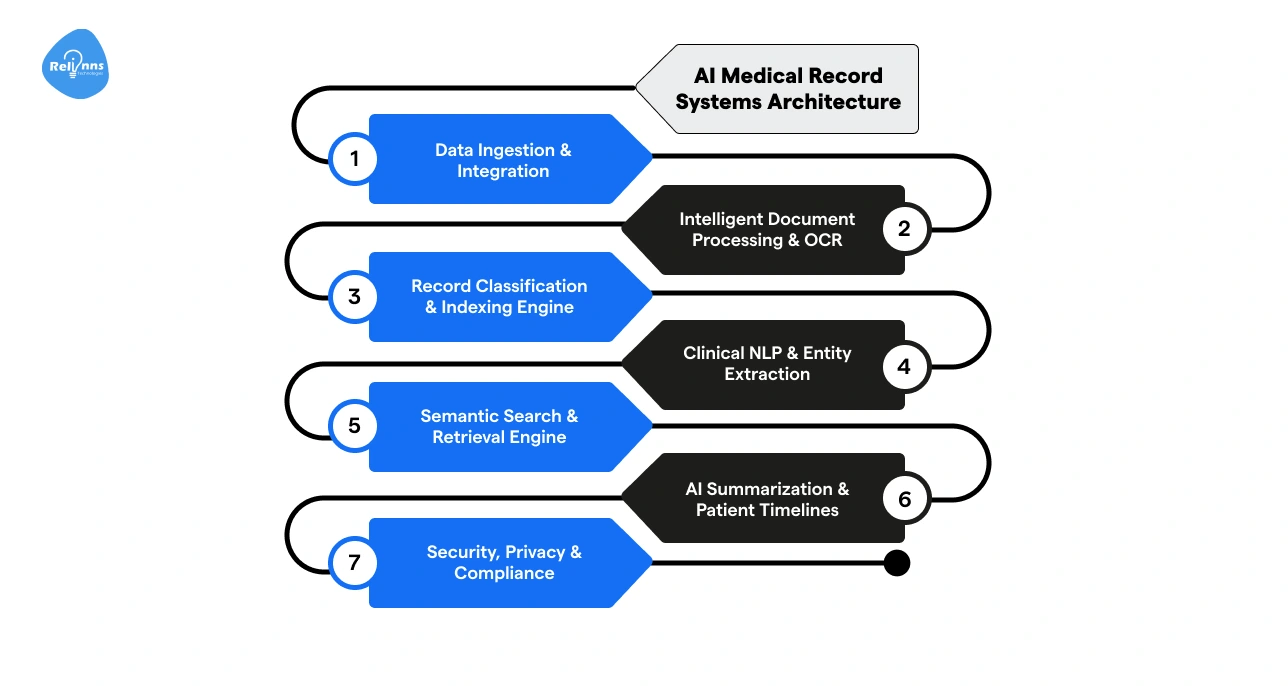
- Clinical NLP and Entity Extraction Layer: Recognizes medical terms, medications, diagnoses, and procedures. Example: Flag all patients with a history of hypertension.
- Semantic Search and Record Retrieval Engine: Finds records based on meaning, not just keywords. Example: Match patients with similar lab results across systems.
- AI Summarization and Patient Timeline Generation: Creates short summaries and chronological timelines. Example: Review a 30-page chart at a glance.
- Security, Privacy, and Compliance Layer: Controls access, encrypts data, and ensures HIPAA/GDPR compliance. Example: Only authorized staff can view sensitive records.
These layers turn messy, scattered records into clear, actionable insights for doctors, nurses, and staff.
Key Use Cases for AI Medical Record Retrieval Apps
AI medical record apps do more than store data; they make it usable.
From doctors to admin staff, and even patients, these tools streamline workflows, reduce errors, and put the right information in the right hands instantly.
Medical Records App for Doctors and Clinical Teams
Doctors and nurses can access patient histories instantly.
AI highlights critical information like allergies, lab results, and past procedures, helping make faster, safer decisions.
Medical Records App for Patients and Personal Health Access
Patients can view their records, lab results, and medication history in one place.
AI simplifies complex data into understandable summaries, empowering patients to take control of their health.
AI Medical Record Summaries for Legal and Insurance Review
AI medical record apps for lawyers and insurers can help teams quickly get concise, accurate summaries of patient records.
This reduces the time spent sifting through long documents and ensures important details aren’t missed.
Healthcare Operations and Administrative Workflows
Administrative teams use AI to streamline billing, audits, and compliance checks. Automated indexing and retrieval cut down manual work and reduce errors.
Best AI Apps for Medical Record Retrieval
These use cases are already transforming workflows in real-world hospitals and clinics.
Leading AI apps like Suki and Health Gorilla combine intelligent search, automated summaries, and secure access to improve workflows for every user.
These solutions save time, reduce mistakes, and make healthcare data easier to manage.
Core Features of Smart Medical Record Apps
AI medical record apps do a lot of the heavy lifting so clinicians, admin staff, and patients can focus on what matters most:
- Smart Document Ingestion: Pulls in records from EHRs, PDFs, and scans, then cleans and organizes them (no more hunting through messy files or missing notes!)
- Automatic Sorting & Tagging: AI groups charts and documents by patient, visit, or type, making it easy to find exactly what you need.
- Natural Language Search: Type or say things like “last cholesterol test”, and the app fetches precise results in seconds.
- Quick Summaries & Timelines: Turns long reports into short, clear summaries and visual timelines, giving a full picture of a patient’s history at a glance.
- Role-Based Dashboards: Doctors, patients, or reviewers each get a view that shows only what matters to them. No clutter, no confusion.
- Secure Access & Audit Trails: Protect sensitive data, control who can see what, and log every action for peace of mind and compliance.
These features make medical records easier to find, understand, and act on, saving time and reducing errors across the board.
AI Technologies Powering Medical Record Automation
AI medical record apps use advanced technologies to make patient data easy to find, understand, and act on.
These tools handle messy documents, extract insights, and even support AI chatbots in healthcare, helping staff and patients get answers faster.
OCR and Intelligent Document Processing for Healthcare Records
This layer converts scanned forms, lab reports, and handwritten notes into readable text. It makes all records searchable and usable without manually reviewing stacks of paper or PDFs.
Natural Language Processing for Clinical Text Understanding
NLP reads and interprets clinical notes, diagnoses, and prescriptions.
It extracts key details and helps AI chatbots in healthcare answer patient questions, and powers search or automated summaries to condense records instantly.
Think: “Find all patients with a history of hypertension in seconds.”
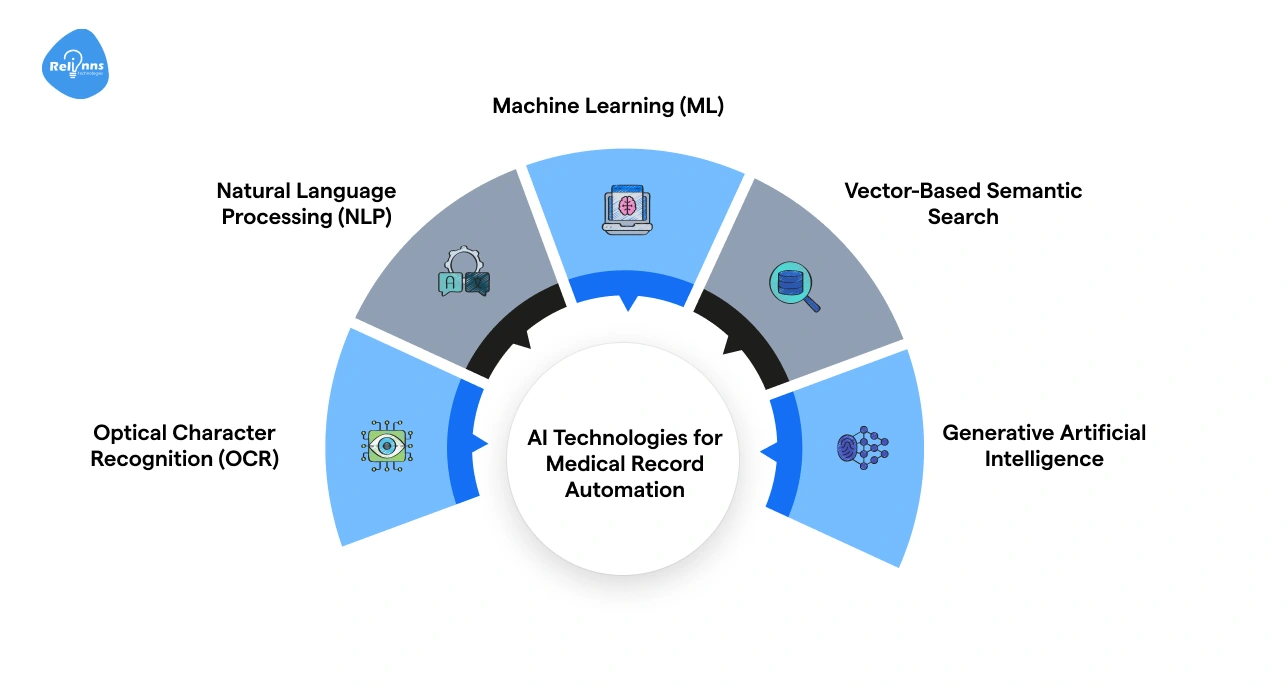
Machine Learning for Record Classification and Indexing
ML models automatically organize documents by patient, visit type, or record category.
This ensures records are sorted correctly and easy to retrieve, reducing errors and saving staff time.
Vector Search for Semantic Medical Record Retrieval
Semantic search engines find relevant records based on meaning and context, not just keywords.
Even incomplete or varied notes are surfaced, making searches faster and more accurate.
For instance, a note saying “high blood sugar last visit” still matches a query for “diabetes follow-up”.
Generative AI for Medical Record Summarization
Generative AI condenses long charts into short summaries and visual timelines.
Clinicians can see a patient’s history at a glance, saving time and reducing the chance of missing critical information.
These technologies work behind the scenes to turn scattered, complex medical records into clear, actionable insights that make care faster, smarter, and more reliable.
Security and Compliance Essentials for AI Health Data
AI medical record apps must protect patient data, meet HIPAA requirements, and maintain accountability. These safeguards keep sensitive records secure, prevent errors, and build trust across clinicians, staff, and patients.
| Safeguard | What It Does | Example |
| Protect Patient Data | Secures health info from leaks or unauthorized access | Encrypt patient records and secure them on hospital servers or the cloud. |
| Access Control & Role-Based Governance | Limits access to only what each user needs. Reduces errors and exposure. | Doctors see full charts; billing staff see only billing info; patients see personal records. |
| Human Review & Validation | Ensures AI-generated summaries and classifications are accurate | A nurse or doctor verifies lab report summaries before filing. |
| Auditability & Traceability | Tracks who accessed or modified records and when | Logs every view, edit, or export for HIPAA audits |
These practices ensure AI medical record systems handle data responsibly, stay compliant, and maintain trust, giving healthcare teams confidence that patient information is safe and accurate.
Performance Benchmarks for AI Medical Record Apps
AI apps are only useful if they perform reliably. If they’re slow, inaccurate, or miss key details, clinicians waste time and risk errors.
Here’s how to measure their impact with practical benchmarks:
- Retrieval Speed & Time to Locate Records: Measure how quickly records are found. Benchmark: 90% of queries return results in under 5 seconds.
- Accuracy of Record Classification and Indexing: Ensure documents are tagged correctly and easy to locate. Benchmark: ≥95% of records classified accurately across patient files, labs, and scans.
- Quality of AI-Generated Medical Summaries: Summaries should capture key patient information clearly. Benchmark:≥90% agreement with human-reviewed summaries in terms of critical data points.
- Reduction in Manual Processing & Administrative Workload: Track how much staff time is saved using AI. Benchmark:40-60% reduction in manual record searches, indexing, and summary preparation.
Monitoring these metrics helps hospitals and clinics understand the system’s efficiency, reliability, and value. Continuous tracking ensures AI keeps improving while supporting faster, safer patient care.
Build vs Buy Decisions for AI Healthcare App Development
Every hospital and clinic has different needs, and so should their AI tools. The right approach depends on your workflows, resources, and how much control you need.
Decision Table for Healthcare Leaders
The table below provides a quick comparison to guide your choice between off-the-shelf, custom, and hybrid AI solutions.
| Approach | When It Works Best | Benefit |
| Off-the-Shelf Tools | Standard workflows, minimal customization needed | Quick setup, lower cost, often HIPAA-compliant out of the box |
| Custom AI Apps | Unique workflows, complex integrations, proprietary AI needs | Fully tailored features, complete control over models and EHR integration |
| Hybrid Approach | Need speed plus some customization | Start with a ready-made platform and add custom modules for specific needs |
Weigh the trade-offs, and choose the path that makes AI work for your hospital or clinic.
Remember: Off-the-shelf tools save time, custom apps maximize flexibility, and hybrid solutions balance both.
Challenges and Solutions for AI Medical Record Retrieval Apps
In healthcare, there’s little room for error. AI apps must handle sensitive patient data accurately, securely, and reliably.
Even small mistakes can have serious consequences, making careful planning and robust safeguards essential at every stage.
Here’s a breakdown of the core challenges for AI medical record retrieval apps and ways to overcome them:
Managing Unstructured and Inconsistent Data
Problem: Patient information exists in PDFs, scans, and free-text notes, making it difficult to organize.
Solution: Apply OCR and AI-driven normalization to convert all sources into structured, searchable formats.
Ensuring Accurate Patient Matching
Problem: Duplicate or mismatched files can cause errors in treatment and reporting.
Solution: Use robust matching algorithms and unique identifiers to reliably link records across systems.
Integrating with Legacy Systems
Problem: Older EHRs and hospital software may not support modern APIs.
Solution: Implement middleware and standards like FHIR to connect AI tools without disrupting existing workflows.
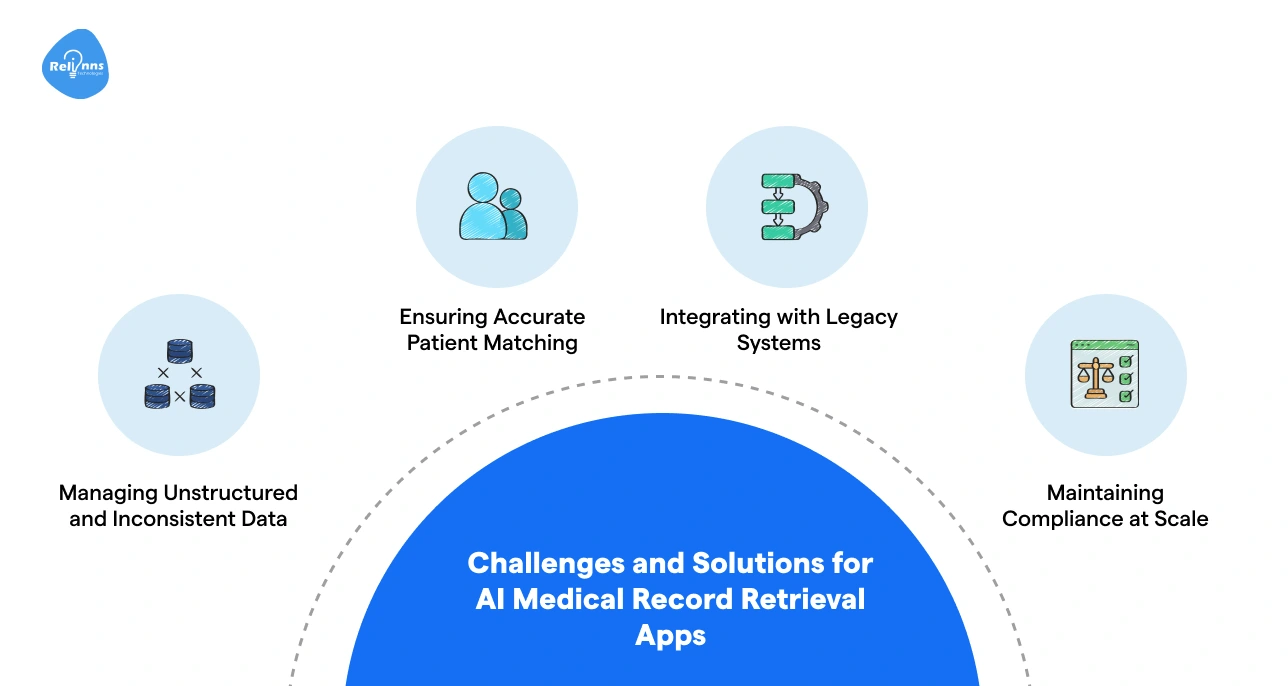
Maintaining Compliance at Scale
Problem: Expanding AI use increases exposure to HIPAA violations or data leaks.
Solution: Enforce role-based access, audit trails, and human review of AI outputs to ensure safety and compliance.
Overcoming these hurdles lays the foundation for building AI apps that are dependable and truly useful in real-world healthcare settings.
Providers looking to address these challenges often partner with experts like Relinns Technologies to build AI medical record apps that are secure, HIPAA-compliant, and tailored to real-world workflows.
Closing Remarks
AI apps for medical record retrieval are changing how healthcare teams work. They make it faster to find patient records, reduce errors, and give a complete view of a patient’s history.
From intelligent search and automated summaries to secure access and timelines, these apps help doctors, nurses, administrators, and patients work smarter.
Choosing the right approach: off-the-shelf, custom, or hybrid, depends on workflows and priorities.
By addressing data challenges, ensuring compliance, and tracking performance, hospitals and clinics can implement AI medical record retrieval solutions that improve efficiency, support better decisions, and make care safer for everyone.
Frequently Asked Questions (FAQs)
What is an AI medical record retrieval system?
An AI medical record retrieval system automates searching, sorting, and summarizing patient records, helping clinicians access accurate information faster and reduce administrative workload.
How does AI improve medical record management?
AI organizes unstructured data, provides semantic search, generates summaries, and ensures secure access, making medical records faster to retrieve and easier to use.
Can AI medical record apps integrate with EHR systems?
Yes, AI apps can connect with EHRs like Epic or Cerner using FHIR or APIs, ensuring seamless access to patient records without duplicate entries.
Are AI medical record systems HIPAA-Compliant?
Properly designed AI apps follow HIPAA regulations, enforce role-based access, encrypt data, and maintain audit logs to protect sensitive patient information.
What are the key features of AI medical record apps?
Core features include smart document ingestion, automated sorting, natural language search, AI summaries, role-based dashboards, and secure access with audit trails.
Should healthcare organizations build or buy AI apps?
Off-the-shelf tools work for standard workflows, custom apps fit complex needs, and hybrid approaches balance speed, flexibility, and tailored features.
How is AI performance measured in medical record apps?
Key metrics include retrieval speed, accuracy of classification, quality of AI summaries, and reduction in manual processing, with benchmarks for continuous improvement.