How To Build a Voice Bot: Step-by-Step Guide 2026
Date
Aug 24, 26
Reading Time
12 Minutes
Category
Generative AI
Share


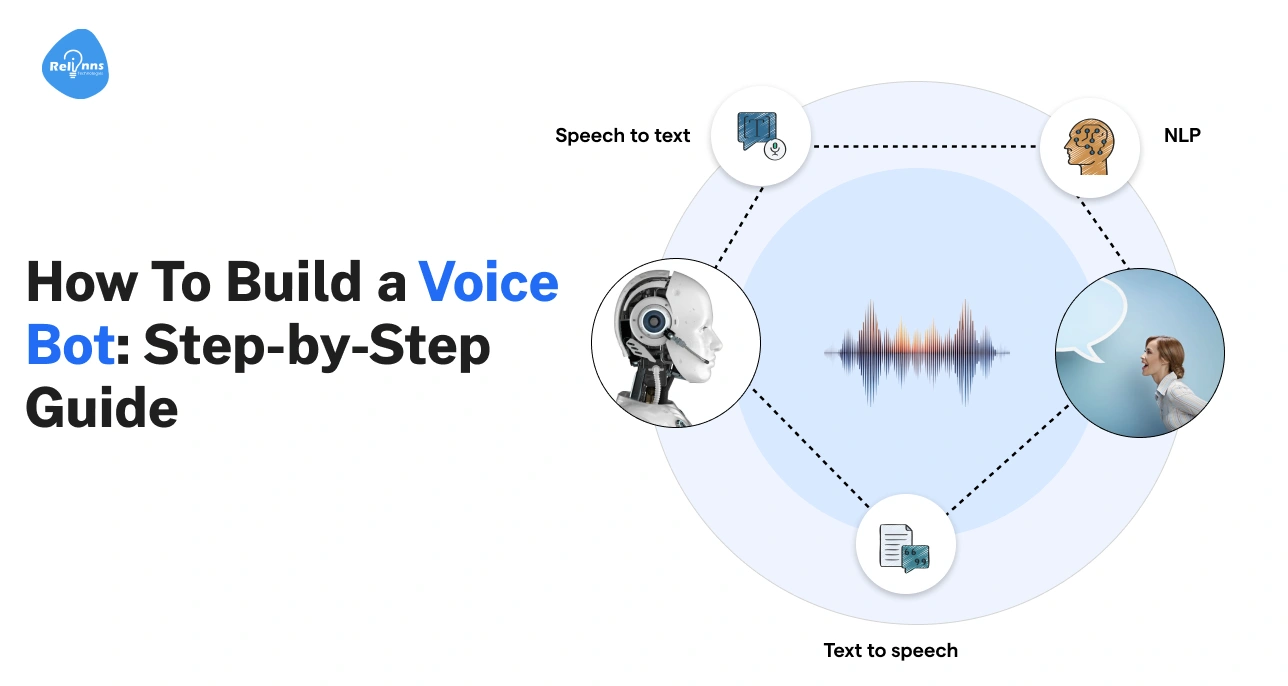
Phone calls aren’t dead. On the contrary, they’re quietly getting smarter.
In 2026, voice is becoming one of the fastest ways businesses support customers, close sales, and automate conversations. AI-powered calling is replacing long wait times and rigid menus with natural, real-time interactions.
But this shift isn’t about old IVRs or rule-based bots pretending to be smart.
Modern AI voice bots understand intent, handle real conversations, and adapt in real time. That’s why learning how to build a voice bot now matters more than ever.
This guide is for product teams, founders, engineers, and ops leaders exploring voice bot development and AI voice bots, without hype or shortcuts. It breaks down how AI voice bots actually work, what to build, and what to avoid.
What is a Modern Voice Bot (vs Chatbots and IVRs)
A modern voice bot is not just a chatbot that talks, but is built for conversations.
It listens, understands what a person means, and replies in easy-to-follow speech, over a phone call or voice channel.
To understand its value, it helps to see how it differs from chatbots and traditional IVRs.
What a Voice Bot is (Simple Explanation)
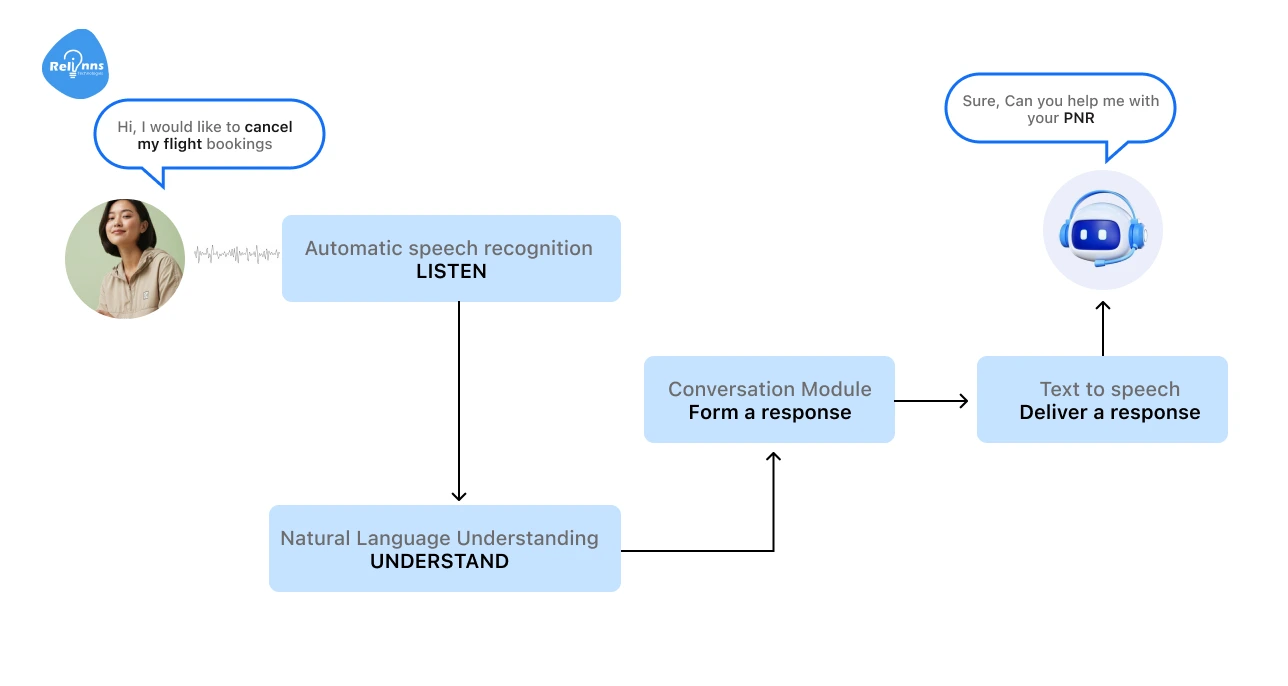
A voice bot is software that can talk with people using spoken language. You speak → It listens → It responds.
Behind the scenes, it combines speech recognition, AI reasoning, and text-to-speech to hold real conversations over voice.
This approach is often called conversational voice AI.
Unlike scripted systems, modern voice bots can:
- Understand intent, not just keywords
- Handle follow-up questions
- Respond differently based on context
Voice Bot vs Chatbot vs IVR
A modern voice bot is an AI-driven conversational system that operates over voice and differs fundamentally from chatbots and traditional IVRs.
| Feature | Voice Bot | Chatbot | IVR |
| Interface | Voice (Natural Language) | Text (Web/App) | Voice Menus (Touch-tone) |
| Input | Natural Speech | Typed Text | Keypress or keywords |
| Conversation Style | Flexible, Multi-turn | Multi-turn | Linear, Scripted |
| Adaptability | High (Handles tangents) | Medium (Topic-bound) | Very Low (Follows a path) |
| Typical Examples | Support Calls, Booking, Outbound Calls | Website Chat, In-app Support | Inbound support calls asking users to “Press 1 for Billing” |
| User Experience | Frictionless, Human-like | Fast and Efficient | Often Frustrating |
Key Takeaways
- Voice bots focus on spoken conversations.
- Chatbots work well for text-heavy tasks.
- IVRs guide users through fixed options, not conversations.
This difference becomes critical when calls need to feel fast and human.
When Voice is the Better Interface
Voice works best when:
- Users are already on phone calls.
- Hands-free interaction is needed.
- Speed matters more than precision typing.
- Follow-ups are contextual and conversational.
- Conversations feel more human-like than forms or chat.
That’s why AI-powered calling systems are growing faster in support, sales, and operations than text-based automation.
However, designing conversations, choosing the right stack, and making everything work reliably at scale takes practical experience.
This is where teams often look for partners like Relinns Technologies that have already built and deployed fast, reliable AI voice bots in real production environments, rather than starting from scratch.
How Do Voice Bots Work? (Core Flow Explained)
Voice bots combine speech recognition, language understanding, and voice generation to simulate natural conversations.
Understanding the workflow helps you build bots that are fast, accurate, and user-friendly.
Step-by-Step Interaction Flow
Voice bots follow a simple loop: they listen, understand, decide, and respond (over and over), just like a human would in a conversation.
- User Speaks → The conversation starts when a person talks to the bot.
- Speech-to-Text (STT)→ The bot converts spoken words into text it can understand using STT engines.
- Intent + Context Processing (LLM / NLU) →The bot figures out what the user wants and remembers the conversation context.
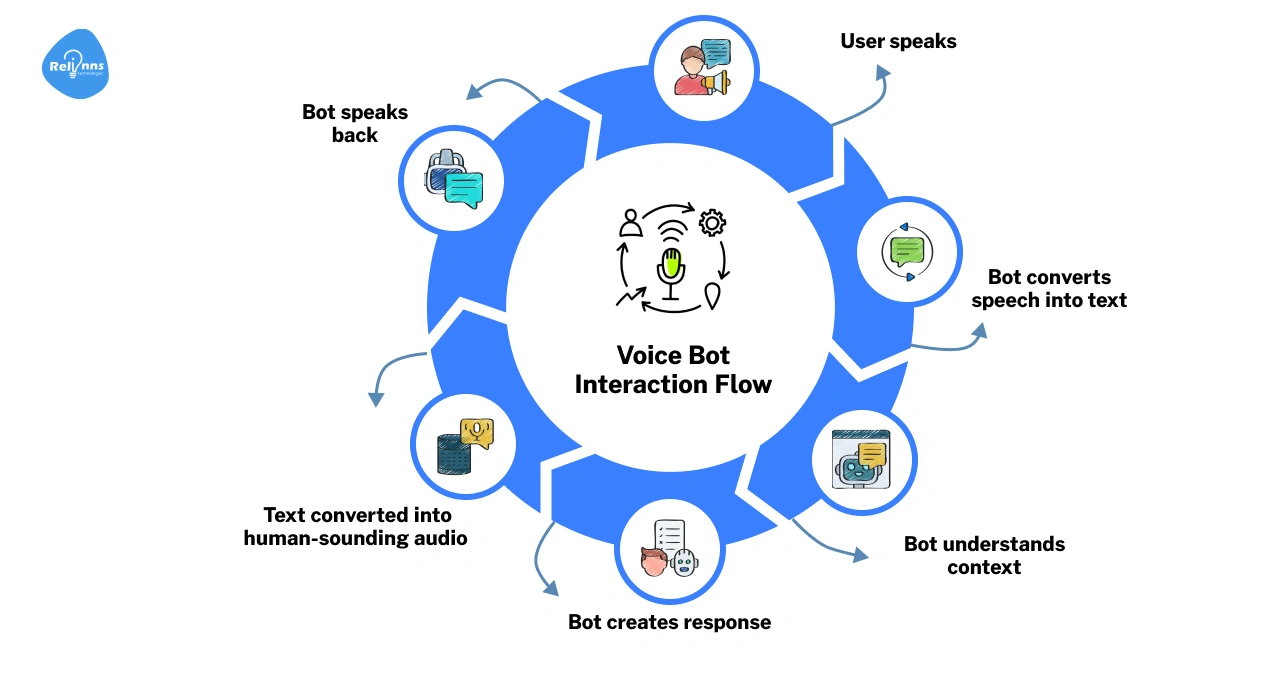
- Response Generation → The bot crafts an appropriate answer for the question based on the intent and context.
- Text-to-Speech (TTS)→ The generated text is converted back into natural-sounding audio.
- Audio Playback→ The bot delivers the spoken response to the user.
This loop happens in real time, so conversations feel smooth, fast, and natural, just like talking to another person.
Real-Time vs Batch Voice Processing
Most voice bots respond in real time, meaning users get instant answers. This makes conversations feel organic and smooth.
Batch processing, on the other hand, handles large volumes of audio at once, but is slower and less interactive.
Real-time voice bots require low-latency systems to keep interactions feeling human.
Where Latency in the Voice Bot Workflow is Introduced
Latency can appear at several points in the voice bot workflow: during STT conversion, intent and context processing, or TTS generation.
Even small delays can make conversations feel awkward, unnatural, or robotic.
Optimizing each step ensures responses are fast, fluid, and natural, giving users a better experience in low-latency voice systems.
Voice Bot Architecture: Components You Need to Build One
A voice bot works only as well as its architecture.
The right components ensure that a voice bot listens, understands, and responds realistically. Knowing how these pieces fit together ensures your bot responds quickly, works consistently, and feels natural to users.
Here’s a breakdown of the essential building blocks that act as the “anatomy” of an AI voice bot:
Speech-to-Text (STT) Engines
STT engines (also known as Automatic Speech Recognition) turn spoken words into text.
Choose one that understands accents, filters noise, and processes speech in real time for a smooth conversation.
Language Understanding (LLMs / NLU)
NLU or LLMs act as the bot’s brain.
They detect intent, extract details like names or dates, and remember context so users don’t repeat themselves.
Dialogue & State Management
This component keeps conversations on track.
It manages multi-turn dialogues and ensures the flow feels natural, not like disconnected questions.
Text-to-Speech (TTS) Engines
TTS engines convert text back into speech.
Modern systems use neural synthesis for natural intonation, rhythm, and emotion, far beyond robotic voices.
Telephony & Voice Channels
These connect your bot to phones, web apps, or smart devices.
They handle incoming and outgoing calls so conversations are seamless and clear.
Backend Services & Orchestration
Orchestration links the bot to CRMs, databases, and APIs.
It powers actions like checking schedules, updating bookings, or completing transactions instantly.
Logging, Analytics, and Monitoring
These tools track conversations, errors, and performance.
Insights help refine the bot’s logic, improve responses, and create a better user experience.
At this stage, it’s worth looking at how each component works together when learning how to create a voice bot that operates in real time.
Step-by-Step: How to Build a Voice Bot From Scratch
Learning how to build a voice bot can feel complex, but clear steps make the process manageable.
From defining your use case to testing real calls, a structured approach keeps the bot fast and reliable.
Step 1: Define Your Use Case and Success Metrics
- Decide the main function of the voice bot, such as support, sales, reminders, booking, or collections.
- Set clear KPIs, including call resolution rate, response latency, drop-offs, and user satisfaction.
Step 2: Choose the Right Voice Channel
- Choose where users will interact with the bot, such as phone calls (PSTN), web voice, mobile apps, or smart devices.
- Align the channel with user behavior and the type of interaction you expect.
Step 3: Select Your Tech Stack
- Pick STT engines for accuracy and low latency, and choose TTS engines for natural, human-like voices.
- Select LLMs or NLU for conversation intelligence.
- Decide between APIs or open-source tools based on control and budget.
Step 4: Design Voice Conversation Flows
- Map out intents, entities, and multi-turn dialogues.
- Plan for fallbacks, errors, silence, interruptions, and barge-ins to keep conversations smooth.
Step 5: Build the Backend Logic
- Set up session handling and API integrations with CRMs, calendars, or databases to make the bot actionable.
- Maintain context memory so the bot remembers past inputs.
Step 6: Add Telephony & Real-Time Streaming
- Enable live call handling for inbound and outbound conversations.
- Build real-time audio streaming pipelines for low-latency responses.
- Define clear call start and end logic to avoid dropped or stuck sessions.
Step 7: Test, Iterate, and Improve
- Run test scripts, simulate real calls, and tackle edge cases.
Continuously refine responses and flow for a better user experience.
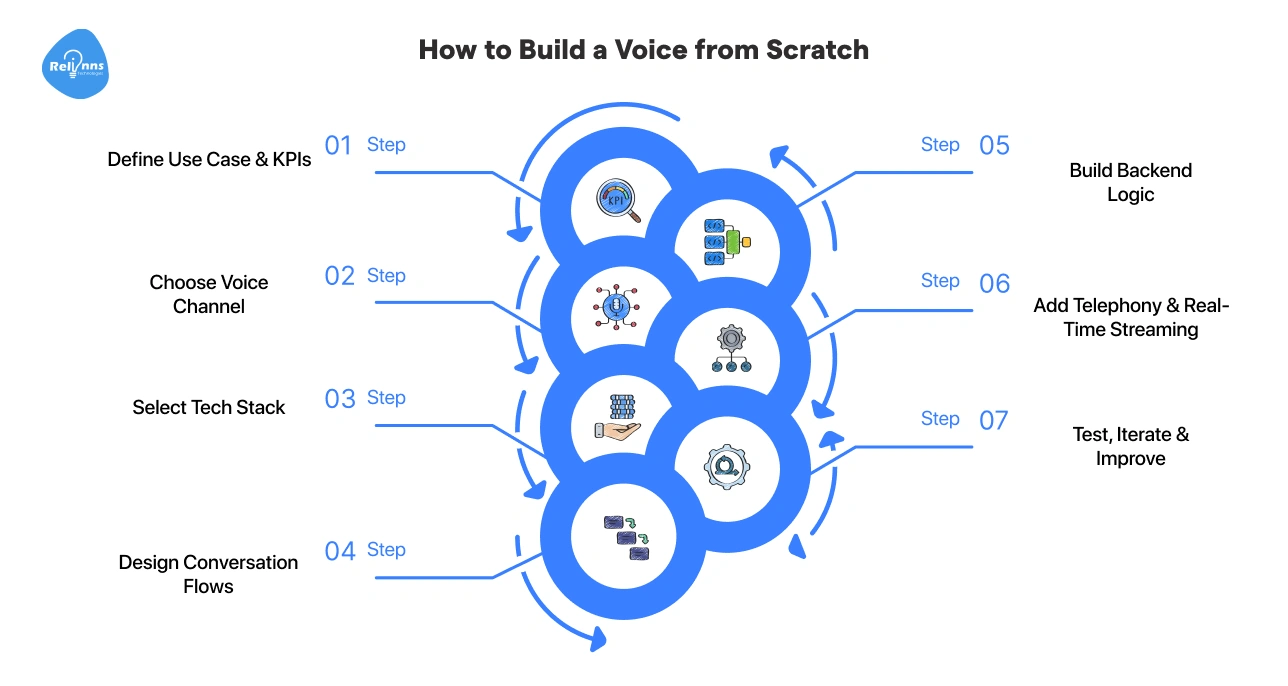
Following these steps ensures your voice bot works reliably and feels human. Next, we’ll explore DIY vs platform-based approaches to building voice bots.
This version maintains your core message and word count while adding a more professional, human-centered "bridge" sentence after your title.
DIY vs Voice Bot Platforms: Which Should You Choose?
There’s no single “right” way to build a voice bot.
Your choice essentially comes down to a trade-off between total creative freedom and the speed of getting your bot into your customers’ hands.
Below is a simple comparison of common voice bot development approaches.
| Criteria | DIY Build | APIs + Custom | No-Code Platforms |
| Control | Absolute | High | Limited |
| Time to Launch | Slow (months) | Medium (weeks) | Fast (days) |
| Customization | Full | High | Limited (template-based) |
| Cost at Scale | High Upfront (variable) | Predictable | Can Spike |
Finding Your Fit (Who Should Choose What)
The ideal approach depends on your team’s technical depth, timeline, and how much control you need as your voice bot grows.
- DIY Build: Best for enterprises and strong engineering teams that need full control and deep integrations. You get maximum flexibility, but also higher build and maintenance effort.
- APIs + Custom Build: Ideal for startups and product teams that want flexibility without starting from zero. Using APIs with custom code gives you control without reinventing the core systems.
- No-Code Voice Bot Platforms: Best for founders, non-technical teams, or quick pilots. They enable fast launches but limit customization and control as complexity increases.
Voice UX Design Best Practices
A voice bot can work perfectly and still fail if the experience feels awkward. Good voice bot UX focuses on how people naturally speak, pause, and recover from mistakes.
These voice interaction design basics make conversations feel smooth and human.
How Humans Expect Conversations to Flow
- Keep responses short and clear.
- Avoid overloading users with information.
Turn-Taking and Natural Pauses
- Pause before responding to avoid interruptions.
- Support “barge-in” so users can speak anytime.
Handling Misrecognition Gracefully
- Acknowledge errors politely.
- Ask clarifying questions instead of repeating prompts.
Personality and Tone Consistency
- Use a consistent voice and tone.
- Match the brand, not the tech.
Reducing User Frustration in Voice Interfaces
- Offer quick exits to humans.
- Confirm actions before making changes.
Once the experience feels right, the next question is how much it costs to run.
Even with great UX, voice bots can become expensive at scale, which makes cost planning the next critical step.
Cost Considerations When Building a Voice Bot (2026)
The cost of building a voice bot depends on how often it listens, speaks, thinks, and connects to users.
Voice bot pricing is usage-based, so costs grow as call volume and complexity increase.
Key Cost Drivers
Most voice bot development costs come from per-use services that run on every call.
- STT Usage (processing audio into text): Costs increase with audio length, call volume, and real-time processing needs.
- LLM Tokens (reasoning and context): Longer conversations and complex reasoning consume more tokens.
- TTS Generation (turning text into speech): Pricing depends on voice quality, languages, and how much the bot speaks. Premium, high-fidelity voices cost more than standard neural options.
- Inbound and Outbound Calls: These add per-minute costs across regions.
- Infrastructure: Includes servers, streaming pipelines, monitoring, and scaling overhead
What to Expect
- Starter: Low traffic stays affordable. Pay only for what you use.
- Enterprise: High-volume bots scale quickly without optimization.
How to Optimize Costs Early
- Be Brief: Keep responses short and focused to save on TTS and token costs.
- Use Caching: Store (cache) common answers, so the bot doesn't “re-think” the same prompt twice.
- Smart Hang-ups: Program the bot to end calls immediately when tasks are complete.
By monitoring usage from day one, you can spot cost spikes early and adjust prompts, flows, and call logic before expenses grow out of control.
Security, Privacy, and Compliance Considerations
Voice bots handle sensitive conversations. That makes security and compliance non-negotiable.
Understanding how to use a voice bot safely, from call recordings to personal data, ensures every layer safeguards users, meets regulations, and lowers risk as the system scales.
Handling Call Recordings Securely
Call recordings should be stored only when necessary. Limit access with strict permissions. Define clear retention rules and delete data automatically once it’s no longer needed.
Data Encryption
Encrypt voice data both in transit and at rest.
This applies to audio streams, logs, and transcripts. Strong encryption prevents leaks, even if systems are compromised.
PII and Sensitive Data
Voice bots may collect personal or regulated information such as names, contact details, or medical data.
Mask or redact sensitive fields and store only what is strictly necessary.
Compliance Requirements (GDPR, HIPAA, etc.)
Regulations like GDPR and HIPAA govern how voice data is collected, stored, and processed.
It’s critical to ensure consent, audit logs, and clear data ownership.
GDPR and HIPAA-compliant companies like Relinns Technologies help implement these safeguards efficiently, so your voice bot stays secure and compliant from day one.
On-Prem vs Cloud Considerations
Cloud setups scale faster. On-prem offers more control.
Regulated industries often choose hybrid models for balance and stronger data governance.
Despite careful planning, voice bots can still face real-world challenges at scale. The next section explores these challenges and how teams can address them.
Common Challenges When Building Voice Bots (and How to Avoid Them)
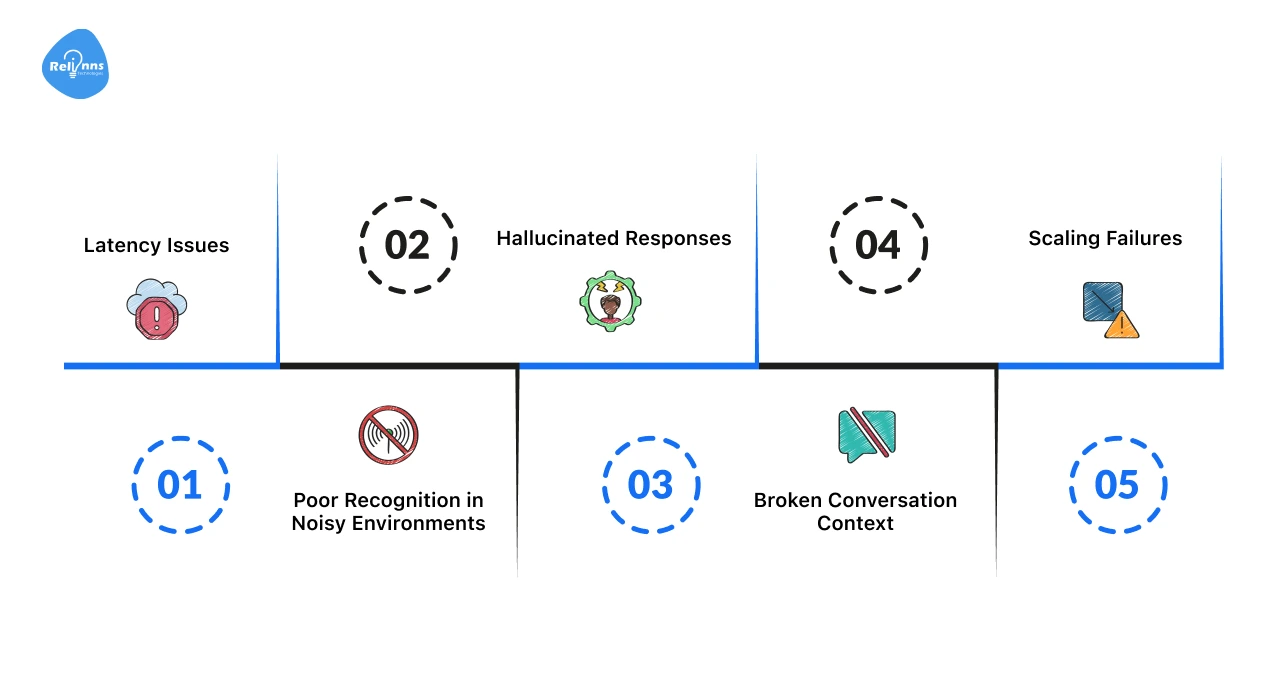
Voice bots rarely fail all at once.
Small issues show up first when real users start calling. Noise, long pauses, or unexpected questions can quickly break the experience.
Understanding and overcoming these common voice bot challenges helps you deliver faster, more reliable, and more natural conversations.
Latency Issues
Long pauses make users think the bot is broken. Such delays usually come from slow speech recognition, LLM processing, or voice generation.
The Fix: Use streaming STT and TTS, pick low-latency models, and keep replies short and direct.
Poor Recognition in Noisy Environments
Background noise, accents, and people talking over the bot reduce accuracy. This leads to wrong answers or repeated prompts.
The Fix: Use speech models that handle background noise well and always verify key information before moving forward.
Hallucinated Responses
Sometimes the bot sounds confident but gives the wrong answer. This usually happens when the model lacks context or data.
The Fix: Ground responses with rules, retrieval, or APIs, and add safe fallbacks like “I’m not sure about that”.
Broken Conversation Context
Users get frustrated when they have to repeat themselves. Context often breaks during long or multi-step calls.
The Fix: Track the conversation state carefully and avoid passing unnecessary history between turns.
Scaling Failures
A bot that works in testing can fail under real traffic. Calls drop, latency spikes, or systems crash, when real users hit the system at the same time.
The Fix: Design for peak traffic, monitor usage closely, and scale infrastructure horizontally from day one.
Many of these issues come from real production edge cases that only show up at scale.
Partnering with AI experts helps reduce risk. Many teams choose experts like Relinns Technologies, who’ve already built, tested, and deployed voice bots in live environments, and know where systems usually break before users do.
Real-World Voice Bot Use Cases
Voice bots work best when they solve clear, repeatable problems. Today, teams use them to handle high call volumes, reduce wait times, and automate tasks that don’t need a human.
Here are some of the most common and effective voice bot use cases.
Customer Support Voice Bots
These bots handle FAQs, order tracking, account checks, and basic troubleshooting instantly. They eliminate frustrating hold times and free up human agents for complex issues.
Appointment Scheduling
Voice bots seamlessly book, reschedule, or cancel appointments over calls. They sync directly with your calendar to check availability, confirm details, and send reminders automatically.
Outbound Calling at Scale
Voice bots run reminder calls, payment follow-ups, surveys, and alerts. They provide a consistent brand voice across thousands of calls without the fatigue of a human dialer.
Internal Business Automation
Teams use voice bots for IT helpdesks, HR queries, and internal reminders. Employees get instant answers to common internal questions, skipping the “submit a ticket” process for simple requests.
Industry-Specific Impact
In healthcare, voice bots help manage patient follow-ups and appointment scheduling. In fintech, they handle balance checks and payment reminders securely. Likewise, In SaaS, they simplify onboarding, renewals, and everyday account management tasks.
Conclusion
Building a voice bot is no longer experimental.
It’s a practical way to handle real conversations at scale. When done right, voice bots reduce wait times, lower costs, and improve customer experience.
The key is understanding how voice bots work, choosing the right architecture, and designing for real human behavior. From voice bot UX and security to cost and scaling, every decision matters.
Whether you build from scratch or use voice bot platforms, start simple. Solve one clear problem well. Then expand with confidence as your AI voice bot grows.
Frequently Asked Questions (FAQs)
What is a voice bot and how does it work?
A voice bot listens to speech, understands intent using AI, and responds with spoken replies over phone calls or voice channels.
How is a voice bot different from an IVR system?
IVRs follow fixed menus. Voice bots understand natural language, handle follow-ups, and adapt responses based on conversation context.
How do I build my own voice AI?
Define the use case, choose STT/TTS and LLM tools, design conversation flows, integrate backend systems, and test in real calls.
What are the main challenges in building voice bots?
Common voice bot issues include latency, speech recognition errors, hallucinated answers, broken context, and failures when scaling to real traffic.
How do you reduce latency in voice bots?
Use streaming speech recognition and speech synthesis, low-latency models, short responses, and infrastructure optimized for real-time processing.
Are voice bots secure and compliant with GDPR or HIPAA?
Yes, when built correctly. Secure voice bots encrypt data, limit storage, mask PII, and follow GDPR voice data and HIPAA requirements.
When should a business use a voice bot instead of a chatbot?
Use voice bots for phone-based support, hands-free interactions, fast resolutions, and conversations that need to feel natural and human.