Best Practices for Automating Warehouse Management Workflows: 2026 Guide
Date
Aug 10, 26
Reading Time
7 Minutes
Category
Low-Code/No-Code Development
Share


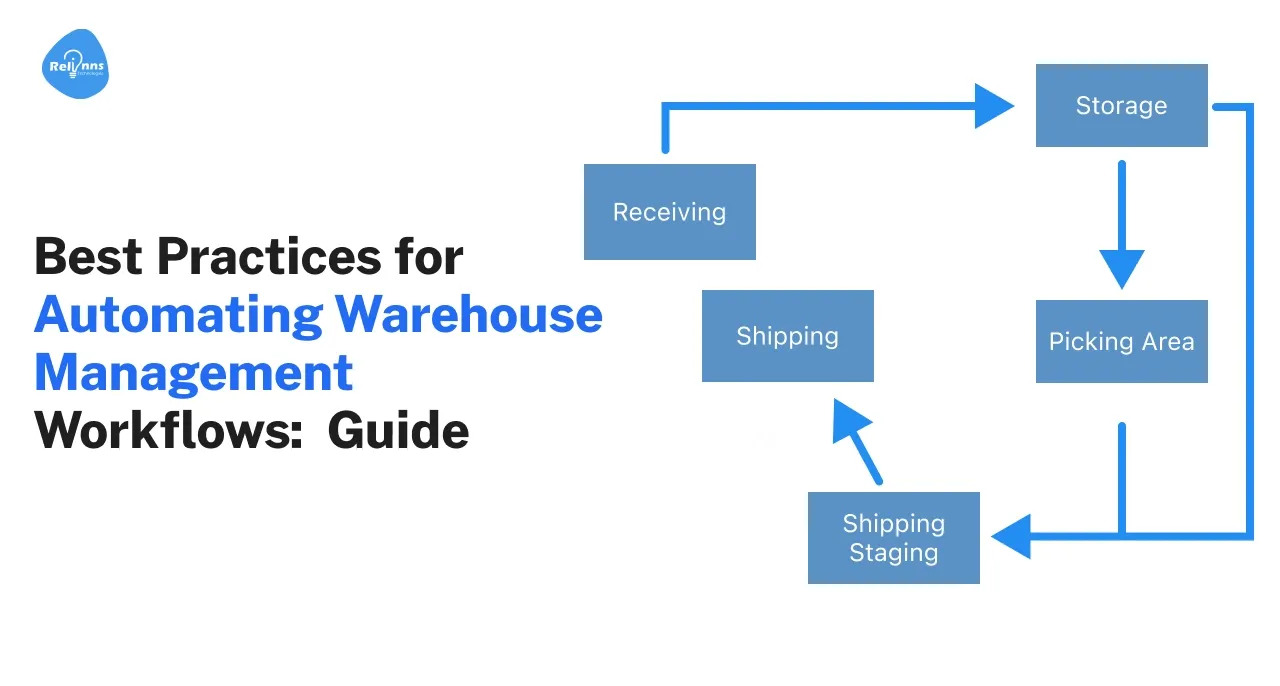
Warehouse workflow automation uses software, scanning systems, robotics, sensors, and AI to reduce manual work across receiving, storage, picking, packing, shipping, and inventory control.
The goal is not to automate every warehouse task.
The better approach is to identify where delays, errors, labor pressure, or poor visibility create the highest operational cost, then automate those workflows in sequence.
This guide covers the most important warehouse automation practices, common implementation risks, and practical examples of how automation can improve warehouse operations.
What Is Warehouse Workflow Automation?
Warehouse workflow automation replaces manual or repetitive warehouse tasks with software driven processes, connected equipment, or automated decision rules.
Automation can support:
- Receiving
- Put away
- Inventory tracking
- Replenishment
- Picking
- Packing
- Quality checks
- Shipping
- Returns
- Reporting
Some workflows rely mainly on software.
Others use scanners, RFID, conveyors, autonomous mobile robots, automated storage systems, or machine vision.
A modern warehouse often combines both.
The key is integration. Automation creates little value if the WMS, ERP, scanners, robots, and operational workflows do not share reliable data.
For a broader system view, see our guide to warehouse management systems.
Why Automate Warehouse Management Workflows?
Warehouse automation is most valuable where manual processes create measurable delays, errors, or capacity constraints.
Three problems usually justify automation first.
Slow Order Processing
Manual picking, paperwork, and disconnected systems increase fulfillment time.
Automation can shorten the time between receiving an order and preparing it for dispatch.
Inventory Errors
Poor inventory visibility affects purchasing, replenishment, picking, and customer commitments.
Barcode, RFID, scanning, and automated stock updates reduce the gap between physical inventory and system records.
Labor Intensive Processes
Picking, counting, moving stock, and repetitive data entry consume large amounts of warehouse labor.
Automation can reduce repetitive effort while allowing employees to focus on exceptions and higher value work.
The highest potential return usually comes from processes with high volume, repeatable rules, and measurable error costs.
What Are the Main Warehouse Automation Challenges?
Warehouse automation projects usually fail because of process, integration, or adoption problems rather than the technology alone.
High Initial Investment
Robotics, conveyors, AS/RS equipment, scanners, WMS software, and integration work can require substantial upfront investment.
Automation should therefore target a defined constraint instead of beginning with a broad technology purchase.
Legacy System Integration
New automation often needs to communicate with ERP systems, warehouse software, databases, carrier tools, and older operational applications.
Weak integration creates duplicate records and manual reconciliation.
Data Quality
Automated decisions depend on reliable SKU data, locations, units of measure, stock balances, and transaction records.
Poor master data can make a new system execute the wrong process faster.
Workforce Adoption
Operators still need to understand the new workflow.
Training should cover daily tasks, exceptions, escalation rules, and what employees should do when automation fails.
Process Design
Automating an inefficient process preserves the same underlying problem.
Teams should simplify the workflow before deciding which steps should become automated.
Manufacturers or warehouse operators considering a low code approach can also review our Joget warehouse automation workflow guide.
What Are the Best Practices for Automating Warehouse Management Workflows?
The strongest warehouse automation programs improve the full movement of inventory rather than installing isolated tools.
1. Automate Receiving and Put Away First
Warehouse data quality begins at receiving.
Incorrect quantities, locations, or SKU records create problems through every downstream process.
Useful automation includes:
- Barcode or RFID scanning during receiving
- Purchase order matching
- Dock scheduling
- Automated discrepancy alerts
- Suggested storage locations
- Put away task assignment
The system should update inventory as soon as goods are accepted.
That gives planning and picking teams a reliable starting point.
2. Build Real Time Inventory Visibility
Warehouse teams need to know what stock exists and where it sits.
Inventory visibility can combine:
- Barcode scanning
- RFID
- WMS transactions
- Automated cycle counting
- Location tracking
- Replenishment rules
Low stock or location discrepancies can then trigger tasks automatically.
But alerts should connect to a workflow.
A low stock notification has limited value if someone still needs to manually identify the item, approve replenishment, create the request, and update multiple systems.
3. Optimize Picking Before Adding More Labor
Picking is one of the most labor intensive warehouse activities.
Automation options depend on volume, SKU profile, facility layout, and order structure.
Common approaches include:
- Pick to light
- Voice directed picking
- Autonomous mobile robots
- Goods to person systems
- Zone picking
- Batch picking
- Dynamic pick path optimization
The right technology depends on the operation.
A high SKU ecommerce fulfillment center has different requirements from a pallet based B2B warehouse.
4. Automate Packing and Quality Checks
Packing errors increase returns, reshipment costs, and customer complaints.
Automation can verify:
- SKU
- Quantity
- Weight
- Package dimensions
- Shipping label
- Packaging type
Machine vision can support visual checks where image inspection fits the process.
Cartonization software can also recommend packaging based on order size and product dimensions.
5. Connect Shipping and Dispatch
Automation should continue after packing.
Shipping workflows can connect warehouse systems with carrier and transport applications.
Useful automations include:
- Carrier selection
- Shipping label generation
- Manifest creation
- Dock assignment
- Load planning
- Shipment status updates
- Return initiation
Warehouse teams should avoid creating a digital process that ends with manual carrier coordination.
6. Use AI Where Prediction Improves Decisions
Warehouse automation AI should support specific decisions rather than being added as a generic intelligence layer.
Useful applications include:
- Demand forecasting
- Replenishment recommendations
- Slotting optimization
- Anomaly detection
- Predictive maintenance
- Labor planning
- Inventory exception analysis
AI becomes more useful when warehouse data is already structured and reliable.
If inventory and transaction data are inconsistent, predictive models inherit those problems.
7. Integrate the Automation Stack
Warehouse automation usually touches several systems.
That may include:
- WMS
- ERP
- TMS
- CRM
- Carrier APIs
- Procurement systems
- IoT platforms
- Robotics platforms
- Databases
Define which system owns each important data object before building integrations.
For example, ERP may own purchase orders while the WMS owns bin level inventory.
Clear ownership prevents systems from overwriting each other.
Low code platforms such as Joget can also act as a workflow layer between existing applications. Our overview of how Joget works explains the underlying workflow model.
8. Design Exception Workflows
Automation design often focuses too much on the normal process.
Warehouses also need defined workflows for:
- Damaged goods
- Missing stock
- Incorrect quantities
- Failed scans
- Short picks
- Carrier failures
- Equipment downtime
- System outages
Every automated workflow needs an answer to one question:
What happens when the expected process fails?
Exceptions should create tasks, alerts, approvals, or escalation rather than sending employees back to spreadsheets and messages.
9. Measure the Workflow Before Scaling
Automation should improve a measurable warehouse KPI.
Relevant metrics include:
- Order cycle time
- Pick rate
- Pick accuracy
- Inventory accuracy
- Dock to stock time
- Cost per order
- Replenishment time
- Return rate
- Equipment downtime
Record baseline performance before implementation.
Then compare the same metric after the automated workflow goes live.
Scaling should depend on the measured result, not whether the pilot technology looked impressive.
Where Should a Warehouse Start Automating?
Warehouses should start with a workflow that has high volume, repeatable rules, and clear operational pain.
A practical prioritization model uses four questions:
- How many times does the process happen?
- How much manual work does each transaction require?
- What does an error or delay cost?
- How difficult is the workflow to integrate?
Good starting points often include:
- Receiving
- Inventory updates
- Replenishment
- Picking
- Approval workflows
- Shipment processing
Avoid beginning with the most advanced technology available.
The first automation should prove that the warehouse can redesign a process, integrate systems, train operators, and measure the result.
What Does Warehouse Automation Look Like in Practice?
Different automation technologies solve different warehouse constraints.
Relinns Inventory Management Project
The supplied Relinns case study describes a UAE retail operation managing inventory across 12 stores.
The project used a low code inventory and warehouse automation system built with Joget DX.
The implementation included:
- Unified SKU records
- Receiving workflows
- Put away workflows
- Automated replenishment
- Low stock alerts
- ERP integration
- POS integration
- Barcode enabled inventory processes
The supplied case study reports:
- 27% reduction in inventory holding costs
- 33% faster forecasting and replenishment cycles
- 22% decrease in vendor lead time
- 43% improvement in cycle counting and audit speed
The full implementation is available in the Relinns inventory management system case study.
AutoStore for Goods to Person Fulfillment
Automated storage and retrieval systems such as AutoStore bring inventory to operators instead of requiring employees to walk through large picking areas.
This model works well where high SKU density, order volume, and facility space make manual travel expensive.
The main operational gain comes from reducing picker travel while increasing storage density.
Autonomous Mobile Robots
AMRs support warehouses where goods to person automation needs more flexibility than fixed conveyor systems.
Robots can move totes or guide workers through pick routes while the warehouse retains a more adaptable physical layout.
The decision between fixed automation and mobile robotics depends on throughput, product profile, layout stability, and expected operational changes.
Should You Automate the Entire Warehouse at Once?
Most warehouses should automate in phases.
A full facility transformation creates more dependencies across software, equipment, processes, and employees.
A phased rollout lets teams validate:
- Integration
- Process design
- Employee adoption
- Data accuracy
- Operational impact
One workflow can then become the template for the next.
Partial automation only becomes a problem when teams ignore the handoff between automated and manual processes.
For example, an automated picking system may increase throughput while manual packing becomes the new bottleneck.
Warehouse optimization therefore requires end to end flow measurement, even when implementation happens in stages.
How Can Relinns Support Warehouse Workflow Automation?
Relinns Technologies can build workflow and integration layers around existing warehouse systems instead of requiring a complete technology replacement.
Warehouse automation work can include:
- Inventory management applications
- Receiving and put away workflows
- Replenishment automation
- Approval processes
- ERP and WMS integrations
- Operational dashboards
- Barcode driven workflows
- Exception management
- Warehouse AI applications
- Custom Joget development
This approach fits warehouses where the existing ERP or WMS covers core functions but operational gaps remain between systems.
Relinns can use Joget development services to build those workflows, integrations, and internal applications around existing infrastructure.
The architecture should start with the warehouse bottleneck, not the software.
Automate High Friction Warehouse Workflows Without Replacing Every System
Talk to a Warehouse Automation Expert
Conclusion
Warehouse automation works best when teams improve one measurable workflow at a time and connect each automated process to the wider warehouse operation.
Receiving, inventory, picking, packing, shipping, and exception handling all offer automation opportunities.
But technology alone does not fix weak processes.
Warehouse teams need accurate data, system integration, defined exception handling, operator training, and clear performance metrics.
Start with the process creating the highest repeatable cost. Automate it, measure it, then expand from there.
Frequently Asked Questions
How can warehouses start automation with limited budgets?
Start with software led workflows before investing in large physical automation projects.
Barcode scanning, cloud WMS tools, automated approvals, inventory alerts, and system integrations can remove manual work without requiring robotics or major facility changes.
Which warehouse processes should be automated first?
Receiving, inventory updates, replenishment, picking, and shipping are common starting points.
Prioritize the workflow with the highest combination of volume, manual effort, error cost, and operational delay.
Is partial warehouse automation a problem?
Partial automation can work well when manual and automated processes have clear handoffs.
Problems appear when one automated stage creates more volume than the next manual stage can handle.
How does AI support warehouse automation?
AI can support demand forecasting, slotting, inventory exception analysis, predictive maintenance, and labor planning.
AI needs accurate operational data and should connect to a defined decision or workflow.
Do warehouses need a new WMS before automating?
No.
A warehouse may be able to automate workflows around an existing WMS or ERP through APIs, low code applications, and integration layers.
Replacement makes sense when the existing system cannot support the required processes or integrations.
What metrics should warehouse automation projects track?
Track metrics linked to the process being automated.
Common measures include order cycle time, pick rate, inventory accuracy, dock to stock time, cost per order, error rate, and equipment downtime.